EasyManua.ls Logo

Sony SLV-E811NP - Audio Dubbing; Index to Parts and Controls; Front Panel

Sony SLV-E811NP
30 pages
Print Icon
To Next Page IconTo Next Page
To Previous Page IconTo Previous Page
Loading...
Le-b
56
Audio
dubbing
This
feature
lets
you
record
over
the
normal
audio
track.
The
monaural
sound
previously
recorded
is
replaced
while
the
original
hi-fi
sound
remains
unchanged.
Use
this
feature
to
add
commentary
to
a
tape
that
you
have
recorded
with
a
camcorder.
Before
you
start
editing...
¢
Turn
on
your
TV
and
set
it
to
the
video
channel.
¢
Press
INPUT
SELECT
to
display
“L2”
in
the
display
window.
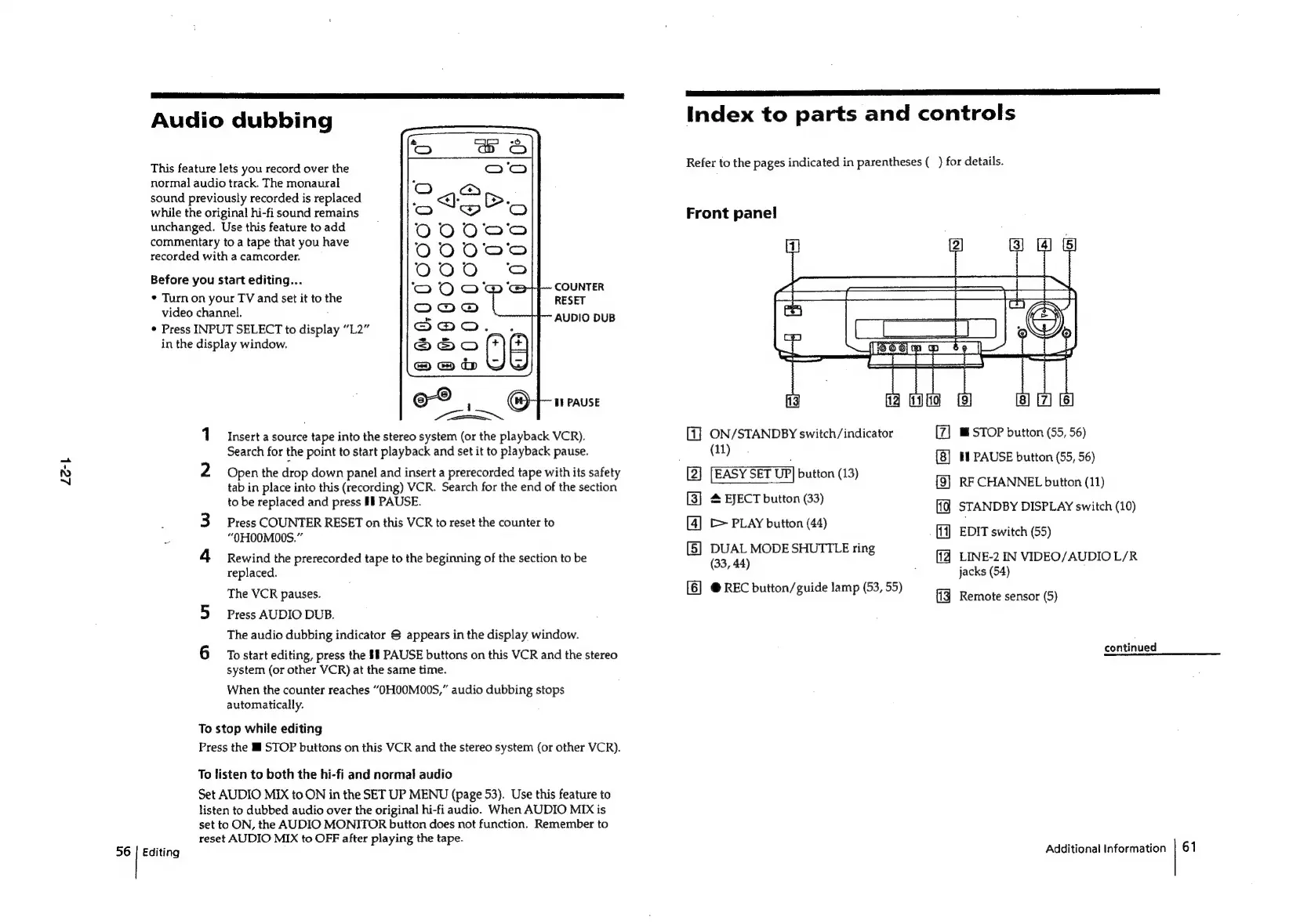
COUNTER
RESET
AUDIO
DUB
1
Insert
a
source
tape
into
the
stereo
system
(or
the
playback
VCR).
Search
for
the
point
to
start
playback
and
set
it
to
playback
pause.
2
Open
the
drop
down
panel
and
insert
a
prerecorded
tape
with
its
safety
tab
in
place
into
this
(recording)
VCR.
Search
for
the
end
of
the
section
to
be
replaced
and
press
Ii
PAUSE.
Press
COUNTER
RESET
on
this
VCR
to
reset
the
counter
to
“OHO0MO00S.”
4
Rewind
the
prerecorded
tape
to
the
beginning
of
the
section
to
be
replaced.
The
VCR
pauses.
5
Press
AUDIO
DUB.
The
audio
dubbing
indicator
S
appears
in
the
display
window.
6
Tostart
editing,
press
the
§1
PAUSE
buttons
on
this
VCR
and
the
stereo
system
(or
other
VCR)
at
the
same
time.
When
the
counter
reaches
“OHO0M00S,”
audio
dubbing
stops
automatically.
To
stop
while
editing
Press
the
li
STOP
buttons
on
this
VCR
and
the
stereo
system
(or
other
VCR).
To
listen
to
both
the
hi-fi
and
normal
audio
Set
AUDIO
MIX
to
ON
in
the
SET
UP
MENU
(page
53).
Use
this
feature
to
listen
to
dubbed
audio
over
the
original
hi-fi
audio.
When
AUDIO
MIX
is
set
to
ON,
the
AUDIO
MONITOR
button
does
not
function.
Remember
to
reset
AUDIO
MIX
to
OFF
after
playing
the
tape.
Editing
Ii
LR
ST
a
ON
NEES
RSS
ST
es]
Index
to
parts
and
controls
Refer
to
the
pages
indicated
in
parentheses
(_)
for
details.
Front
panel
[1]
ON/STANDBY
switch/indicator
(11)
[2]
[EASY
SET
UP]
button
(13)
[3]
4
EJECT
button
(33)
[4]
[>
PLAY
button
(44)
[5]
DUAL
MODE
SHUTTLE
ring
(33,
44)
[6]
@
REC
button/guide
lamp
(53,
55)
{9]
IF)
fig
W@
STOP
button
(55,
56)
tl
PAUSE
button
(55,
56)
RF
CHANNEL
button
(11)
STANDBY
DISPLAY
switch
(10)
EDIT
switch
(55)
LINE-2
IN
VIDEO/AUDIO
L/R
jacks
(54)
Remote
sensor
(5)
continued
Additional
Information
|
61

Related product manuals