EasyManua.ls Logo

Sony SLV-E811NP - Additional Connections; Tuning Your TV to the VCR

Sony SLV-E811NP
30 pages
Print Icon
To Next Page IconTo Next Page
To Previous Page IconTo Previous Page
Loading...
bl
10
Step
3
:
Connecting
the
VCR
(continued)
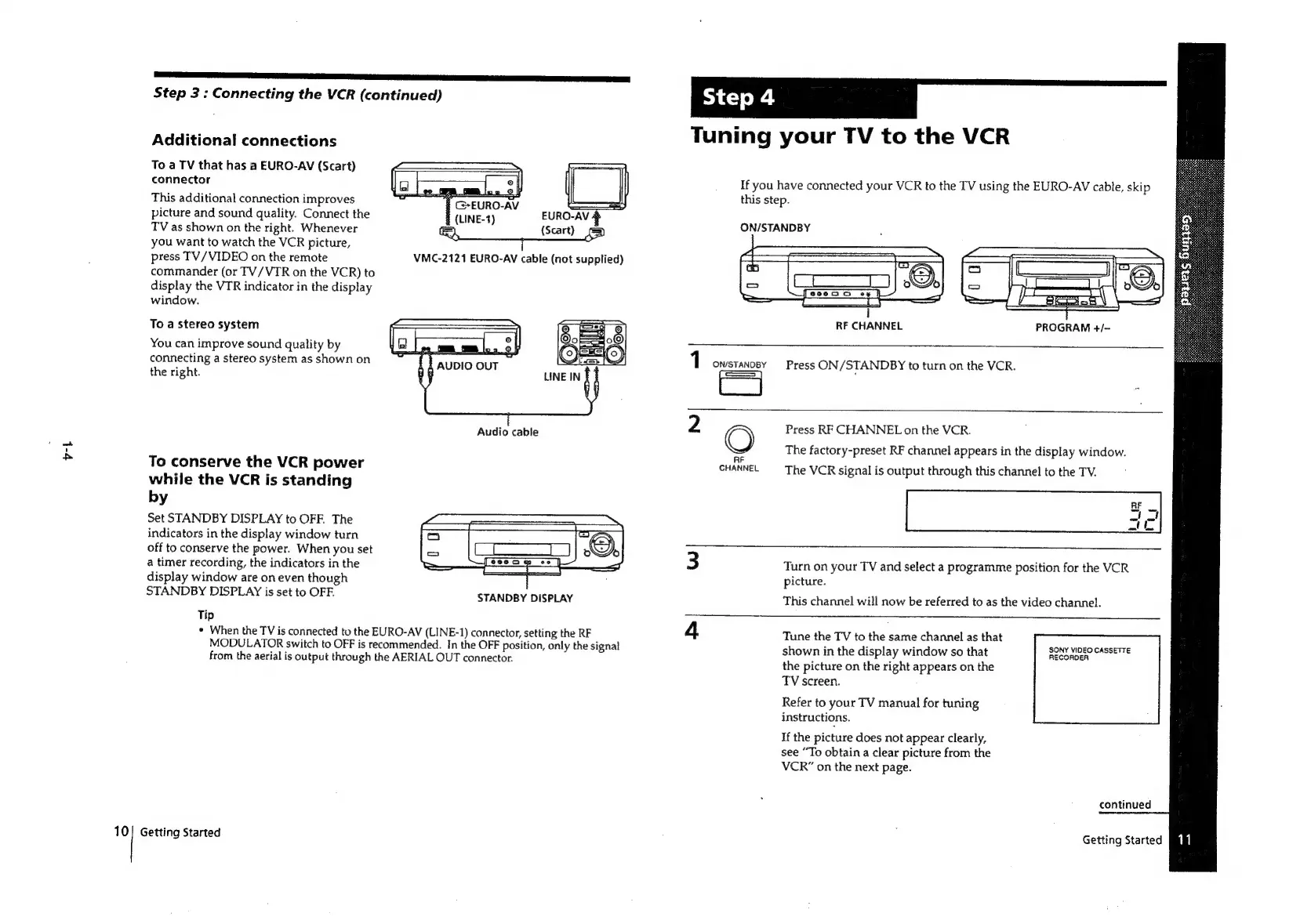
Additional
connections
To
a
TV
that
has
a
EURO-AV
(Scart)
connector
This
additional
connection
improves
|
Ce-EURO-
picture
and
sound
quality.
Connect
the
(LINE-1)
EURO-AV
TV
as
shown
on
the
right.
Whenever
(Scart)
you
want
to
watch
the
VCR
picture,
press
TV/VIDEO
on
the
remote
commander
(or
TV/VTR
on
the
VCR)
to
display
the
VIR
indicator
in
the
display
window.
VMC-2121
EURO-AV
cable
(not
supplied)
To
a
stereo
system
You
can
improve
sound
quality
by
connecting
a
stereo
system
as
shown
on
the
right.
Audio
cable
To
conserve
the
VCR
power
while
the
VCR
is
standing
by
Set
STANDBY
DISPLAY
to
OFF.
The
indicators
in
the
display
window
turn
off
to
conserve
the
power.
When
you
set
a
timer
recording,
the
indicators
in
the
display
window
are
on
even
though
STANDBY
DISPLAY
is
set
to
OFF.
Tip
¢
When
the
TV
is
connected
to
the
EURO-AV
(LINE-1)
connector,
setting
the
RF
MODULATOR
switch
to
OFF
is
recommended.
In
the
OFF
position,
only
the
signal
from
the
aerial
is
output
through
the
AERIAL
OUT
connector.
STANDBY
DISPLAY
Getting
Started
Tuning
your
TV
to
the
VCR
If
you
have
connected
your
VCR
to
the
TV
using
the
EURO-AV
cable,
skip
this
step.
ON/STANDBY
1
ON/STANDBY
CJ
43
=——
(es
ES
ECP
EE,
CET
-
ke.
=
[econ
ey
|
a
=
eS
—=—s
l
RF
CHANNEL
PROGRAM
+/-
Press
ON
/
STANDBY
to
turn
on
the
VCR.
-
Oe
RF
CHANNEL
Press
RF
CHANNEL
on
the
VCR.
The
factory-preset
RF
channel
appears
in
the
display
window.
The
VCR
signal
is
output
through
this
channel
to
the
TV.
ne]
i
Turn
on
your
TV
and
select
a
programme
position
for
the
VCR
picture.
This
channel
will
now
be
referred
to
as
the
video
channel.
Tune
the
TV
to
the
same
channel
as
that
shown
in
the
display
window
so
that
the
picture
on
the
right
appears
on
the
TV
screen.
SONY
VIDEO
CASSETTE
RECORDER
Refer
to
your
TV
manual
for
tuning
instructions.
If
the
picture
does
not
appear
clearly,
see
“To
obtain
a
clear
picture
from
the
VCR”
on
the
next
page.
continued
Getting
Started

Related product manuals