EasyManua.ls Logo

Sony SLV-E811NP - Page 6

Sony SLV-E811NP
30 pages
Print Icon
To Next Page IconTo Next Page
To Previous Page IconTo Previous Page
Loading...
S-l
12
Step
4:
Tuning your
TV
to
the
VCR
(continued)
5
O
Press
RF
CHANNEL.
AE
You
have
now
tuned
your
TV
to
the
VCR.
From
now
on,
whenever
CHANNEL
you
want
to
play
a
tape,
set
the
TV
to
the
video
channel.
To
check
to
see
if
the
TV
tuning
is
correct
Set
the
TV
to
the
video
channel
and
press
PROGRAM
+/-
on
the
VCR.
If
the
TV
screen
changes
to
a
different
programme
each
time
you
press
PROGRAM
+/-,
the
TV
tuning
is
correct.
To
obtain
a
clear
picture
from
the
VCR
If
the
picture
does
not
appear
clearly
in
step
4
above,
press
PROGRAM
+/-
in
step
4,
so
that
another
RF
channel
appears.
Then
tune
the
TV
to
the
new
RF
channel
until
a
clear
picture
appears.
Getting
Started
Setting
up
the
VCR
with
EASY
:
SET
UP
CURSOR
tities
EXECUTE
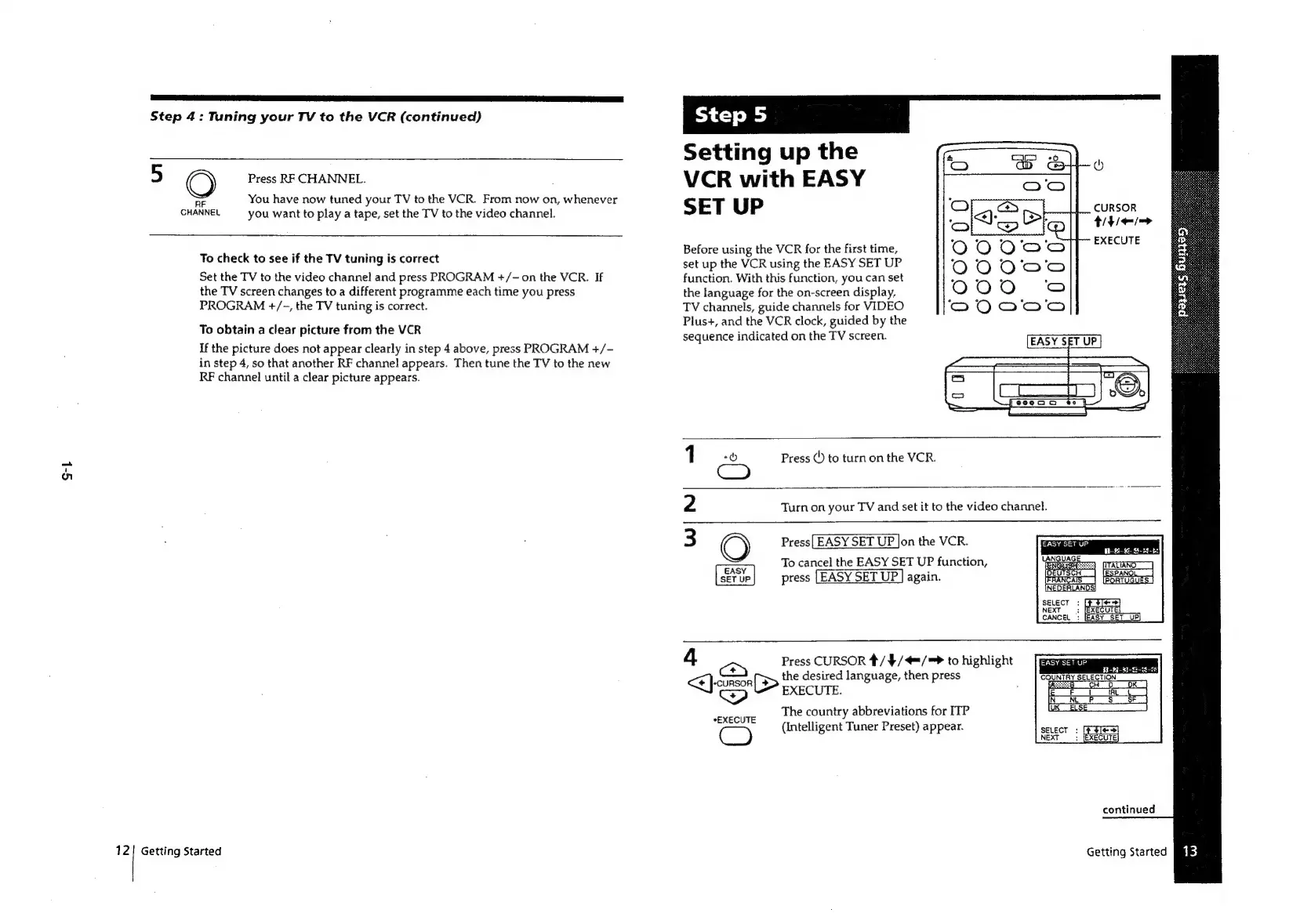
Before
using
the
VCR
for
the
first
time,
set
up
the
VCR
using
the
EASY
SET
UP
function.
With
this
function,
you
can
set
the
language
for
the
on-screen
display,
TV
channels,
guide
channels
for
VIDEO
Plus+,
and
the
VCR
clock,
guided
by
the
sequence
indicated
on
the
TV
screen.
Press
()
to
turn
on
the
VCR.
Turn
on
your
TV
and
set
it
to
the
video
channel.
Press|
EASY
SET
UP
Jon
the
VCR.
aay
To
cancel
the
EASY
SET
UP
function,
press
[EASY
SET
UP
J
again.
SELECT
:
NEXT
3
CANCEL:
4
a
Press
CURSOR
#/
4/4=/=
to
highlight
<<]
-conson[
>
the
desired
language,
then
press
COUNTRY
SELECTION
<P)
EXECUTE.
é
—_
é
The
country
abbreviations
for
ITP
peal
(Intelligent
Tuner
Preset)
appear.
continued
Getting
Started

Related product manuals