EasyManua.ls Logo

Sony SLV-E811NP - Page 7

Sony SLV-E811NP
30 pages
Print Icon
To Next Page IconTo Next Page
To Previous Page IconTo Previous Page
Loading...
9o-1
SS
SS
SSS
sss
Step
5:
Setting
up
the
VCR
with
EASY
SET
UP
(continued)
7
*EXECUTE
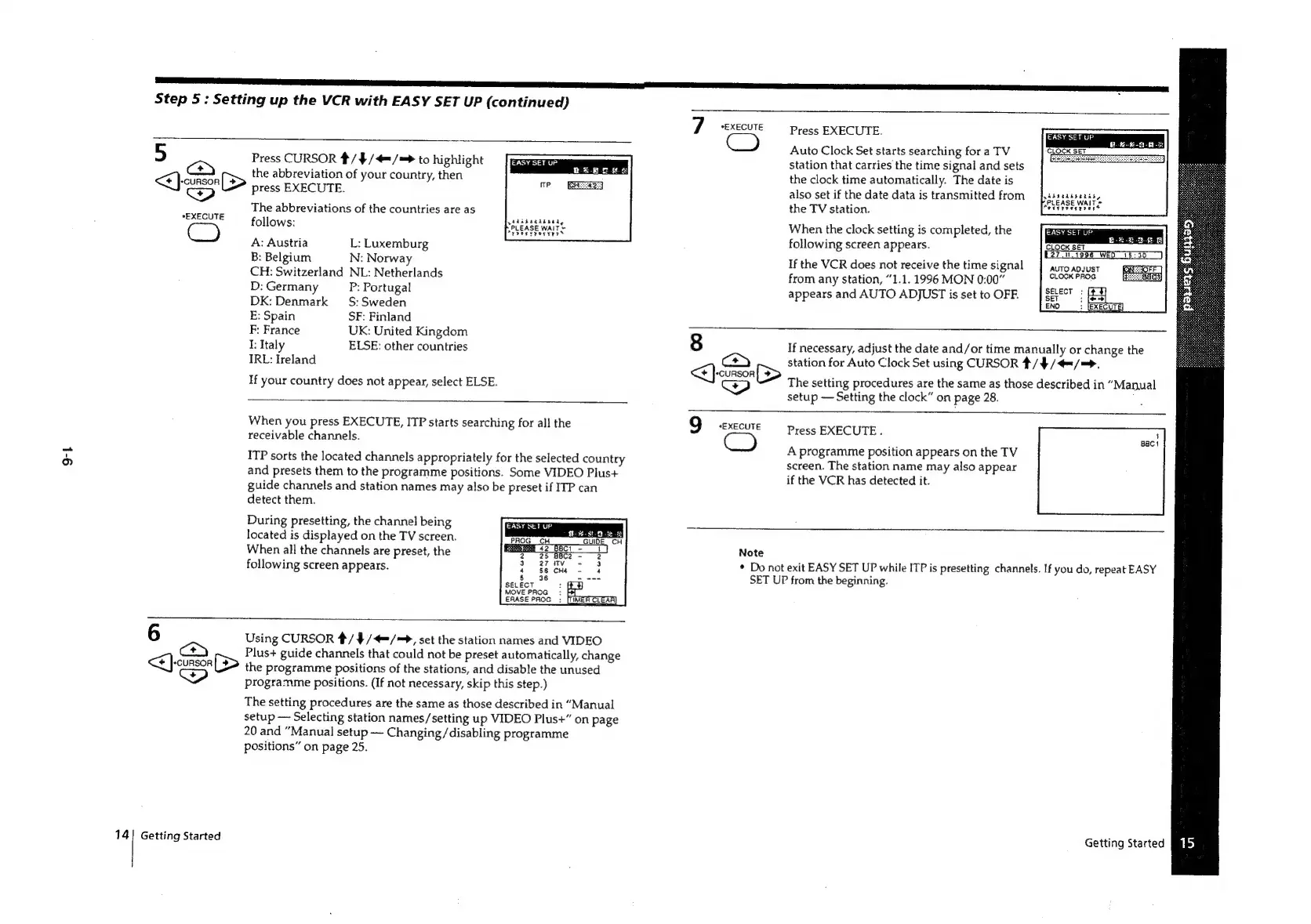
Press
EXECUTE.
Auto
Clock
Set
starts
searching
for
a
TV
station
that
carries
the
time
signal
and
sets
the
clock
time
automatically.
The
date
is
also
set
if
the
date
data
is
transmitted
from
5
Press
CURSOR
/$/4=/=>
to
highlight
<]
(<>)
(>
the
abbreviation
of
your
country,
then
Pest
press
EXECUTE.
ee
The
abbreviations
of
the
countries
are
as
the
TV
station.
-
follows:
When
the
clock
setting
is
completed,
the
A:
Austria
L:
Luxemburg
following
screen
appears.
Bae
Smee
B:
Belgium
N:
Norway
If
the
VCR
does
not
receive
the
time
signal
AUTO
ADJUST
GOFF]
CH:
Switzerland
NL:
Netherlands
from
any
station,
“1.1.
1996
MON
0:00”
CLOCK
PROG
Ge
Bees}
D:Germany
_P:
Portugal
appears
and
AUTO
ADJUST
is
set
to
OFF.
DK:
Denmark
—S:
Sweden
E:
Spain
SF:
Finland
F:
France
UK:
United
Kingdom
I:
Italy
ELSE:
other
countries
8
If
necessary,
adjust
the
date
and/or
time
manually
or
change
the
IRL:
Ireland
<]
ca
[>
station
for
Auto
Clock
Set
using
CURSOR
4/4
/4=/=>.
“CURSOR
eee
If
your
country
does
not
appear,
select
ELSE.
cP)
The
ae
ee
a
the
ed
those
described
in
“Manual
setup
Setting
the
clock”
on
page
28.
;
Pie
ss
Aiea
aad
ITP
starts
searching
for
all
the
9
*EXECUTE
Press
EXECUTE.
:
iv
a
:
Bact
:
ee
A
programme
position
appears
on
the
TV
ITP
sorts
the
located
channels
appropriately
for
the
selected
country
screen.
The
station
name
may
also
appear
and
presets
them
to
the
programme
positions.
Some
VIDEO
Plus+
:
3
.
if
the
VCR
has
detected
it.
guide
channels
and
station
names
may
also
be
preset
if
ITP
can
detect
them.
During
presetting,
the
channel
being
located
is
displayed
on
the
TV
screen.
When
all
the
channels
are
preset,
the
Note
following
screen
appears.
°
Deel
exit
ane
UP
while
ITP
is
presetting
channels.
If
you
do,
repeat
EASY
P
from
the
beginning.
6
Using
CURSOR
%/
¥//=
>,
set
the
station
names
and
VIDEO
Plus+
guide
channels
that
could
not
be
preset
automatically,
change
<<}
-cunson[S>
the
programme
positions
of
the
stations,
and
disable
the
unused
Ww
programme
positions.
(If
not
necessary,
skip
this
step.)
The
setting
procedures
are
the
same
as
those
described
in
“Manual
setup
Selecting
station
names/setting
up
VIDEO
Plus+”
on
page
20
and
“Manual
setup
Changing/disabling
programme
positions”
on
page
25.
14]
Getting
Started
Getting
Started

Related product manuals