EasyManua.ls Logo

Sony SLV-E811NP - Page 8

Sony SLV-E811NP
30 pages
Print Icon
To Next Page IconTo Next Page
To Previous Page IconTo Previous Page
Loading...
Zt
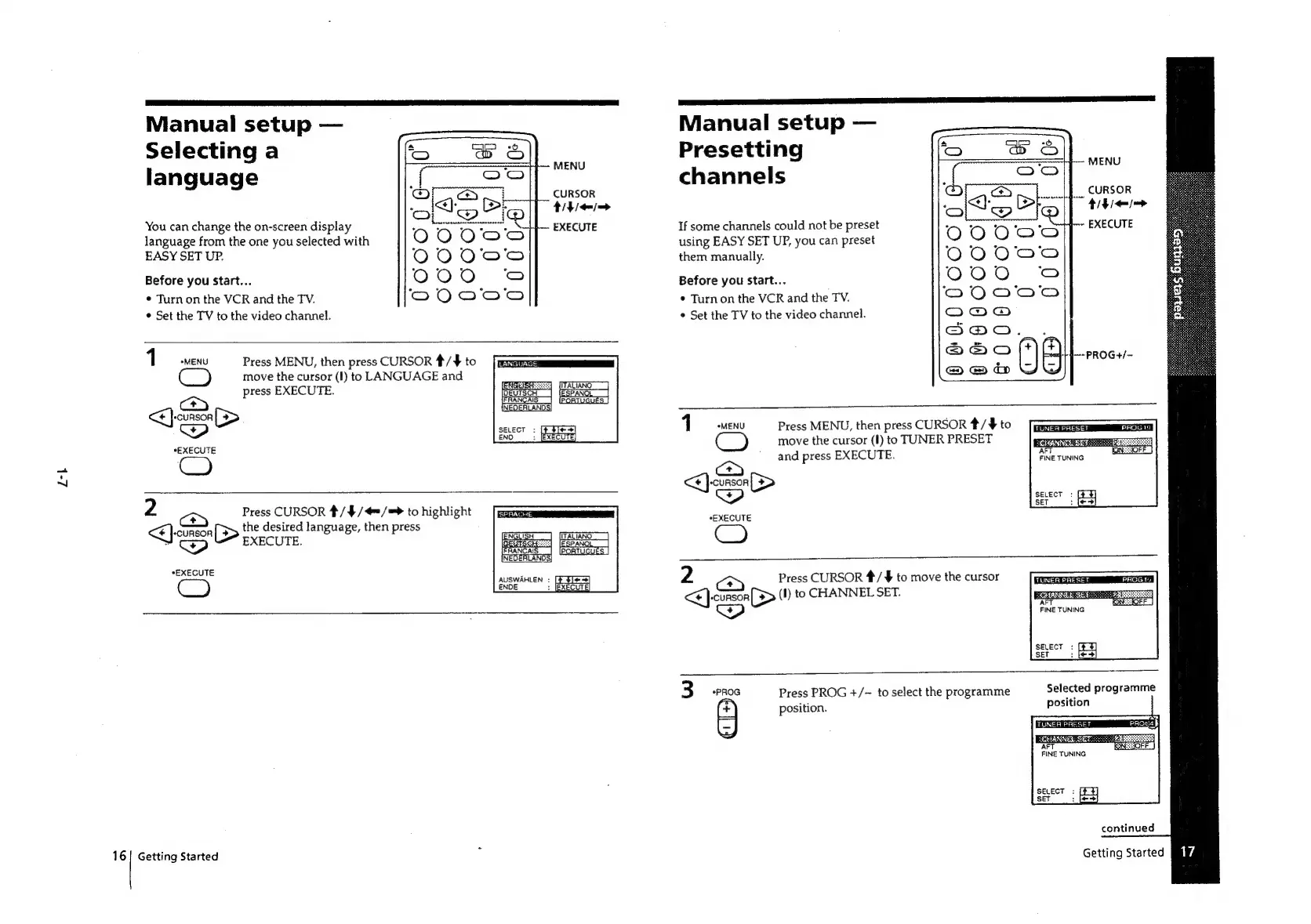
Manual
setup
Selecting
a
language
MENU
CURSOR
titie=
You
can
change
the
on-screen
display
EXECUTE
language
from
the
one
you
selected
with
EASY
SET
UP.
Before
you
Start...
¢
Turnon
the
VCR
and
the
TV.
¢
Set
the
TV
to
the
video
channel.
1
*MENU
CO
Press
MENU,
then
press
CURSOR
4/¥
to
move
the
cursor
(I)
to
LANGUAGE
and
cae
press
EXECUTE.
O1
[FRANCAIS
_}
[PORTUGUES
|
(INEQERLANOS)
a
ae
*EXECUTE
2
aS
Press
CURSOR
#/4/4=/=>
to
highlight
<E]-cunson
(>
Liehiipee
language,
then
press
pititie
*EXECUTE
AUSWAHLEN
:
ENDE
[
t1~
=]
:
IEXECUTE
16|
Getting
Started
Manual
setup
Presetting
MENU
channels
|.
cursor
thie
If
some
channels
could
not
be
preset
~
EXECUTE
using
EASY
SET
UP,
you
can
preset
them
manually.
Before
you
start...
¢
Turnon
the
VCR
and
the
TV.
Set
the
TV
to
the
video
channel.
++4---PROG+/—
1
*MENU
Press
MENU,
then
press
CURSOR
*/$#
to
move
the
cursor
(I)
to
TUNER
PRESET
and
press
EXECUTE.
2
a>)
Press
CURSOR
*/
¥
to
move
the
cursor
<<]
-conson
[>
(I)
to
CHANNEL
SET.
_—
pcan
FINE
TUNING
SELECT
SET
W
*
ua
z
Q
fo)
Press
PROG
+/-
to
select
the
programme
Selected
programme
position.
position
¢'
[+3
continued
Getting
Started

Related product manuals