EasyManua.ls Logo

Sony SLV-E811NP - VIDEO Plus

Sony SLV-E811NP
30 pages
Print Icon
To Next Page IconTo Next Page
To Previous Page IconTo Previous Page
Loading...
Manual
setup
Selecting
station
*
MENU
names/setting
up
VIDEO
Plus+
tieei
EXECUTE
VIDEO
Plus+
is
a
feature
in
Sony
VCRs
that
simplifies
programming
the
VCR
to
make
timer
recordings.
To
use
VIDEO
Plus+,
each
programme
position
needs
to
be
matched
with
its
VIDEO
Plus+
guide
channel.
If
the
guide
channels
were
not
preset
in
the
EASY
SET
UP
procedure,
set
them
by
selecting
the
station
names.
If
you
cannot
find
a
station
name
you
want,
you
need
to
set
the
guide
channel
manually.
To
get
the
guide
channel
numbers,
see
“Guide
channels
for
VIDEO
Plus+”
on
page
23,
or
look
in
the
programme
guide
for
your
area
that
features
PlusCode.
¢
If
you
want
to
record
satellite
broadcasts
using
VIDEO
Plus+,
see
page
24.
Before
you
start...
¢-
Turn
on
the
VCR
and
the
TV.
¢
Set
the
TV
to
the
video
channel.
a
es
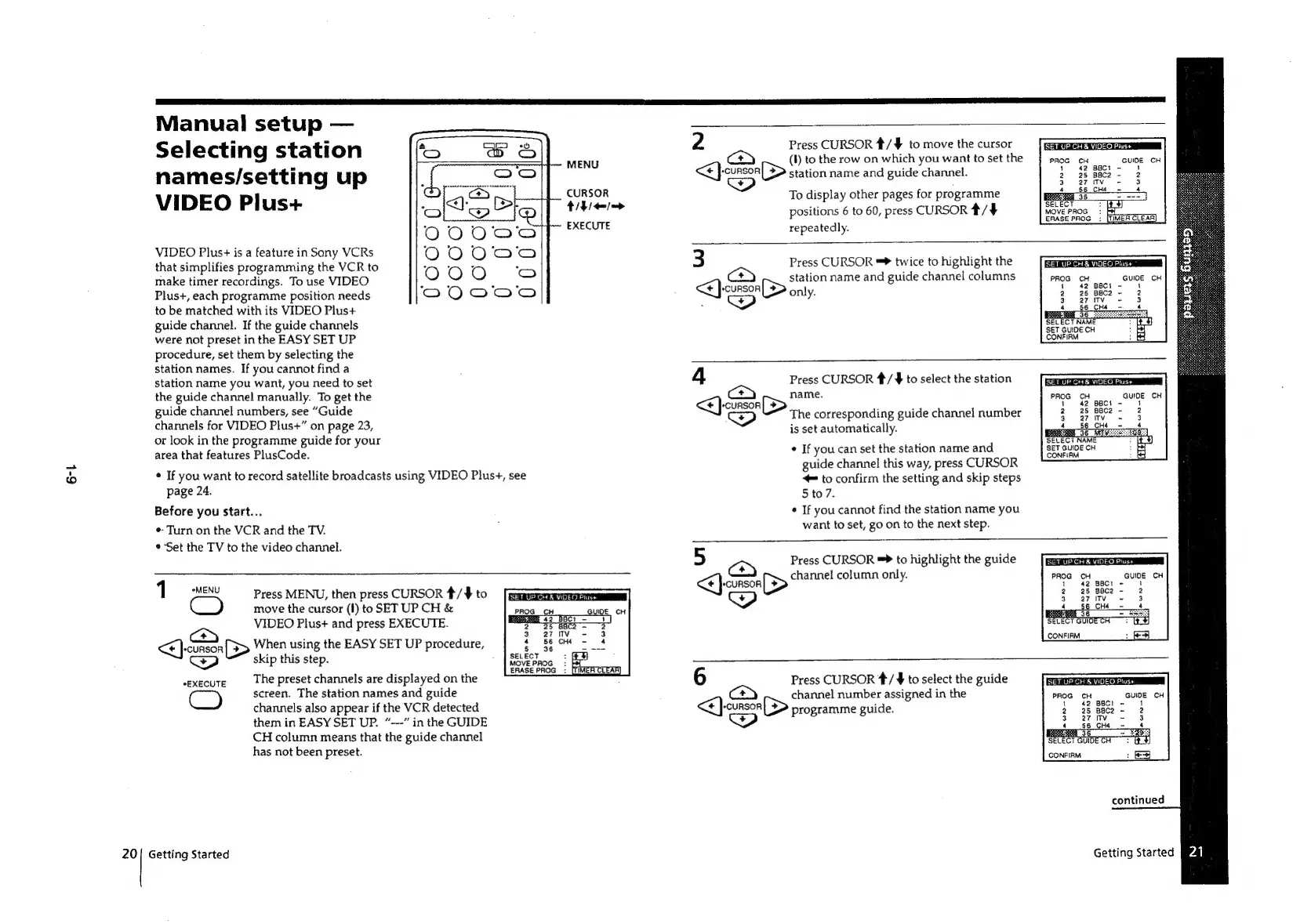
Press
MENU,
then
press
CURSOR
#/4
to
move
the
cursor
(1)
to
SET
UP
CH
&
VIDEO
Plus+
and
press
EXECUTE.
<<}
cursor
[$>
When
using
the
EASY
SET
UP
procedure,
cP)
skip
this
step.
;
SET
UP
CH
&
VIDEO
Plus+
ERASE
PROG:
[fF
The
preset
channels
are
displayed
on
the
screen.
The
station
names
and
guide
channels
also
appear
if
the
VCR
detected
them
in
EASY
SET
UP.
“---”
in
the
GUIDE
CH
column means
that
the
guide
channel
has
not
been
preset.
*EXECUTE
20|
Getting
Started
2
ce
So
Press
CURSOR
#/¥
to
move
the
cursor
(I)
to
the
row
on
which
you
want
to
set
the
station
name
and
guide
channel.
To
display
other
pages
for
programme
positions
6
to
60,
press
CURSOR
#/4
repeatedly.
SET
UP
CH
&
VIDEO
Plus+
MOVE
PROG:
ERASE
PROG
:
3
a)
ISS
Press
CURSOR
=
twice
to
highlight
the
station
name
and
guide
channel
columns
only.
SET
UP
CHA
VIDEO
Plus+
*
PROG
i
2
3
s
WN
SET
GUIDE
CH
CONFIRM
mes
Jes.
Press
CURSOR
#/
$
to
select
the
station
name.
The
corresponding
guide
channel
number
is
set
automatically.
¢
If
you
can
set
the
station
name
and
guide
channel
this
way,
press
CURSOR
©
to
confirm
the
setting
and
skip
steps
5
to
7.
¢
If
you
cannot
find
the
station
name
you
want
to
set,
go
on
to
the
next
step.
SET
UP
CH
&
VIDEO
Plus+
PROG
CH
GUIDE
CH
1
1
2
3
aan
Press
CURSOR
to
highlight
the
guide
channel
column
only.
SETUP
CHE
VIDEO
Plush
|
UP
CH
&
VIDEO
Plus+
PROG
CH
GUIDE
CH
6
ce
>
Press
CURSOR
*/
¥
to
select
the
guide
channel
number
assigned
in
the
programme
guide.
SET
UP
CH
&
VIDEO
Plus+
ceo
CH
CONFIRM
continued
Getting
Started
[4]

Related product manuals