EasyManua.ls Logo

Sony SLV-E811NP - Page 13

Sony SLV-E811NP
30 pages
Print Icon
To Next Page IconTo Next Page
To Previous Page IconTo Previous Page
Loading...
Stel
26
Manual
setup
Changing/disabling
programme
positions
(continued)
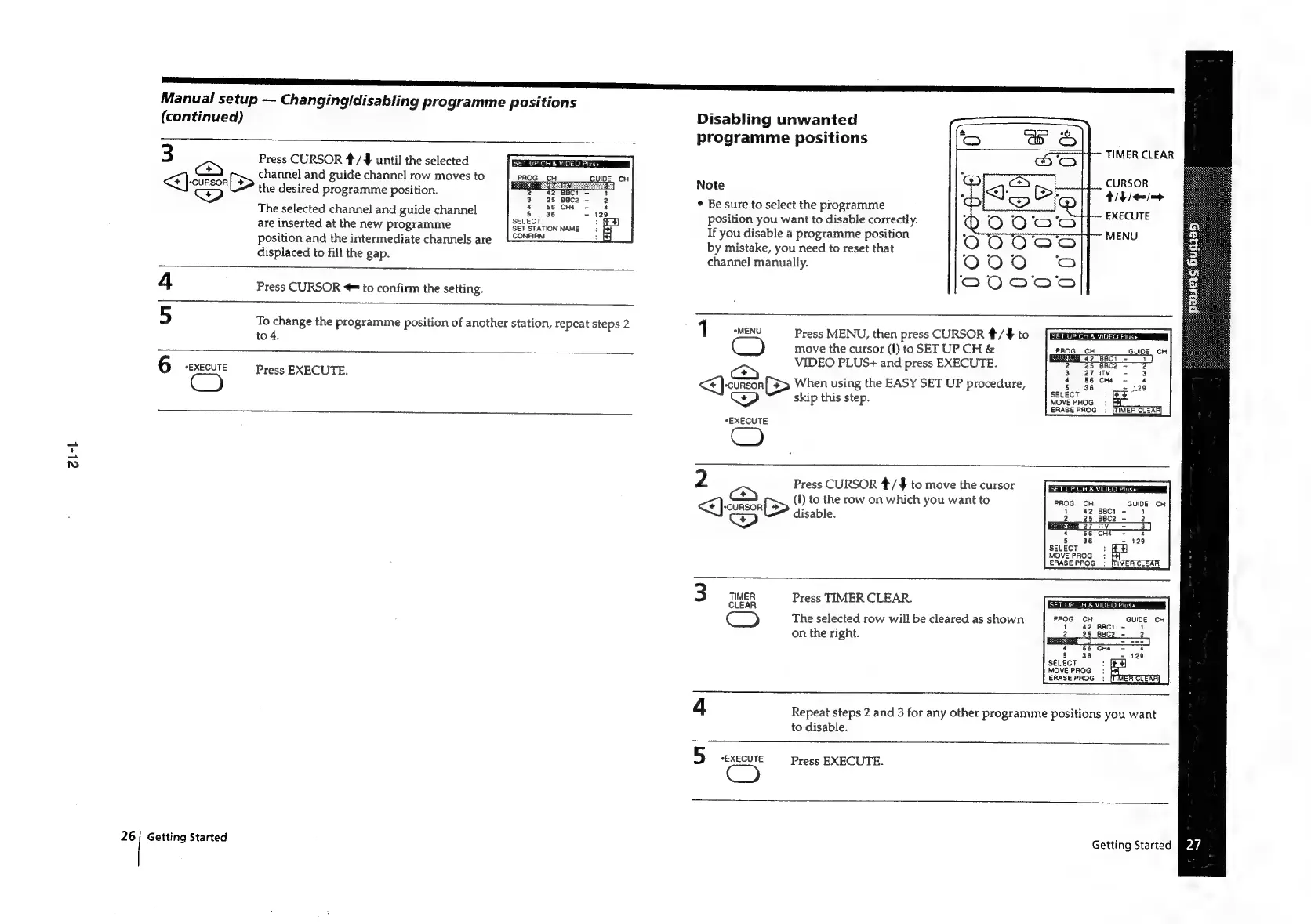
3
Press
CURSOR
*/¥#
until
the
selected
<]
<>)
channel
and
guide
channel
row
moves
to
“CURSOR
[>
od
the
desired
programme
position.
SET
UP
CH
&
VIDEO
Pluse
The
selected
channel
and
guide
channel
are
inserted
at
the
new
programme
position
and
the
intermediate
channels
are
displaced
to
fill
the
gap.
SELECT
SET
STATION
NAME
CONFIRM
4
Press
CURSOR
=
to
confirm
the
setting.
5
To
change
the
programme
position
of
another
station,
repeat
steps
2
to
4.
Press
EXECUTE.
6
*EXECUTE
Getting
Started
Disabling
unwanted
programme
positions
TIMER
CLEAR
CURSOR
tit
/enj—>
EXECUTE
MENU
Note
Be
sure
to
select
the
programme
position
you
want
to
disable
correctly.
If
you
disable
a
programme
position
by
mistake,
you
need
to
reset
that
channel
manually.
Press
MENU,
then
press
CURSOR
*/¥
to
move
the
cursor
(f)
toSET
UP
CH
&
VIDEO
PLUS+
and
press
EXECUTE.
<<)
-cunson[3>
When
using
the
EASY
SET
UP
procedure,
1
MENU
C)
skip
this
step.
*EXECUTE
2
Press
CURSOR
*/$
to
move
the
cursor
ce
(I)
to
the
row
on
which
you
want
to
Dey
disable.
3
Clean
Press
TIMER
CLEAR.
CO
The
selected
row
will
be
cleared
as
shown
|
PROS
cH
GUIDE
cH
on
the
right.
2
4
Repeat
steps
2
and
3
for
any
other
programme
positions
you
want
to
disable.
5
“EXECUTE
Press
EXECUTE.
Getting
Started
Pz

Related product manuals