EasyManua.ls Logo

Sony SLV-E811NP - Page 12

Sony SLV-E811NP
30 pages
Print Icon
To Next Page IconTo Next Page
To Previous Page IconTo Previous Page
Loading...
LL-k
arene
NRE,
Manual
setup
Selecting
station
namesisetting
up
VIDEO
Plus+
Manu
al
setup
a
(continued)
=
Changing/
Setting
up
VIDEO
Plus+
for
satellite
broadcasts
disabli
MENU
When
your
satellite
tuner
is
connected
via
the
AERIAL
IN
connector,
first
isa
ing
CURSOR
you
have
to
set
the
programme
position
for
each
satellite
channel
using
the
tiie
TUNER
PRESET
menu.
Then
set
the
guide
channel
number
for
each
prog
ramme
satellite
channel
using
the
SET
UP
CH
&
VIDEO
Plus+
menu.
positi
ons
EXECUTE
If
your
satellite
tuner
is
connected
via
the
LINE-3
IN
EURO-AV
(Scart)
connector,
you
don’t
have
to
set
programme
positions
nor
guide
channel
numbers
for
satellite
channels.
Skip
the
following
operations.
After
setting
the
channels
and
VIDEO
1
Turnon
the
satellite
tuner.
Plus+
guide
channels,
you
can
change
the
programme
positions
as
you
like.
If
2
Press
MENU,
then
select
TUNER
PRESET
and
press
EXECUTE.
any
programme
positions
are
unused
or
3
Press
PROG
+/-
to
select
a
programme
position
you
want
to
use
for
contain
unwanted
channels,
you
can
watching
a
satellite
channel.
disable
them.
4
Select
CHANNEL
SET,
then
press
CURSOR
=>
Before
you
start...
to
tune
the
VCR
to
the
satellite
tuner.
Ser
°
Turnon
the
VCR
and
the
TV.
The
channel
number
displayed
beside
FINE
TUNING
¢
Set
the
TV
to
the
video
channel.
CHANNEL
SET
is
used
for
receiving
all
satellite
broadcasts
from
the
satellite
tuner.
Changing
programme
positions
s
e.g.
Moving
the
programme
position
from
3
to
1.
5
press
PROG
+/-
to
select
another
programme
position
for
another
satellite
channel,
and
press
the
programme
number
buttons
to
enter
the
ae
eo oe
ee
same
channel
number
as
the
one
displayed
in
step
4.
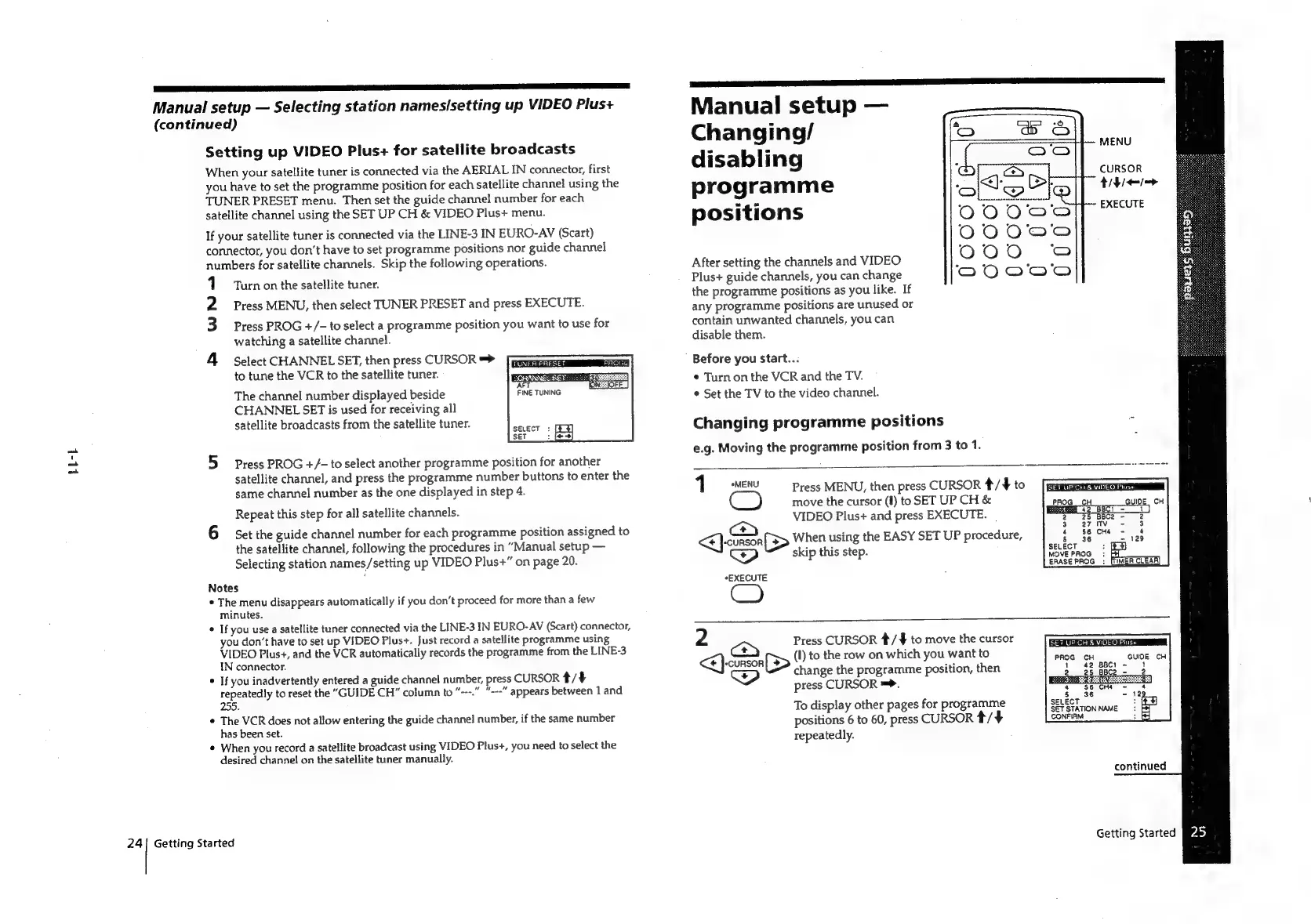
1
sMENU
Press
MENU,
then
press
CURSOR
*/#
to
move
the
cursor
(1)
to
SET
UP
CH
&
Repeat
this
step
for
all
satellite
channels.
VIDEO
Plus+
and
press
EXECUTE.
6
Set
the
guide
channel
number
for
each
programme
position
assigned
to
the
satellite
channel,
following
the
procedures
in
“Manual
setup
<<
}-cunson
[>
When
using
the
EASY
SET
UP
procedure,
Selecting
station
names/setting
up
VIDEO
Plus+”
on
page
20.
ship
Wiis
Steps
Notes
*EXECUTE
°
The
menu
disappears
automatically
if
you
don’t
proceed
for
more
than
a
few
minutes.
¢
If
you
use
a
satellite
tuner
connected
via
the
LINE-3
IN
EURO-AV
(Scart)
connector,
you
don’t
have
to
set
up
VIDEO
Plus+.
Just
record
a
satellite
programme
using
2
Press
CURSOR
#/¥#
to
move
the
cursor
SET
UP
CH
&
VIDEO
Pius
PROG
CH
VIDEO
Plus+,
and
the
VCR
automatically
records
the
programme
from
the
LINE-3
IN
connector.
<}
corso
S>
(I)
to
the
row
on
which
you
want
to
If
you
inadvertently
entered
a
guide
channel
number,
press
CURSOR
*/4#
change
the
programme
position,
then
repeatedly
to
reset
the
"GUIDE
CH”
column
to
“---.”
"---"
appears
between
1
and
press
CURSOR
=.
z
255.
.
=
123
To
display
other
pages
for
programme
SELECT
:
e
aches
oras
not
allow
entering
the
guide
channel
number,
if
the
same
number
peitioke
to
abs
arece
CaReae
ait
SET
STATION
NAME
°
;
repeatedly.
When
you
record
a
satellite
broadcast
using
VIDEO
Plus+,
you
need
to
select
the
desired
channel
on
the
satellite
tuner
manually.
continued
24|
Getting
Started
Getting
Started
Js)

Related product manuals