– 1-4 –
17
Getting Started
Getting Started
Presetting all receivable
channels automatically
If you have preset the channels using the
One Touch Tuning function, skip this
procedure.
Before you start…
• Turn on the VCR and the TV.
• Set the TV to the VCR channel
(channel 3 or 4). If your TV is
connected to the VCR using A/V
connections, set the TV to video input.
• Press TV/VIDEO to display the
VIDEO indicator in the VCR’s display
window.
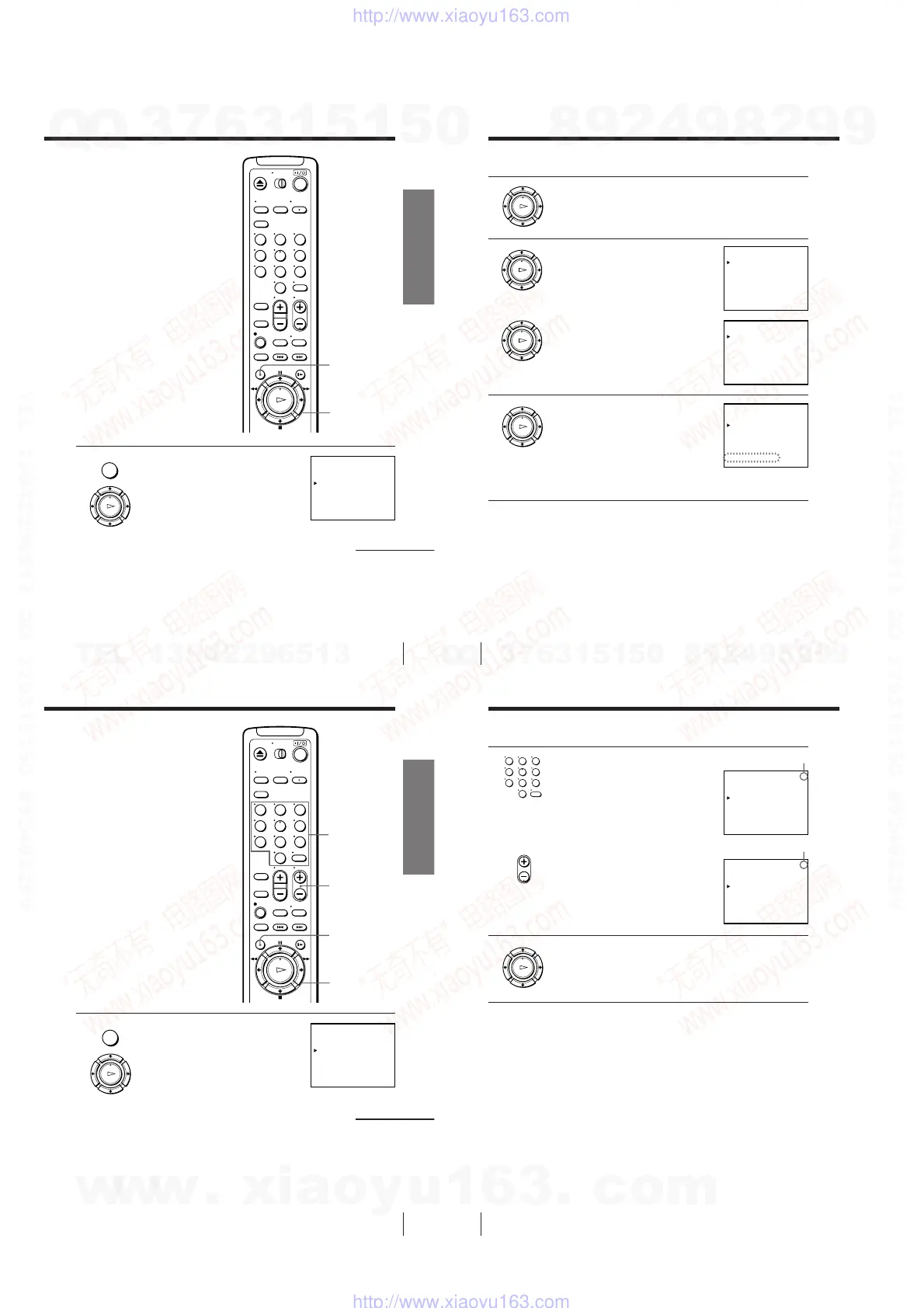
1 Press MENU, then press M/m to move the
cursor (B) to AJUSTE DE SINTONIA and
press OK.
continued
OK
M/m/</,
OK
PLAY
MENU
AJUSTE DE SINTONIA
:[ ]B b
ANTENA / CABLE
SINTONIA AUTOMATICA
SINT. MANUAL
SINTONIA FINA.
AFT
AJUSTAR
SELECCIONAR : [ ]V v
1CAN
ANT CABLE•
NOSI•
•
–+
MENU
123
456
789
0
18
Getting Started
Step 6: Presetting channels (continued)
2 Press M/m to select ANTENA/CABLE.
3 • To preset cable TV channels:
Press </, to set ANTENA/CABLE
to CABLE.
• To preset VHF and UHF channels:
Press </, to set ANTENA/CABLE
to ANT.
4 Press M/m to move the cursor (B) to
SINTONIA AUTOMATICA, then press
OK.
All receivable channels are preset in
numerical sequence. When no more
receivable channels can be found,
presetting stops and the picture from the
lowest numbered channel is displayed on
the TV screen.
Note
• The menu disappears automatically if you don’t proceed for more than a few
minutes.
AJUSTE DE SINTONIA
:[ ]B b
ANTENA / CABLE
SINTONIA AUTOMATICA
SINT. MANUAL
SINTONIA FINA.
AFT
AJUSTAR
SELECCIONAR : [ ]V v
1CAN
ANT CABLE•
NOSI•
•
–+
AJUSTE DE SINTONIA
:[ ]B b
ANTENA / CABLE
SINTONIA AUTOMATICA
SINT. MANUAL
SINTONIA FINA.
AFT
AJUSTAR
SELECCIONAR : [ ]V v
1CAN
ANT CABLE•
NOSI•
•
–+
AJUSTE DE SINTONIA
ANTENA / CABLE
SINTONIA AUTOMATICA
SINT. MANUAL
SINTONIA FINA.
AFT
POR FAVOR ESPERE
1CAN
ANT CABLE•
NOSI•
•
–+
19
Getting Started
Getting Started
Presetting/disabling
channels manually
Before you start…
• Turn on the VCR and the TV.
• Set the TV to the VCR channel
(channel 3 or 4). If your TV is
connected to the VCR using A/V
connections, set the TV to video input.
• Press TV/VIDEO to display the
VIDEO indicator in the VCR’s display
window.
1 Press MENU, then press M/m to move the
cursor (B) to AJUSTE DE SINTONIA and
press OK.
continued
MENU
OK
M/m/</,
OK
PLAY
MENU
123
456
789
0
AJUSTE DE SINTONIA
:[ ]B b
ANTENA / CABLE
SINTONIA AUTOMATICA
SINT. MANUAL
SINTONIA FINA.
AFT
AJUSTAR
SELECCIONAR : [ ]V v
1CAN
ANT CABLE•
NOSI•
•
–+
CH +/–
Number
buttons,
ENTER
20
Getting Started
2 • To preset a channel:
1 Press the number buttons to enter the
channel number, then press ENTER.
2 Press </, to set SINT. MANUAL
to +.
• To disable a channel:
1 Press CH +/– to select the channel
number.
2 Press </, to set SINT. MANUAL
to –.
3 Repeat step 2 to preset or disable channels as required, then press
OK.
Note
• The menu disappears automatically if you don’t proceed for more than a few
minutes.
Channel to be preset
Channel to be disabled
Step 6: Presetting channels (continued)
123
456
789
0
AJUSTE DE SINTONIA
:[ ]B b
ANTENA / CABLE
SINTONIA AUTOMATICA
SINT. MANUAL
SINTONIA FINA.
AFT
AJUSTAR
SELECCIONAR : [ ]V v
4CAN
ANT CABLE•
NOSI•
•
–+
AJUSTE DE SINTONIA
:[ ]B b
ANTENA / CABLE
SINTONIA AUTOMATICA
SINT. MANUAL
SINTONIA FINA.
AFT
AJUSTAR
SELECCIONAR : [ ]V v
5CAN
ANT CABLE•
NOSI•
•
–+
• CH
w
w
w
.
x
i
a
o
y
u
1
6
3
.
c
o
m
Q
Q
3
7
6
3
1
5
1
5
0
9
9
2
8
9
4
2
9
8
T
E
L
1
3
9
4
2
2
9
6
5
1
3
9
9
2
8
9
4
2
9
8
0
5
1
5
1
3
6
7
3
Q
Q
TEL 13942296513 QQ 376315150 892498299
TEL 13942296513 QQ 376315150 892498299
http://www.xiaoyu163.com
http://www.xiaoyu163.com



 To Next Page