20
Setting the clock
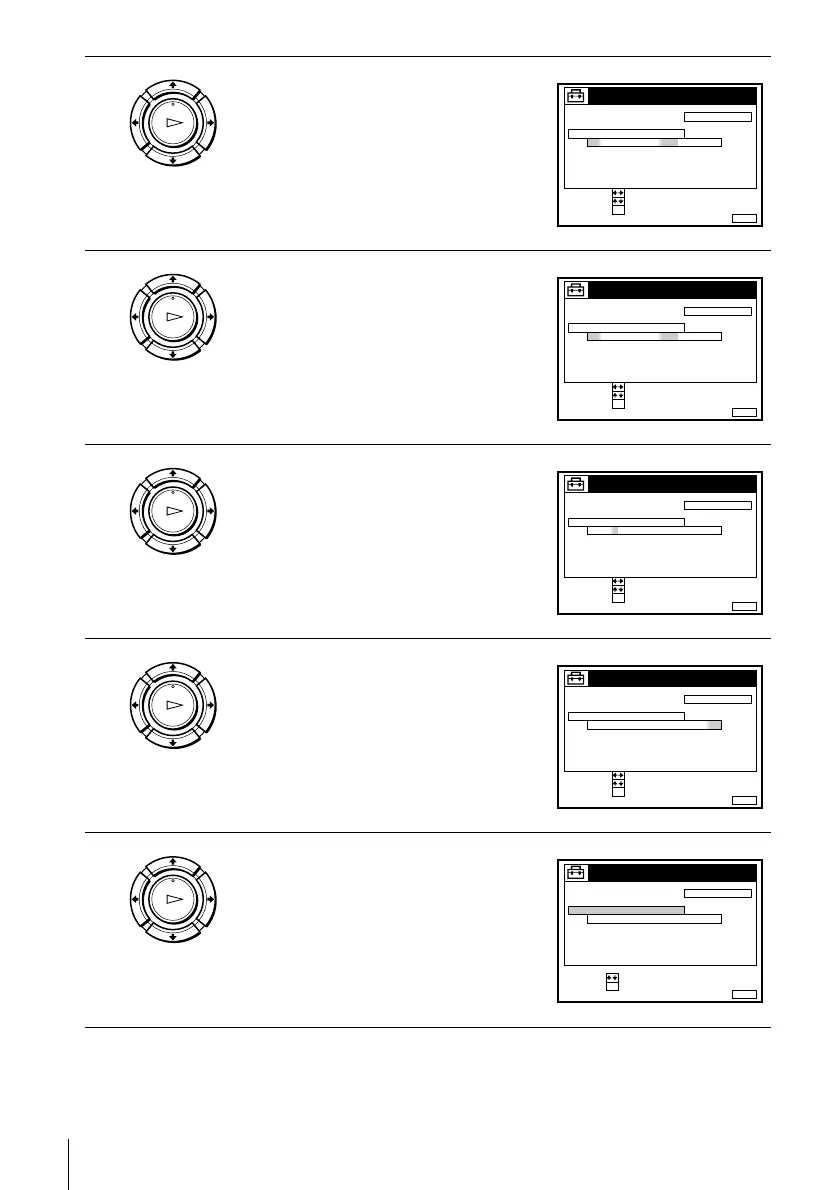
3
Press M/m to highlight MANUAL
ADJUST, then press OK.
4
Press M/m to set the day.
5
Press , to highlight the month and set the
month pressing M/m.
6
Set the year, hour, and minutes in
sequence, pressing , to highlight the
item to be set, and press M/m to select the
digits.
The day of the week is set automatically.
7
Press OK to start the clock.
OK
PLAY
CONFIRM :
SET :
OK
MENUEXIT :
CLOCK
OFFAUTO ADJUST
CLOCK PROGRAM
MANUAL ADJUST
1 . 1 .2000 SAT 0 :00
SELECT :
OK
PLAY
CONFIRM :
SET :
OK
MENUEXIT :
CLOCK
OFFAUTO ADJUST
CLOCK PROGRAM
MANUAL ADJUST
8 . 1 .2000 FRI 0:00
SELECT :
2
OK
PLAY
CONFIRM :
SET :
OK
MENUEXIT :
CLOCK
OFFAUTO ADJUST
CLOCK PROGRAM
MANUAL ADJUST
8 . 9 .2000 THU 0 :00
SELECT :
2
OK
PLAY
CONFIRM :
SET :
OK
MENUEXIT :
CLOCK
OFFAUTO ADJUST
CLOCK PROGRAM
MANUAL ADJUST
8 . THU 8 : 0 0
SELECT :
21.20009
OK
PLAY
MENUEXIT :
CLOCK
OFFAUTO ADJUST
CLOCK PROGRAM
MANUAL ADJUST
8 . THU 8 : 0 0
21
SET :
SELECT :
OK
.20009



 To Next Page