22
Setting the clock
Changing the station for the
Auto Clock Set function
(not available on SLV-SE600A/E
and SX600E)
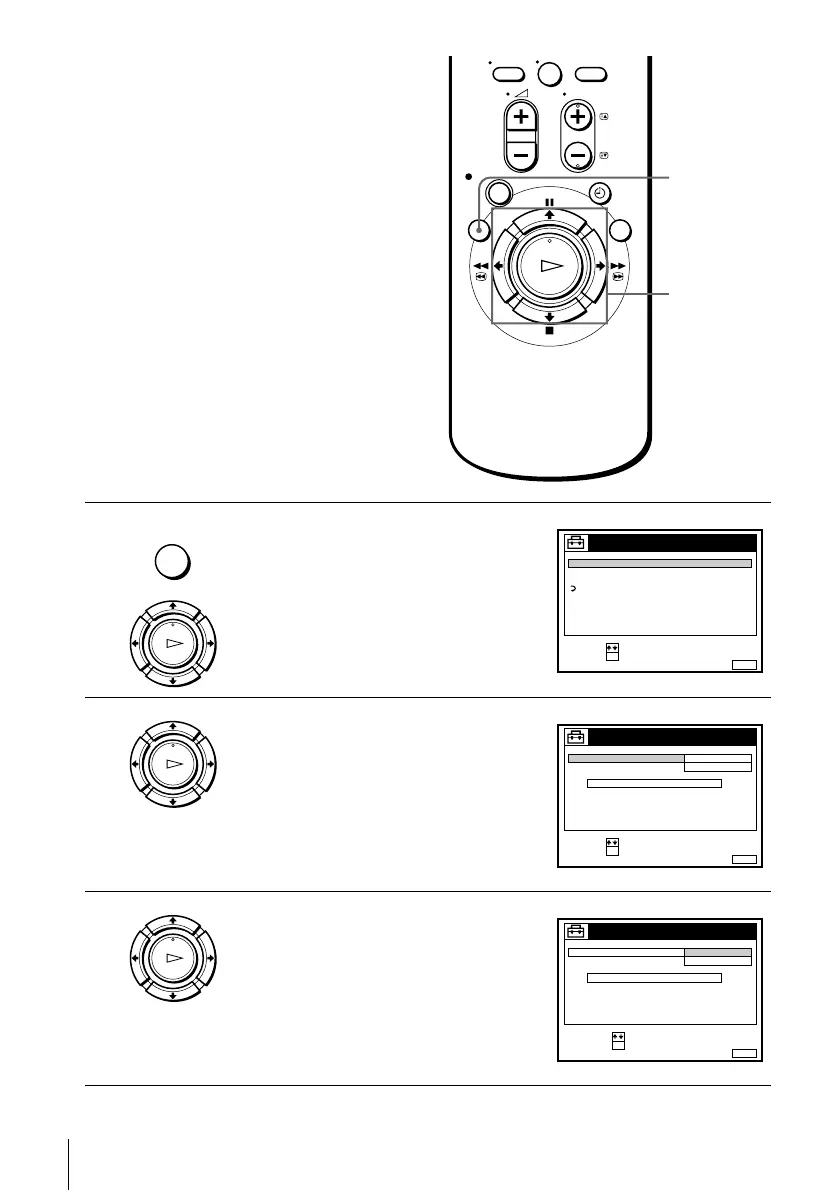
Before you start…
• Turn on the VCR and the TV.
• Set the TV to the video channel.
1
Press MENU, then press M/m to highlight
SETTINGS and press OK.
2
Press M/m to highlight CLOCK, then press
OK.
AUTO ADJUST is highlighted.
3
Press OK.
0
MENU
M/m
OK
MENU
OK
PLAY
SET :
SELECT :
OK
MENUEXIT :
SETTINGS
RETURN
TUNER
CLOCK
LANGUAGE
OK
PLAY
SET :
SELECT :
OK
MENUEXIT :
CLOCK
ON
1 AAB
AUTO ADJUST
CLOCK PROGRAM
MANUAL ADJUST
.8 THU 8 : 0 0
12 .20009
OK
PLAY
CONFIRM :
SELECT :
OK
MENUEXIT :
CLOCK
OFF
AUTO ADJUST
CLOCK PROGRAM
MANUAL ADJUST
THU 8 : 0 0
8.
ON
21.20009


 To Next Page