Getting Started
9
Connecting the VCR
Step 3 : Connecting the VCR
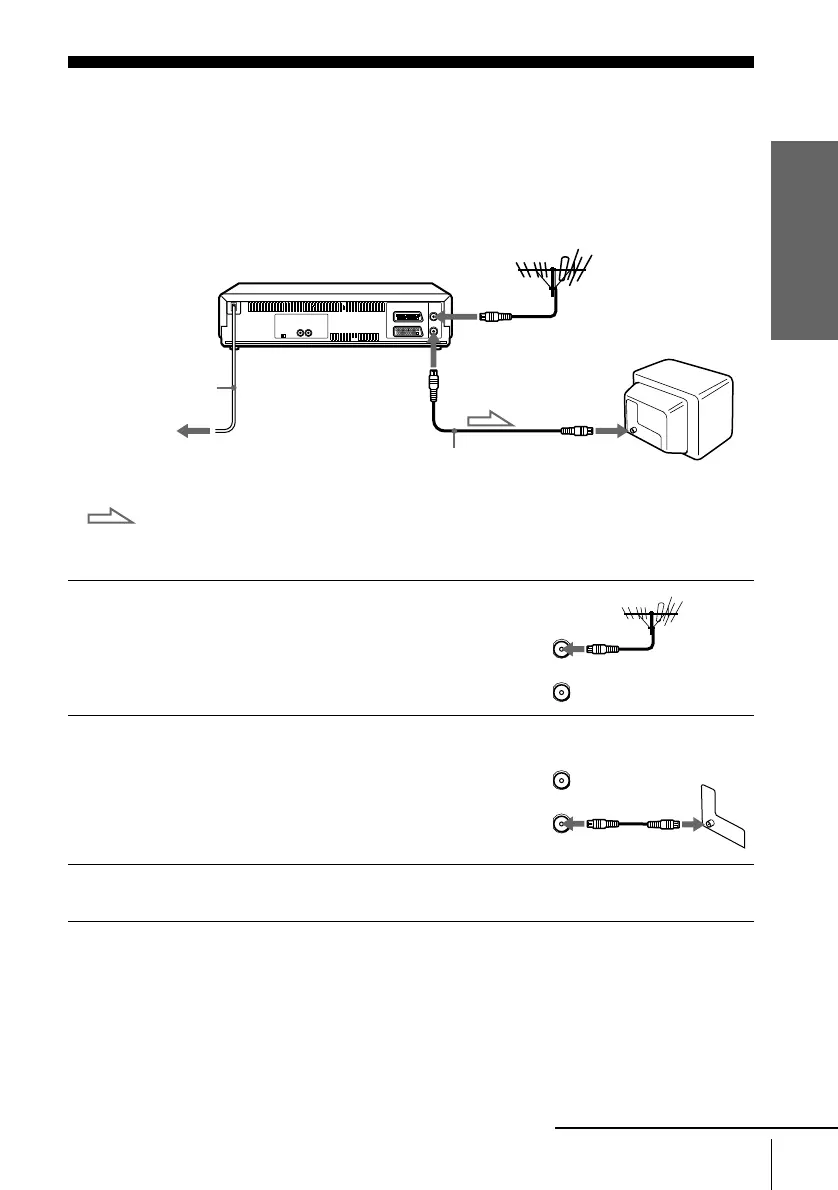
If your TV has a Scart (EURO-AV) connector, see page 10.
If your TV does not have a Scart (EURO-AV) connector
Note
• When you connect the VCR and your TV only with an aerial cable, you have to tune your TV
to the VCR (see page 13).
1
Disconnect the aerial cable from your
TV and connect it to AERIAL IN on
the rear panel of the VCR.
2
Connect AERIAL OUT of the VCR
and the aerial input of your TV using
the supplied aerial cable.
3
Connect the mains lead to the mains.
Mains lead
AERIAL IN
to mains
Aerial cable (supplied)
AERIAL OUT
: Signal flow
AERIAL IN
AERIAL
ANTENNE
IN
ENTREE
OUT
SORTIE
IN
ENTREE
OUT
SORTIE
AERIAL
ANTENNE
continued


 To Next Page