Additional Operations42
Using the CLICK SHUTTLE ring
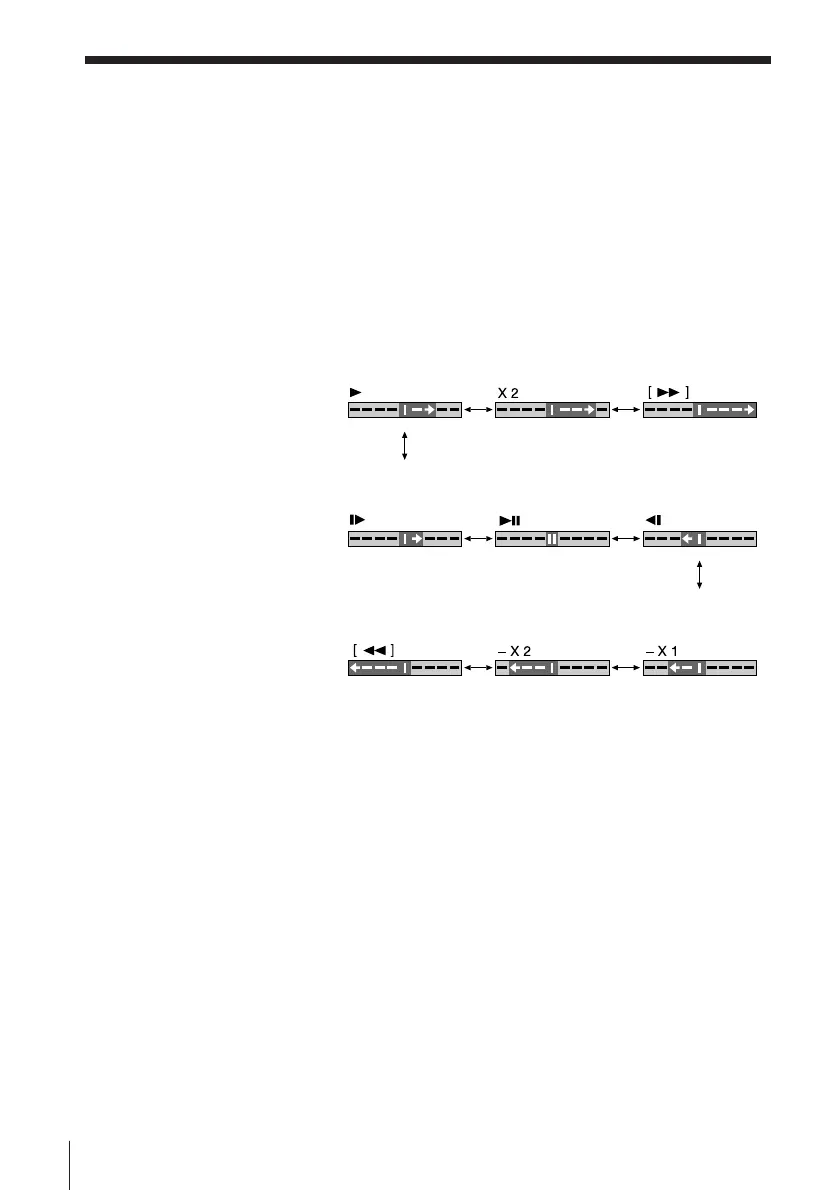
With the CLICK SHUTTLE ring, you can operate a variety of playback
options.
During playback or pause, turn the CLICK SHUTTLE ring clockwise or
counter clockwise. Each change in the CLICK SHUTTLE ring position
changes the playback mode, and the cor responding mark appears on the TV
screen for a few seconds in the following way if the on-scr een display
function is on:
To resume nor mal playback
Press Æ PLAY.
Tip
• Adjust the pictur e using $ /4 TRACKING if (VHS deck only) :
– Streaks appear while playing in slow motion.
– Bands appear at the top or bottom while pausing.
– The pictur e shakes while pausing.
Notes
• The playback sound is muted during these operations.
• In the LP mode, noise may appear or ther e may be no colour .
• The colour of the pictur e may not be r eproduced nor mally while playing back a tape
at various speeds or pausing.
• Tapes r ecorded in the LP mode on other VCRs can be played back on this VCR but
the pictur e quality cannot be guaranteed.
• If the playback mode mark doesn’ t appear on the TV scr een, pr ess DISPLAY.
Playing/searching at various speeds (continued)
Mark on the TV screen
Slow motion Pause Slow motion
in reverse
Playback mode Normal speed Double speed High speed
High speed Double speed Normal speed
in reverse in reverse in reverse



 To Next Page