Additional Operations 51
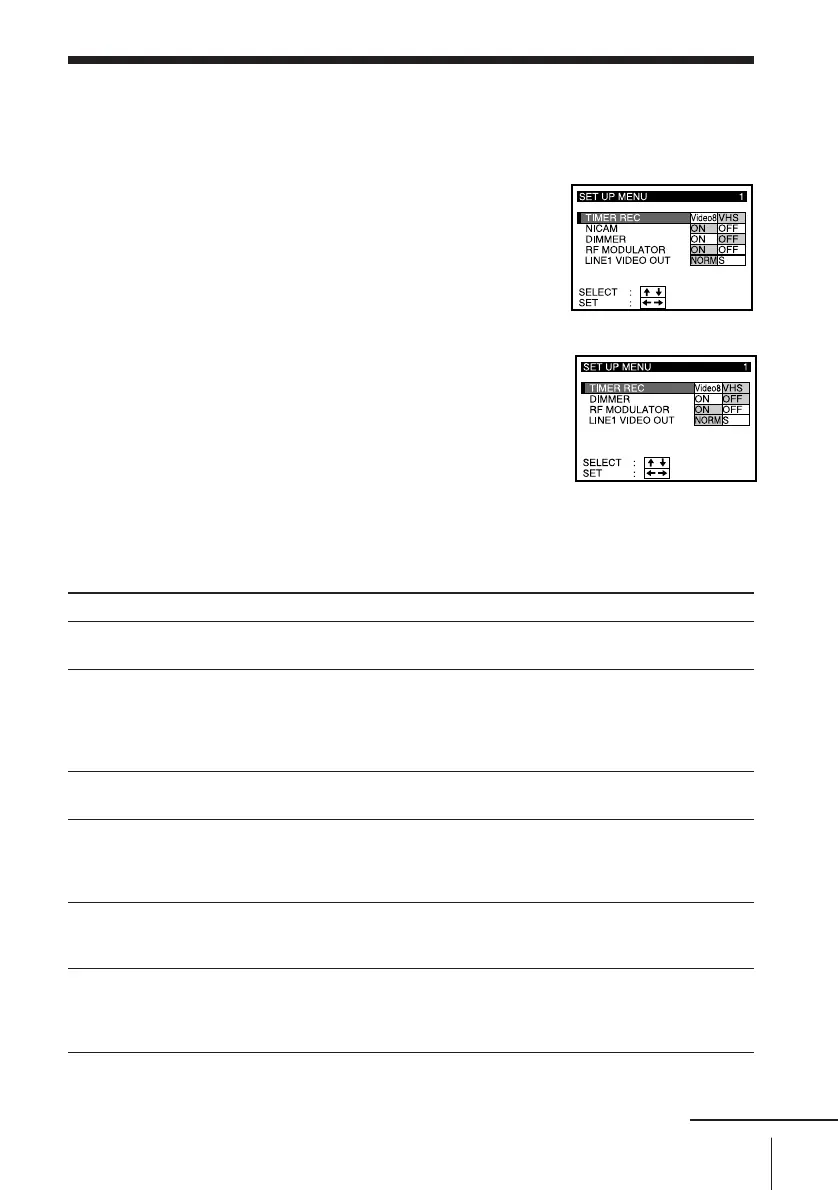
Changing menu options
1 Press MENU, then select SET UP MENU.
2 Press CURSOR > /. to select the option to
change, then pr ess CURSOR ? // to
change the setting.
3 Press EXECUTE to retur n to the original
screen.
SLV-T2000MN
SLV-T2000AS
Menu choices
Initial settings ar e indicated in bold print.
Set this option to
Video8 to select the 8 mm deck for timer r ecording.
VHS to select the VHS deck for timer r ecording.
ON to listen to and r ecor d ster eo/bilingual programmes that ar e
broadcast on the NICAM system and r ecorded.
OFF when you do not wish to use the NICAM system and when
recording an 8 mm standar d sound.
For details, see page 46.
ON to dim the VCR display.
OFF to brighten it.
ON if you have connected the VCR to your TV using only the aerial
cable.
OFF if you have connected the VCR to your TV using the EURO-A V, S
or AV cable.
NORM when using a EURO-A V cable.
S when using a EURO-A V cable connected to a TV with an S
connection.
ST to listen to and r ecord ster eo sound using and the LINE IN jacks
when selected the 8 mm deck.
BIL to listen to and r ecord bilingual pr ogrammes using the LINE IN
jack when selected the 8 mm deck.
continued
Menu option
TIMER REC
NICAM
(SLV-T2000MN only)
DIMMER
RF MODULATOR
LINE 1 VIDEO OUT
Video8 AUDIO LINE
IN



 To Next Page