20
Notes
• When you supply power from a PoE++ power
source, use a network cable of Category 5e or
higher.
• Do not connect the PoE++ power supply device
an
d the AC adapter at the same time to prevent
generating heat.
• When power is supplied from PoE++, both the
P
OWER lamp (green) and NETWORK lamp
(green) flash until the initial verification process
is complete (approximately 1 minute,
depending on the power supply device).
• When the network camera is powered by a
P
oE++ power supply, do not route the wiring
outdoors.
• If a non PoE++ compatible device is connected,
b
oth the POWER lamp (green) and NETWORK
lamp (green) flash, and the camera won’t start.
• When you turn the power off, wait at least 10
se
conds before you turn it on again.
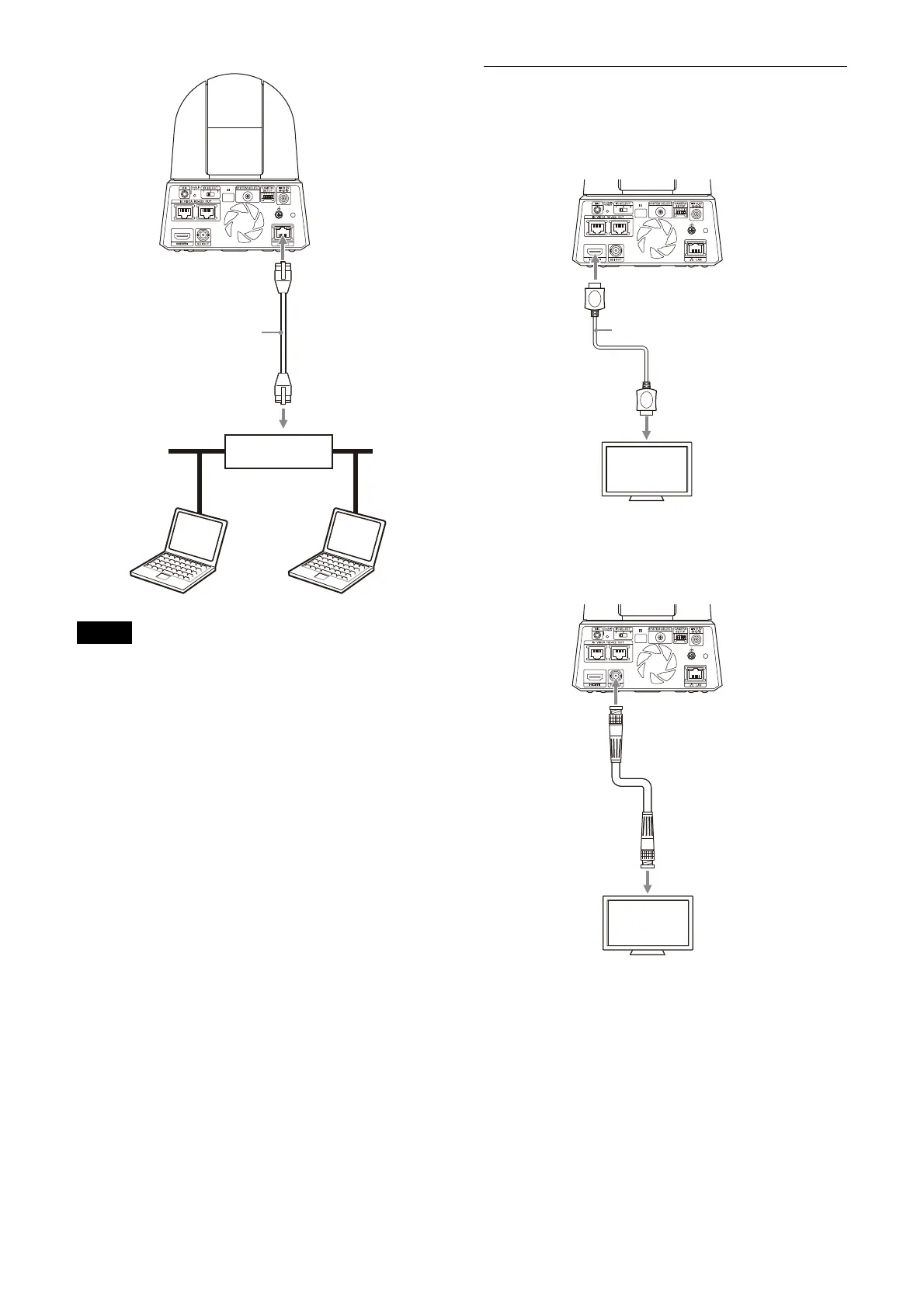
Connecting a single camera to a
switcher, recorder, or monitor
Devices equipped with an HDMI input terminal
Devices equipped with an SDI input terminal
(HD
output):
Network cable
(commercially
available)
Hub with PoE++
power supply
feature
HDMI cable (not supplied)
To HDMI input terminal
Video monitor
Connecting cable with
BNC connector
(commercially available)
To SDI input terminal
SDI OUT
Video monitor



 To Next Page