51
Location and Function of the
Screen Common Parts
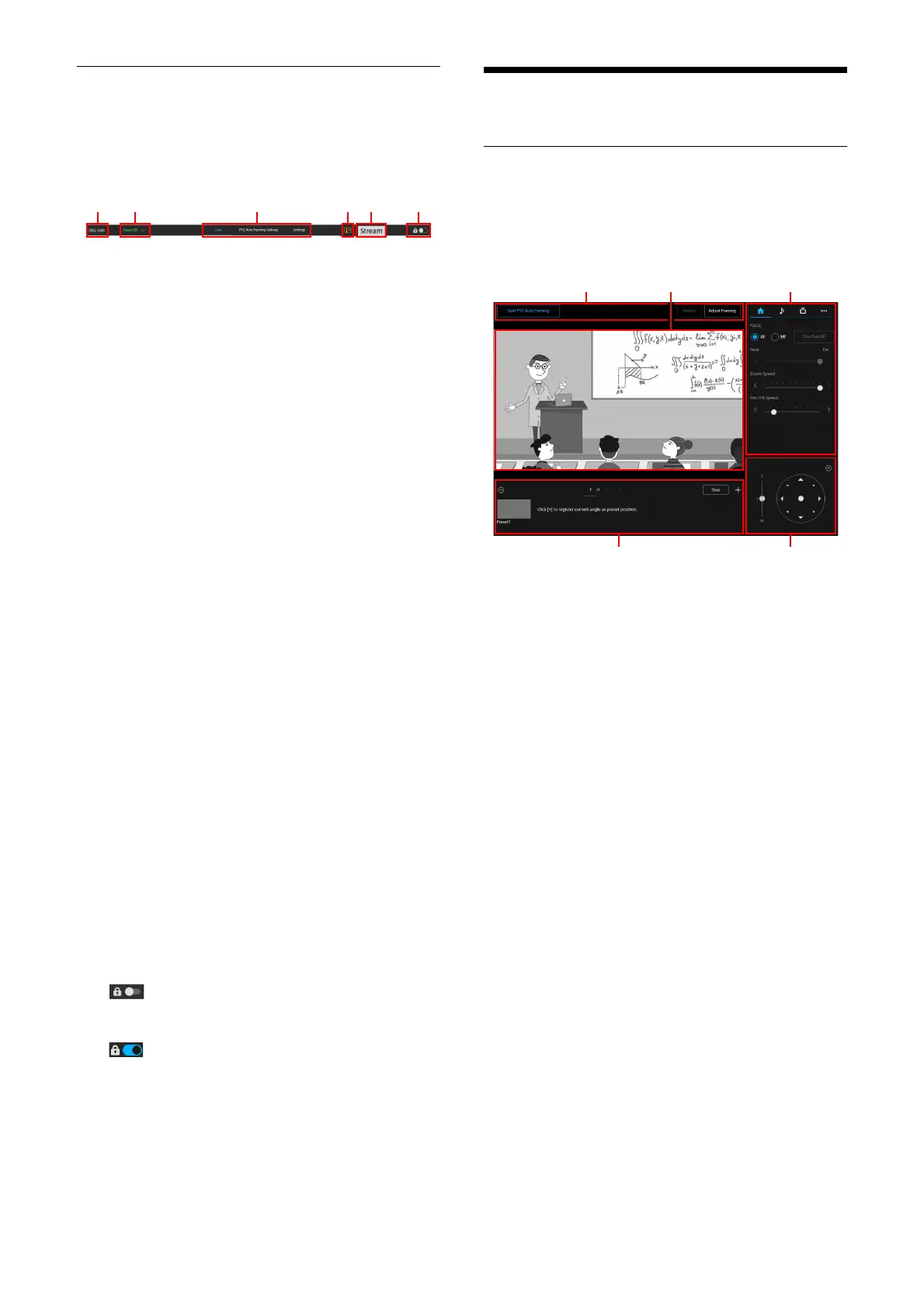
This section explains the location and function of
the screen common parts.
C
amera name
Displays the camera name.
The name can be changed on [Camera
Nam
e] under [Network] on the Web App
menu.
Po
wer Switch
When turning on the camera, [Power ON] is
d
isplayed. When [Power Standby] is selected
when the switch is pressed down, the
camera’s power goes into the Standby.
When [Power ON] is selected when the
s
witch is pressed down while [Power
Standby] is displayed, the camera turns on.
S
witching section of the operation screen
Press the tab to change the operation
sc
reen.
[Live] tab: Disp
lays the live operation
screen.
[PTZ Auto Framing Settings] tab: Di
splays
the PTZ Auto Framing setting screen.
[Settings] tab:
Displays the setting screen
(Web App menu).
T
emperature abnormality warning
A warning is displayed when the internal
te
mperature is high.
After the power is turned off, do not use the
c
amera until it cools down.
S
treaming distribution status display
Displayed while a stream is being distributed
(o
nly when the streaming setting is set to
[SRT-Caller]).
S
creen operation lock switch
(Operation Unlock): Turn the switch to
the left to operate the live operation
s
creen.
(Ope
ration Lock): Turn the switch to
the right to lock the operation of the live
o
peration screen in order to prevent
malfunctions.
Live Operation Screen
Location and Function of the Live
Operation Screen
This section explains the location and function of
the live operation screen.
P
TZ Auto Framing operation section
The PTZ Auto Framing function keeps
shoo
ting the moving subject under an
optimum composition, rotating the camera
up, down, left, right, zoom in or zoom out
automatically based on the shot video. To
use the PTZ Auto Framing, in advance the
initial setting on the PTZ Auto Framing
setting tab is required. For details of the
initial setting, refer to “Location and function
of the PTZ Auto Framing Setting Screen”
(page 54). Also, for details of the operation
of the PTZ Auto Framing refer to “Location
and function of PTZ Auto Framing execution
screen” (page 58).
Cam
era’s video section
Displays the video while shooting.
When performing the PTZ Auto Framing and
D
etected Indicator (page 57) is valid,
Detected Indicator is displayed.
Also, the red frame is displayed around the
v
ideo depending on the external tally lamp
signal.
C
amera’s operation section
Sets the necessary functions that operate
the
camera. Switches the displayed screen
using the screen top tab.
ɞ
ɟ
ɡ
ɢ
ɠ



 To Next Page