52
For details, refer to the operations of each
function.
(M
ain) tab
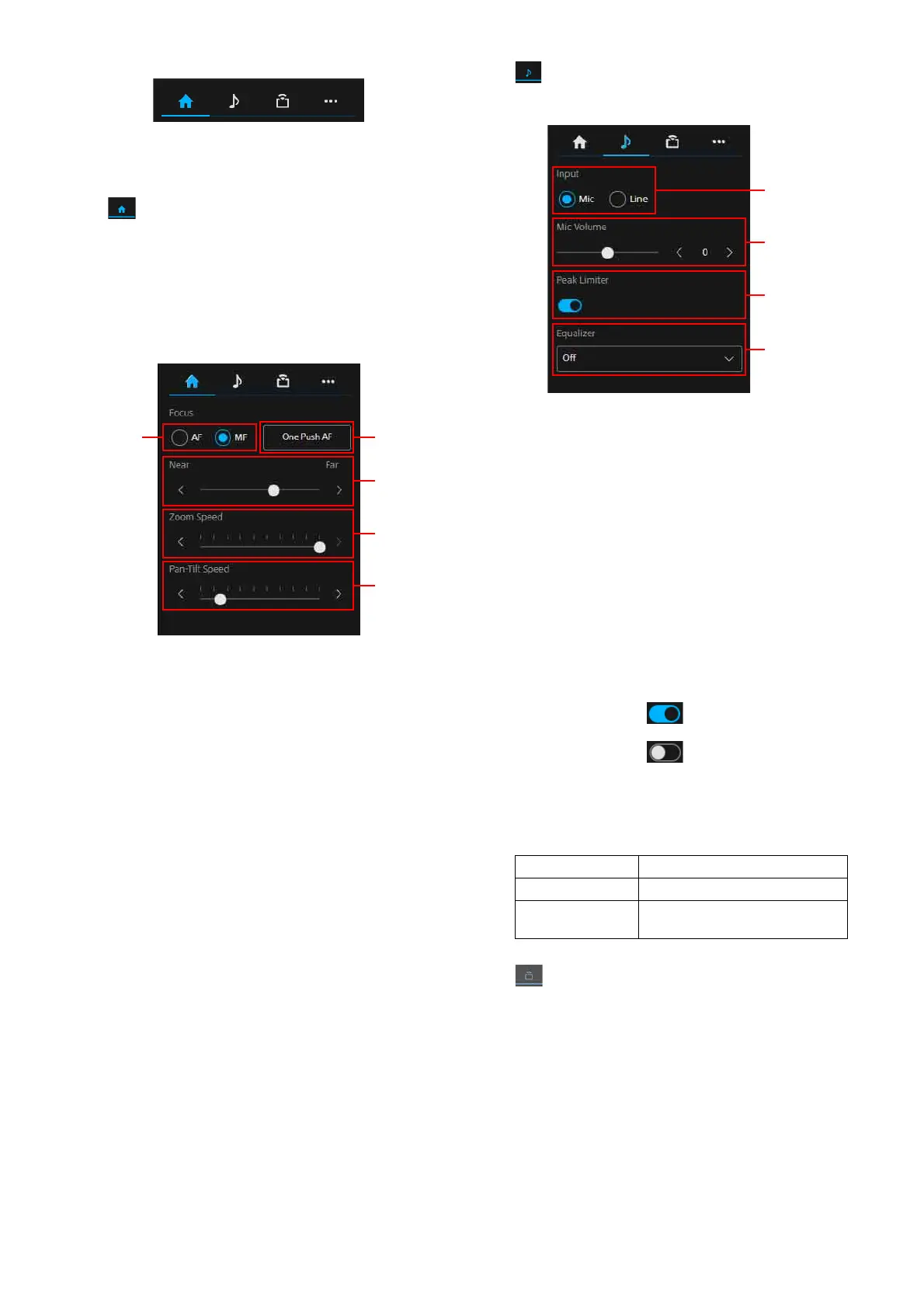
Displays the setting values of functions
which
are operated frequently. The following
functions can be selected.
•Focus
• Zoom Speed
• Pan-Tilt Speed
Focus mode
Selects the focus mode.
AF: Se
lects the auto focus mode.
MF: S
elects the manual mode.
One P
ush AF
Performs the auto focus once. This can be
pe
rformed only when in manual focus mode.
F
ocus adjustment
Adjusts the focus using the slider. This can
be
performed only when in manual focus
mode.
Z
oom Speed
Sets the zoom speed for operating the zoom
o
f the angle of view operation section by
using the slider.
P
an-Tilt Speed
Sets the pan/tilt speed using the slider for
op
erating the pan/tilt of the angle of view
operation section.
(A
udio) tab
Displays the setting items related to audio.
In
put
Selects the Audio input setting.
Mic:
Selects the mic input.
Line: S
elects the line input.
Mic
Volume
Sets the mic volume level.
Between -10 to +10 can be selected.
This can be set only when the Audio input
se
tting is set to the mic.
Pe
ak Limiter
Sets the auto adjustment function of the
ga
in.
When displaying , the gain auto
adjustment function turns to On.
When displaying , the gain auto
adjustment function turns to Off.
Equ
alizer
Sets the audio equalizing function.
(S
tream) tab
Displays the setting items related to
s
treaming. The items differ depending on
the streaming method.
Perform the start/stop of the distribution
whe
n [SRT-Caller] is set.
For details, refer to “Stream Setting” under
“St
ream” (page 83).
Off Turns the function off
Low Cut Reduces the low-pass
Voice
E
nhancement
Emphasizes the audio



 To Next Page