58
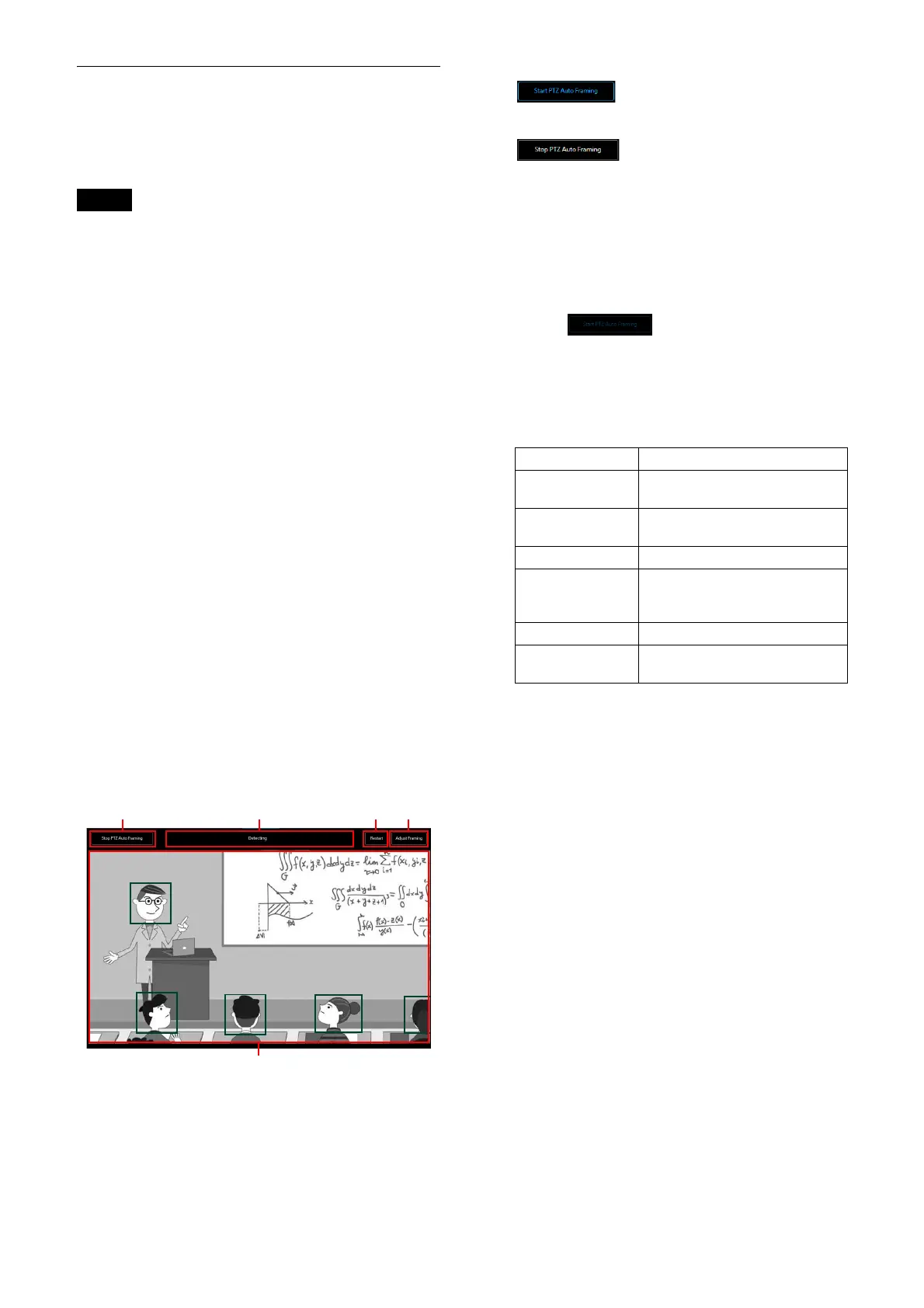
Location and function of PTZ Auto
Framing execution screen
This section explains the location and functions
of PTZ Auto Framing execution screen.
Notes
• Auto tracking movement may not be
performed properly when the camera’s focus
or exposure are not set correctly. The shooting
environment, including the brightness, lighting
factors, the shooting angle (extreme overhead
or low angle) and the person’s density, size,
clothing, movement, whether they are hidden
by something, etc. may also affect the auto
tracking movement.
• The face recognition function may not be
pe
rformed properly when the following
conditions are not satisfied.
– The face is turned toward the camera.
– Normal expression (eyes are closed, no
e
xtreme expressions such as anger, crying,
etc.).
– The face is not overly hidden (by sunglasses,
a m
ask, etc.).
• Disable the Image Stabilizer function. When
en
abled, PTZ Auto Framing does not perform
well.
• When PTZ Auto Framing is set or being
p
erformed and the [Tele Convert] and [Zoom
Mode] settings, which affect the angle of view,
are set differently, the auto tracking movement
may not be performed properly.
When [TELE CONVERT MODE] or [Zoom Mode]
se
tting is changed, set [Start Position] and
[Detection Settings] of [PTZ Auto Framing
Settings] again.
For details, refer to the operations of each
functio
n.
PT
Z Auto Framing start / stop
is displayed while the PTZ
Auto Framing is stopped. Press this button to
st
art PTZ Auto Framing.
is displayed while PTZ Auto
Framing is performed. Press this button to
st
op PTZ Auto Framing.
The initial setting is required beforehand
using
the PTZ Auto Framing tab. For details
of the initial setting, refer to “Location and
function of the PTZ Auto Framing Setting
Screen” (page 54). Before the PTZ Auto
Framing initial setting, it is displayed grayed
ou
t as the operation cannot be
performed.
P
TZ Auto Framing status display
Displays the PTZ Auto Framing status. These
ar
e the following 6 statuses.
Also while in the status of [Detecting],
[T
racking] and [Target Lost], the tracking
subject can be selected by clicking the face
in the camera’s video section.
Re
start
Searches the tracking subject returning the
st
art position forcibly while PTZ Auto
Framing is performed.
When the auto selection of the tracking
sub
ject is valid on the detection setting of
the PTZ Auto Framing setting, tracking of the
detected subject starts automatically.
When the auto selection of the tracking
sub
ject is invalid, selection from the
detected tracking subjects can be performed
manually.
Adju
st Framing
Displays the screen of the composition detail
ad
justment of PTZ Auto Framing.
For details, refer to “Framing” (page 54).
T
racking subject selection
When PTZ Auto Framing starts, the dark
gr
een frames to the selectable faces which
Display value Status
(non-display) PTZ Auto Framing is off or the
init
ial setting does not end.
Return to Start
Position
Moving to the set start
position.
Detecting Detecting the tracking subject.
Select Target Click the face in the camera’s
video sec
tion to select the
tracking subject.
Tracking Tracking the subject.
Target Lost The selected tracking subject
is lost.



 To Next Page