56
Pan-Tilt Reset
Performs the initialization movement for the
p
an/tilt.
Press when the POWER lamp and NETWORK
l
amp are flashing simultaneously or when
[Execute Pan-Tilt Reset.] is displayed in the
angle of view control section.
A
ngle of view control section
Operates pan, tilt, or zoom to adjust the start
p
osition.
Each movement speed of pan/tilt and zoom
ca
n be adjusted.
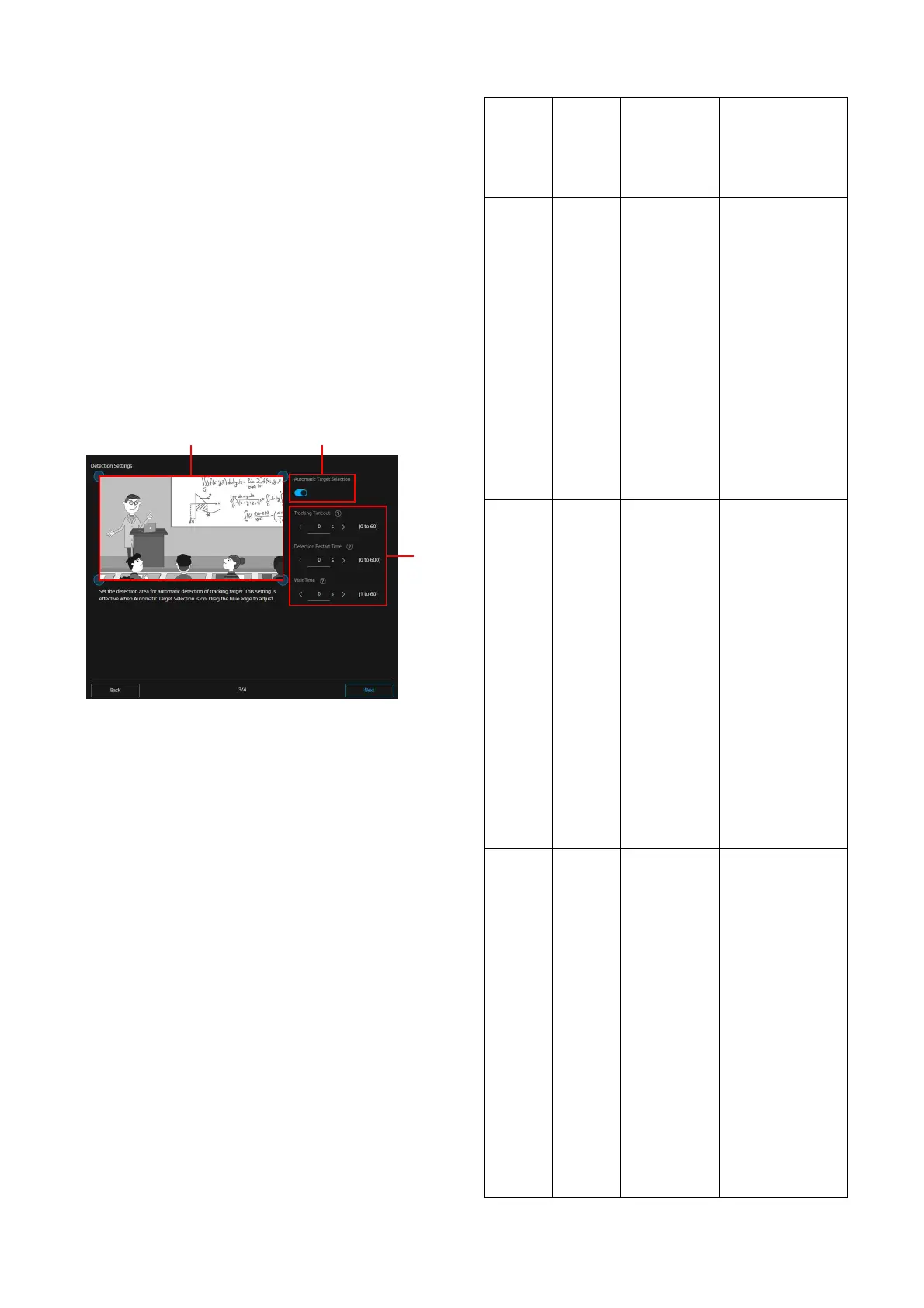
Detection Settings
Configures the setting for detecting the object of
PTZ Auto Framing.
De
tection region setting section
When PTZ Auto Framing is enabled and the
o
bject enters into view here, the object is
detected automatically and the camera
starts tracking it.
The setting is valid when the automatic
se
lection of the tracking object is On.
Drag the blue edge to adjust.
A
utomatic Target Selection
When this setting is valid, the settings of
[D
etection Area], [Tracking Timeout], and
[Detection Restart Time] are valid, and the
tracking object is detected and selected
automatically when PTZ Auto Framing is
started. While this setting is invalid, when
PTZ Auto Framing is started, selecting the
tracking object manually is required.
T
racking setting section
Sets the time for the tracking’s time-out,
r
estart and judgement of the object being
lost.
Tracking setting section
Menu
item
Detail
and
setting
value
Initial
se
tting value
of the
factory
default
setting
Content
Tracking
Timeout
0 to 60
(second)
0 Valid when the
tracking subject is
detected
automatically. Sets
the interval for
time-out when the
face of the tracking
subject cannot be
detected during
tracking. By time-
out, the camera
returns to the start
position and
detects the tracking
subject again.
The default value is
0 s
econds. When 0
seconds is set, there
is no time-out.
Detection
Re
start
Time
0 to 600
(second)
0 Valid when the
tracking subject is
detected
automatically. Stops
the tracking forcibly,
returns to the start
position and sets
the interval for
detecting the
tracking subject
again. After tracking
starts when the
setting time has
passed, the camera
returns to the start
position to detect
the subject again.
The default value is
0 s
econds. When 0
seconds is set,
tracking does not
start again.
Wait
Ti
me
1 to 60
(second)
6 Sets the waiting
time for when the
tracked person is
lost while tracking.
When Automatic
T
arget Selection is
valid, the camera
returns to the start
position and
detects the tracking
subject again.
When Automatic
T
arget Selection is
invalid, the camera
waits for the
tracking subject to
appear again in the
screen. When the
subject does not
return to the screen,
set a new tracking
subject manually.



 To Next Page