EasyManua.ls Logo

Sony STR-D2090 - Remote Commander Programming; Programming Other Manufacturer Codes

Sony STR-D2090
51 pages
Print Icon
To Next Page IconTo Next Page
To Previous Page IconTo Previous Page
Loading...
S)
Col
diate
mO@]iat-vamlitclaleirc(edtelg-1m@e-
MO)
ol-le-ldiare
Mm
Oxele(-\-
Ola
om
tal:
Remote
Commander
RM-P321
Programming
Signals
of
Other
Audio/Video
Equipment
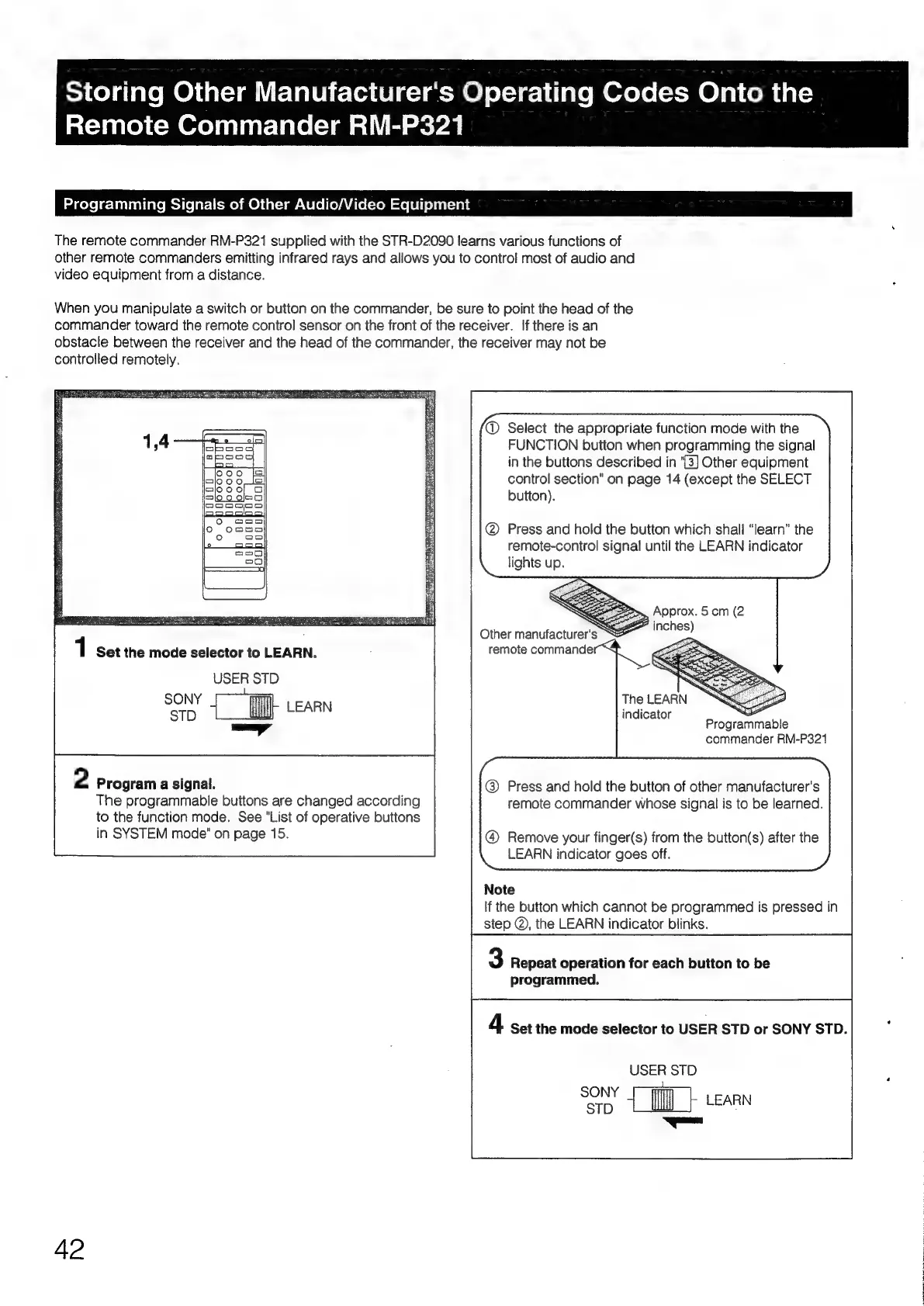
The
remote
commander
RM-P321
supplied
with
the
STR-D2090
learns
various
functions
of
other
remote
commanders
emitting
infrared
rays
and
allows
you
to
contro!
most
of
audio
and
video
equipment
from
a
distance.
When
you
manipulate
a
switch
or
button
on
the
commander,
be
sure
to
point
the
head
of
the
commander
toward
the
remote
control
sensor
on
the
front
of
the
receiver.
If
there
is
an
obstacle
between
the
receiver
and
the
head
of
the
commander,
the
receiver
may
not
be
controlled
remotely.
@
Select
the
appropriate
function
mode
with
the
FUNCTION
button
when
programming
the
signal
in
the
buttons
described
in
"3]
Other
equipment
control
section"
on
page
14
(except
the
SELECT
button).
Press
and
hold
the
button
which
shall
“learn”
the
remote-control
signal
until
the
LEARN
indicator
lights
up.
PES
ER
AP
ESA
URI
TR
Te
TN
OT
1
Set
the
mode
selector
to
LEARN.
USER
STD
STD
LEARN
2
Program
a
signal.
The
programmable
buttons
are
changed
according
to
the
function
mode.
See
"List
of
operative
buttons
in
SYSTEM
mode"
on
page
15.
42
The
LEARN
_
indicator
commander
RM-P321
@
Press
and
hold
the
button
of
other
manufacturer's
remote
commander
whose
signal
is
to
be
learned.
@
Remove
your
finger(s)
from
the
button(s)
after
the
LEARN
indicator
goes
off.
Note
If
the
button
which
cannot
be
programmed
is
pressed
in
step
@,
the
LEARN
indicator
blinks.
3
Repeat
operation
for
each
button
to
be
programmed.
4
Set the
mode
selector
to
USER
STD
or
SONY
STD.
USER
STD
dete
LEARN

Table of Contents

Related product manuals