110
US
D:\NORM'S JOB\SONY HA\SO0046\STR-DA3500ES\U VERSION\US\4144907111\01US-
STRDA3500ESUC\090OTH.fm
masterpage: Left
STR-DA3500ES
4-144-907-11(1)
1 Press the input button of the
playback component.
You can also use INPUT SELECTOR on
the receiver.
2 Prepare the component for
playing.
For example, insert the video tape you
want to copy into the VCR.
3 Prepare the recording
component.
Insert a blank video tape, etc., into the
recording component (VIDEO 1) for
recording.
4 Start recording on the
recording component, then
start playback on the playback
component.
Notes
• Some sources contain copy guards to prevent
recording. In this case, you may not be able to
record from the sources.
• The audio input signals from the MULTI
CHANNEL INPUT jacks are not output.
• Only analog input signals are output from the
analog output jack (for recording).
• Only digital input signals are output from the
digital output jack (for recording).
• HDMI sound cannot be recorded.
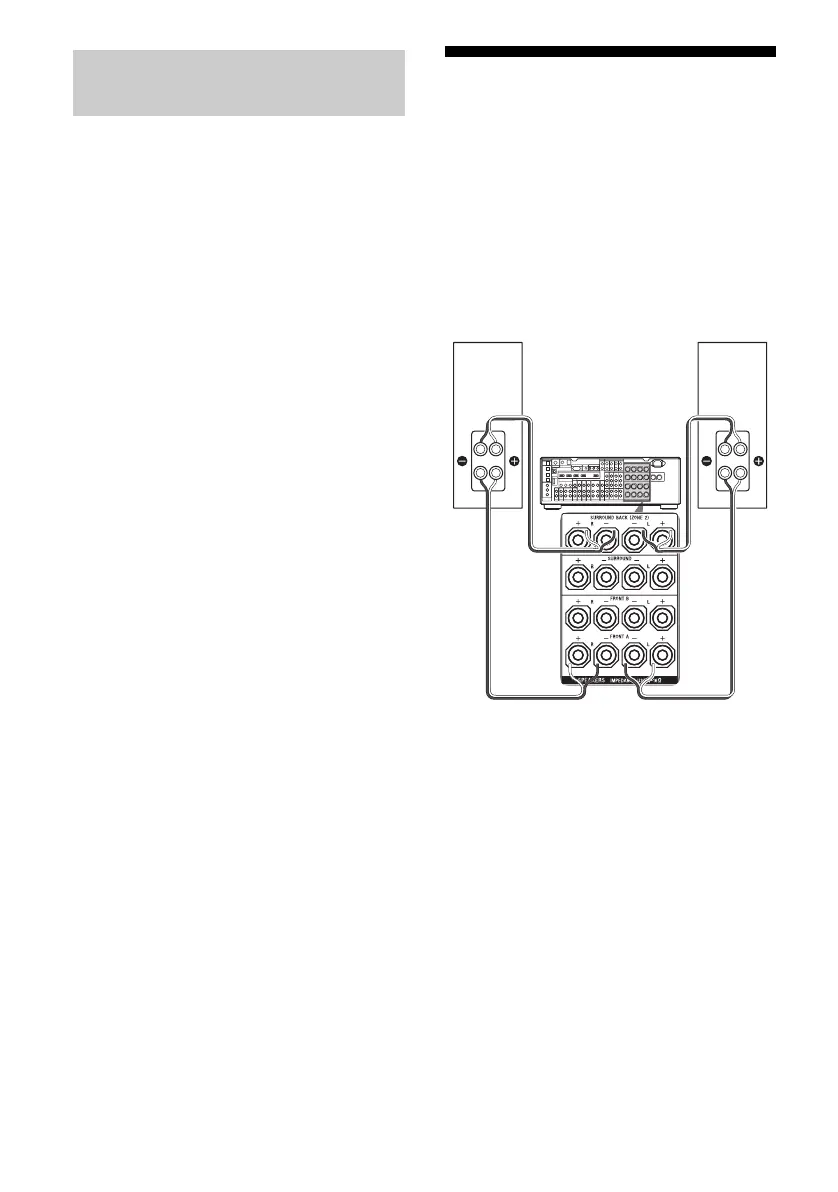
Using a bi-amplifier
connection
If you are not using the surround back
speakers, you can use the SPEAKERS
SURROUND BACK terminals for the front
speakers in a bi-amplifier connection.
To connect the speakers
Connect the jacks on the Lo (or Hi) side of the
front speakers to the SPEAKERS FRONT A
terminals, and connect the jacks on the Hi (or
Lo) side of the front speakers to the
SPEAKERS SURROUND BACK terminals.
Make sure that the metal fittings of Hi/Lo
attached to the speakers have been removed
from the speakers. Otherwise, it may cause the
receiver to malfunction.
Recording onto a recording
media
Front speaker
(R)
Front speaker
(L)
Hi
Lo
Hi
Lo















 To Next Page