31
US
D:\NORM'S JOB\SONY HA\SO0046\STR-DA3500ES\U VERSION\US\4144907111\01US-
STRDA3500ESUC\030CON.fm
masterpage: Right
STR-DA3500ES
4-144-907-11(1)
Getting Started
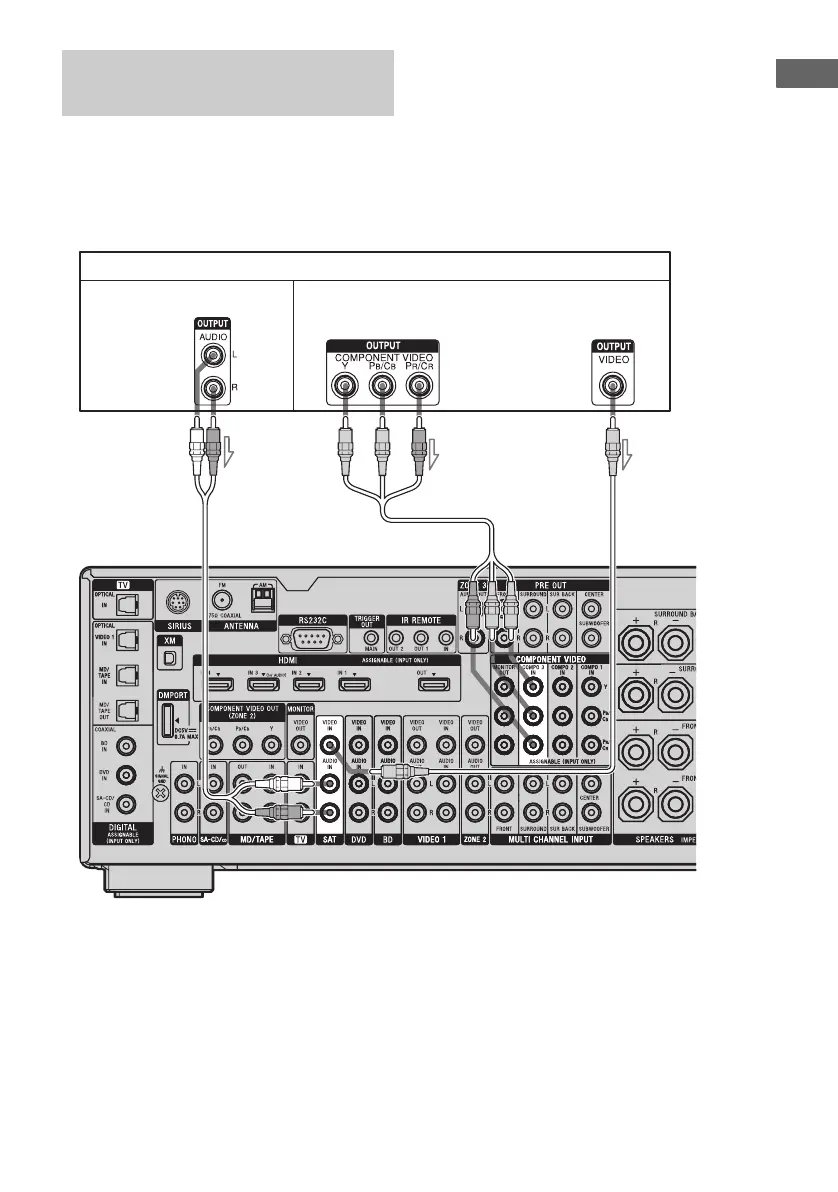
The following illustration shows how to
connect a satellite tuner or set-top box.
It is not necessary to connect all the cords.
Connect the audio and video cords according
to the jacks of your components.
Connecting a satellite tuner,
set-top box
Satellite tuner, set-top box
AB
Audio signals Video signals
C
A Audio cord (not supplied)
B Component video cord (not supplied)
C Video cord (not supplied)
Tip
The COMPONENT VIDEO COMPO 3 IN jacks
have been assigned to the satellite tuner or set-top
box. If you connect your satellite tuner or set-top
box to the COMPONENT VIDEO COMPO 1 or
COMPO 2 IN jacks, set “Input Assign” in the Input
menu.















 To Next Page