43
US
D:\NORM'S JOB\SONY HA\SO0046\STR-DA3500ES\U VERSION\US\4144907111\01US-
STRDA3500ESUC\030CON.fm
masterpage: Right
STR-DA3500ES
4-144-907-11(1)
Getting Started
8: Setting the speakers
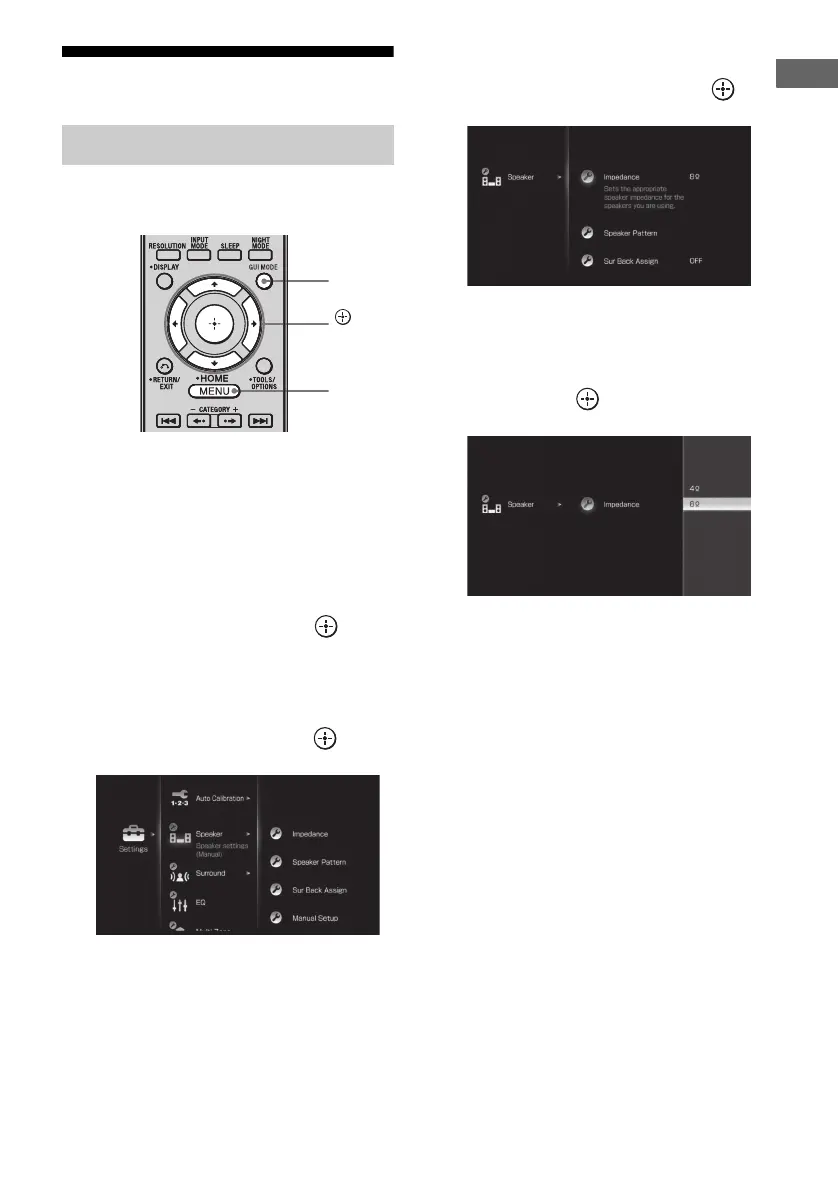
Set the appropriate speaker impedance for the
speakers you are using.
1 Press GUI MODE repeatedly to
select “GUI ON”.
The GUI menu appears on the TV screen.
Press MENU if the GUI menu does not
appear on the TV screen.
2 Press V/v repeatedly to select
“Settings”, then press or b.
The Settings menu list appears on the TV
screen.
3 Press V/v repeatedly to select
“Speaker”, then press or b.
4 Press V/v repeatedly to select
“Impedance”, then press .
5 Press V/v repeatedly to select
“4 :” or “8 :” depending on
the speakers you are using,
then press .
Notes
• If you are not sure of the impedances of the
speakers, refer to the operating instructions
supplied with your speakers. (This information is
often found on the back of the speaker.)
• When you connect all speakers with a normal
impedance of 8 ohms or higher, set “Impedance” to
“8 :”. When connecting other types of speakers,
set it to “4 :”.
• When you connect front speakers to both the
SPEAKERS A and B terminals, connect the
speakers with a normal impedance of 8 ohms or
higher.
– When you connect speakers with impedance of
16 ohms or higher in both “A” and “B”
configuration:
Set “Impedance” to “8 :” in the Speaker
settings menu.
– For other types of speakers in other
configurations:
Set “Impedance” to “4 :” in the Speaker
settings menu.
Setting the speaker impedances
MENU
,
V/v/B/b
GUI
MODE















 To Next Page