128
US
D:\NORM'S JOB\SONY HA\SO0046\STR-DA3500ES\U VERSION\US\4144907111\01US-
STRDA3500ESUC\100REM.fm
masterpage: Left
STR-DA3500ES
4-144-907-11(1)
Performing several
commands in sequence
automatically
(Macro Play)
The Macro Play function lets you link several
commands in a sequential order as a single
command.
The remote provides 2 macro lists (MACRO 1
and MACRO 2). You can specify up to 20
commands for each macro list.
Note
When setting up Macro Play, replace the batteries
with new ones.
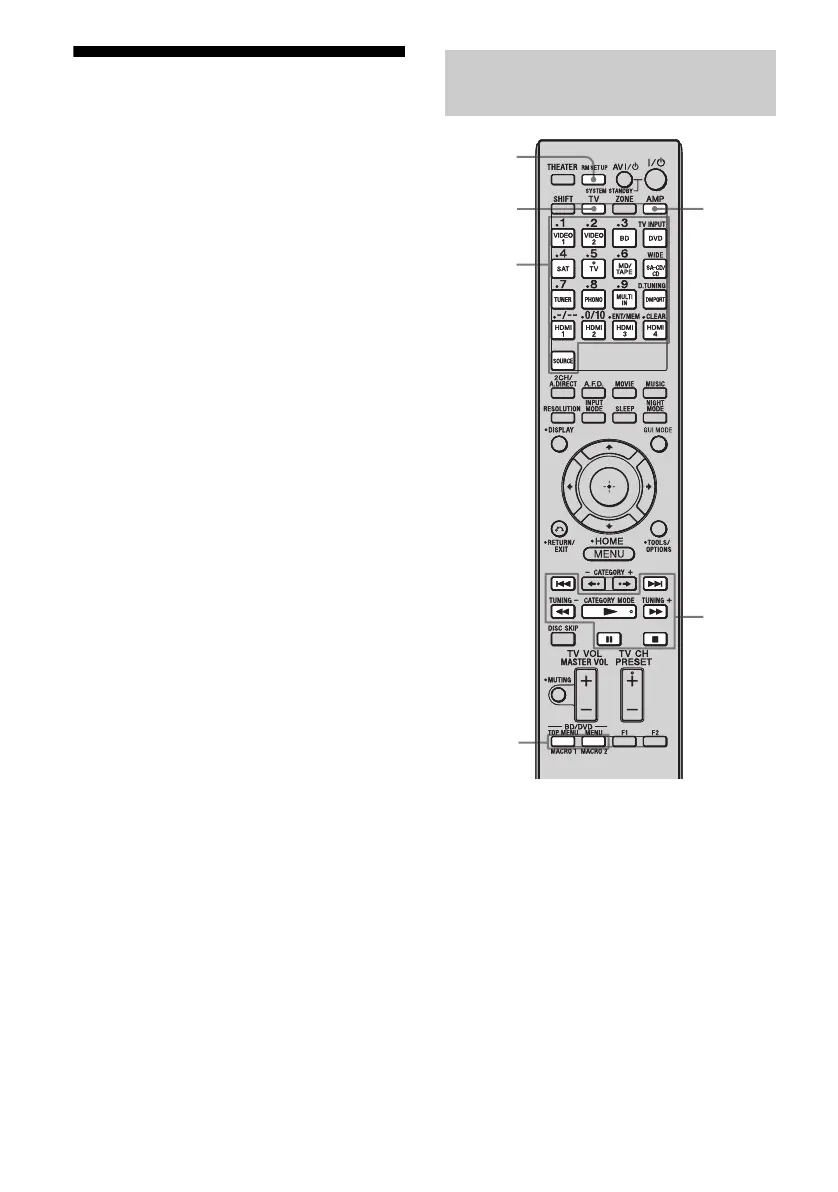
1 While holding down RM SET
UP, press MACRO 1 or MACRO
2 for more than 1 second.
The RM SET UP button flashes and one
of the input buttons lights up (in the initial
setting, the VIDEO1 button lights up).
2 Press the input button of the
component that you want to
assign one of the following
operations.
The selected input button lights up.
Program the sequence of the
operation
Input
buttons
RM SET
UP
N, x, X,
M, m,
., >,
AMP
MACRO 1
MACRO 2
TV















 To Next Page