14
US
D:\NORM'S JOB\SONY HA\SO0046\STR-DA3500ES\U VERSION\US\4144907111\01US-
STRDA3500ESUC\030CON.fm
masterpage: Left
STR-DA3500ES
4-144-907-11(1)
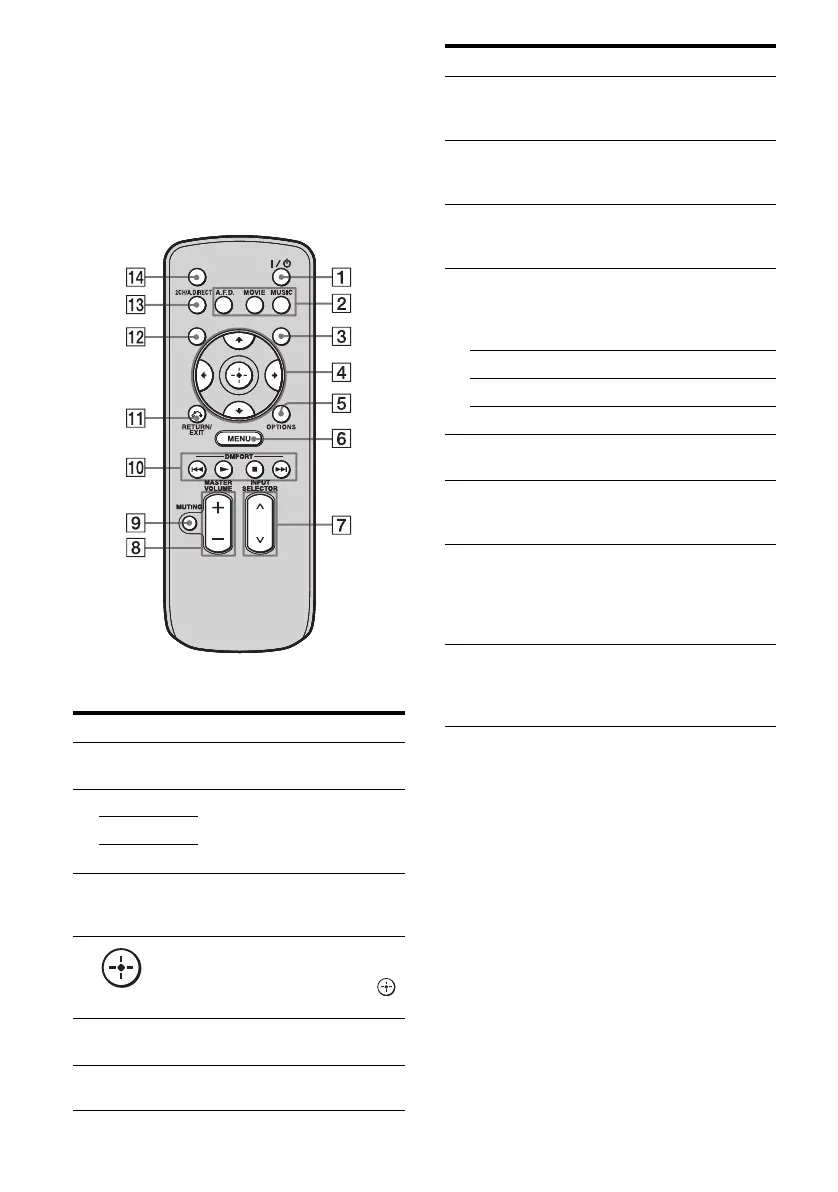
Simple remote commander
(RM-AAU039)
This remote can only be used to operate the
receiver. You can control the main functions of
the receiver with simple operations using this
remote.
Name Function
A ?/1 (on/
standby)
Press to turn a receiver on or off.
B A.F.D. Press to select a sound field
(page 119).
MOVIE
MUSIC
C GUI MODE Press to display the menu on the
TV screen to operate the
receiver.
D
V/v/B/b
After pressing GUI MODE
(3), press V/v/B/b to select
the menu item. Then press
to enter the selection.
E OPTIONS Press to display and select items
from option menus.
F MENU Press to display the menu to
operate the receiver.
DISPLAY
SLEEP
GUI MODE
G INPUT
SELECTOR
U/u
Press to select the input source
to play back.
H MASTER
VOLUME
+/–
Press to adjust the volume level.
I MUTING Press to turn off the sound
temporarily. Press the button
again to restore the sound.
J DMPORT Press to operate the component
connected to the DIGITAL
MEDIA PORT adapter
(page 50).
N Starts play.
x Stops play.
./> Skips tracks.
K RETURN/
EXIT O
Press to return to the previous
menu or exit the menu.
L DISPLAY Press to select information
displayed in the display
window.
M 2CH/
A.DIRECT
Press to select sound field
(page 119) or to switch the
audio of the selected input to
analog signal without any
adjustment (page 119).
N SLEEP Press to activate the sleep timer
function and the duration which
the receiver turns off
automatically (page 108).
Name Function















 To Next Page