33
US
D:\NORM'S JOB\SONY HA\SO0046\STR-DA3500ES\U VERSION\US\4144907111\01US-
STRDA3500ESUC\030CON.fm
masterpage: Right
STR-DA3500ES
4-144-907-11(1)
Getting Started
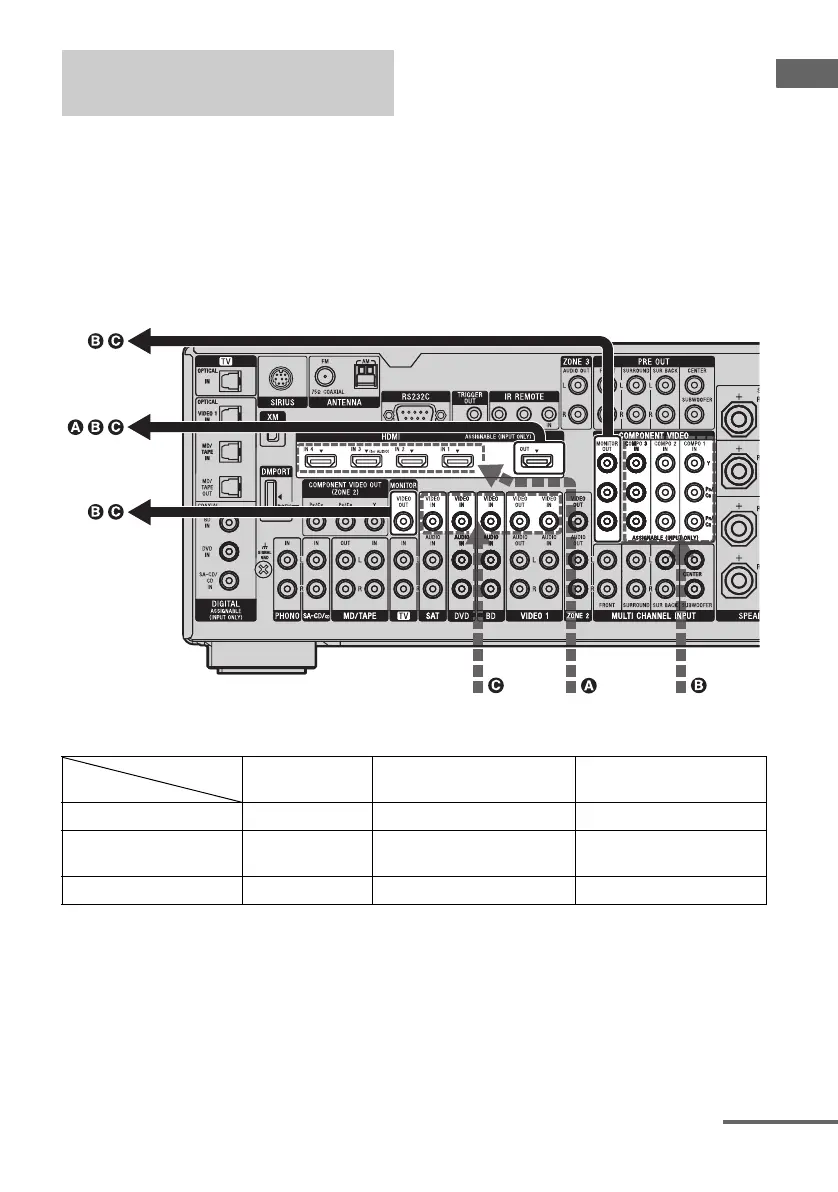
This receiver is equipped with a function for
converting video signals. You can output the
video signal after connecting this receiver via
the MONITOR OUT or HDMI OUT jack as
shown in the illustration.
• Video signals can be up-converted as HDMI
video and component video signals.
• Component video signals can be output as
HDMI video and video signals.
For details on the video converting function,
see “In the video input/output conversion table
classified by the menu settings” (page 35).
In the video input/output conversion table of the receiver
a : Video signals are converted and output through the video converter.
f : The same type of signal as that of the input signal is output. Video signals are not converted.
X : Video signals are not output.
* Video signals are output when “Resolution” is set to “DIRECT” in the Video settings menu.
Function for conversion of video
signals
Input Signals
Output Signals
HDMI OUT
COMPONENT VIDEO
MONITOR OUT
MONITOR VIDEO OUT
HDMI IN 1/2/3/4 A f XX
COMPONENT VIDEO IN
B
aa/fa
VIDEO IN C aa a/f*
INPUT jack
OUTPUT jack
continued















 To Next Page