39
US
D:\NORM'S JOB\SONY HA\SO0046\STR-DA3500ES\U VERSION\US\4144907111\01US-
STRDA3500ESUC\030CON.fm
masterpage: Right
STR-DA3500ES
4-144-907-11(1)
Getting Started
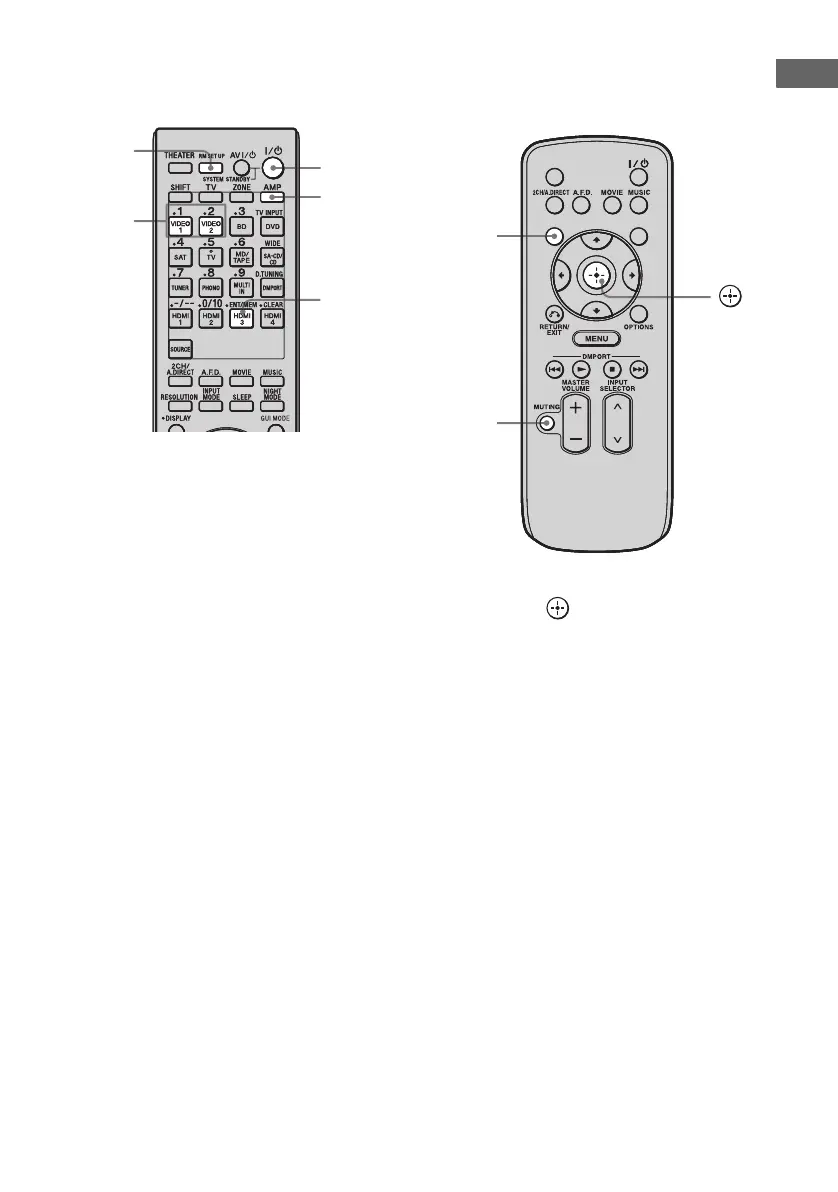
To switch the command mode
of the multi function remote
commander
1
While holding down RM SET UP, press
?/1.
The AMP and ZONE buttons flash.
2 Press AMP.
The ZONE button lights off, the AMP
button keeps flashing and the SHIFT button
lights up.
3 Press 1 or 2 while the AMP buttons is
flashing.
When you press 1, the command mode is
set to AV SYSTEM 1. When you press 2,
the command mode is set to AV SYSTEM
2.
The AMP button lights up.
4 Press ENT/MEM before the AMP
button lights off.
The AMP button flashes twice, then the
command mode setting process is
completed.
To switch the command mode
of the simple remote
commander
Press and hold DISPLAY, then press
MUTING and at the same time.
RM SET
UP
?/1
ENT/MEM
AMP
1, 2
DISPLAY
SLEEP
GUI MODE
DISPLAY
MUTING















 To Next Page