85
US
D:\NORM'S JOB\SONY HA\SO0046\STR-DA3500ES\U VERSION\US\4144907111\01US-
STRDA3500ESUC\090OTH.fm
masterpage: Right
STR-DA3500ES
4-144-907-11(1)
“BRAVIA” Sync features
Before connecting cords, be sure to disconnect
the AC power cord (mains lead).
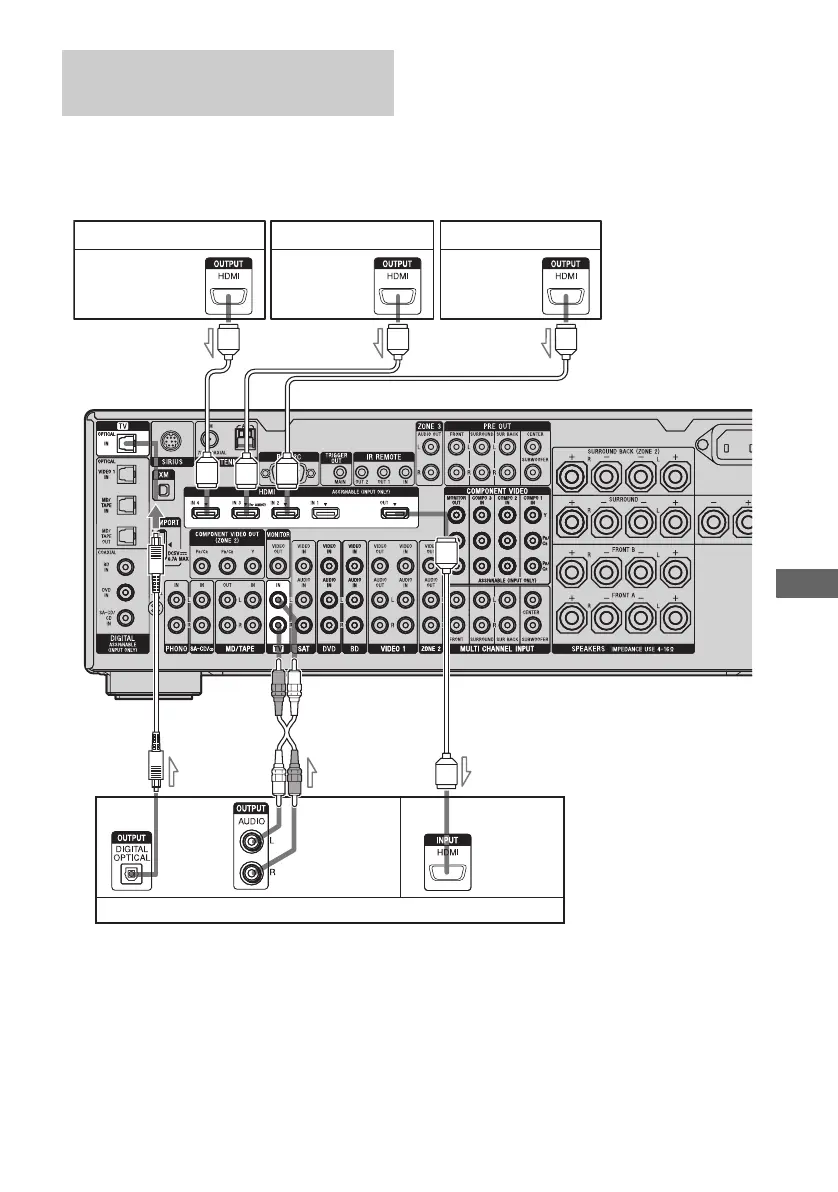
To enjoy TV multi channel
surround sound broadcasting
You can listen to TV multi channel surround
sound broadcasting from the speakers
connected to the receiver.
Connect the OPTICAL output jack of the TV
to the OPTICAL IN jack of the receiver.
a)
Connect at least one of the audio cords (B or C).
Connecting a TV and other
components
Satellite tuner, Set-top box
A HDMI cable (not supplied)
Sony recommends that you use an HDMI-authorized cable or Sony HDMI cable.
B Optical digital cord (not supplied)
a)
C Audio cord (not supplied)
a)
Audio/video
signals
C
Audio/video
signals
Audio/video
signals
Blu-ray disc player DVD player
TV, etc.
Audio/video
signals
Audio signals
BA
AAA















 To Next Page