22
GB
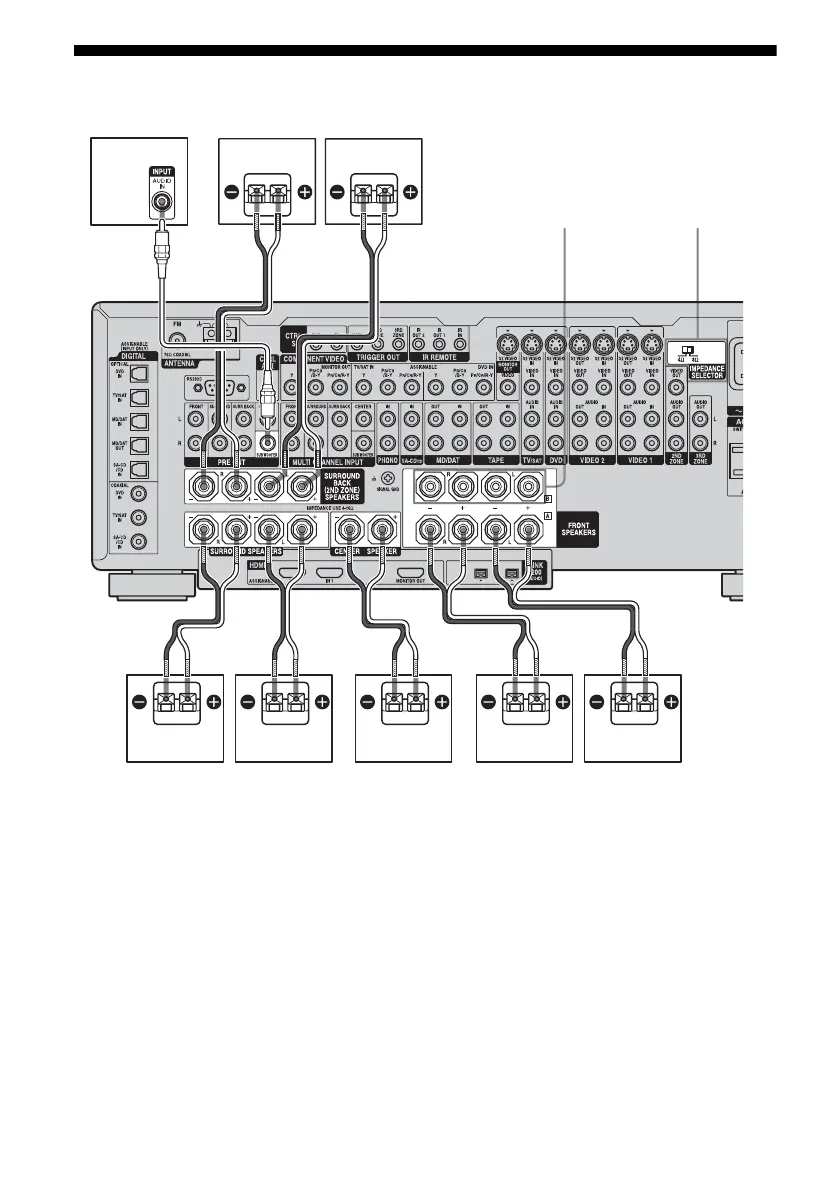
2: Connecting speakers
AFront speaker A (L)
BFront speaker A (R)
CCenter speaker
DSurround speaker (L)
ESurround speaker (R)
FSurround back speaker (L)
c)
GSurround back speaker (R)
c)
HSub woofer
d)
a)
• Be sure to turn the power off before
adjusting the IMPEDANCE SELECTOR.
• To enjoy the best possible multi channel
surround sound, connect speakers with a
nominal impedance of 8 ohms or higher to
the FRONT, CENTER, SURROUND and
SURROUND BACK terminals, and set the
IMPEDANCE SELECTOR to “8 Ω.”
Refer to the operating instructions
supplied with your speakers if you are not
HGF
BADEC
AB
FRONT SPEAKERS B
b)
IMPEDANCE
SELECTOR
a)
A Monaural audio cord (not supplied)
B Speaker cords (not supplied)














 To Next Page