76
GB
Listening to FM/AM radio
You can listen to FM and AM broadcasts
through the built-in tuner. Before operation,
make sure you have connected the FM and
AM antennas to the receiver (see page 43).
Tip
The tuning scale for direct tuning differs depending
on the area code as shown in the following table. For
details on area codes, see page 4.
* The AM tuning scale can be changed (see page
136).
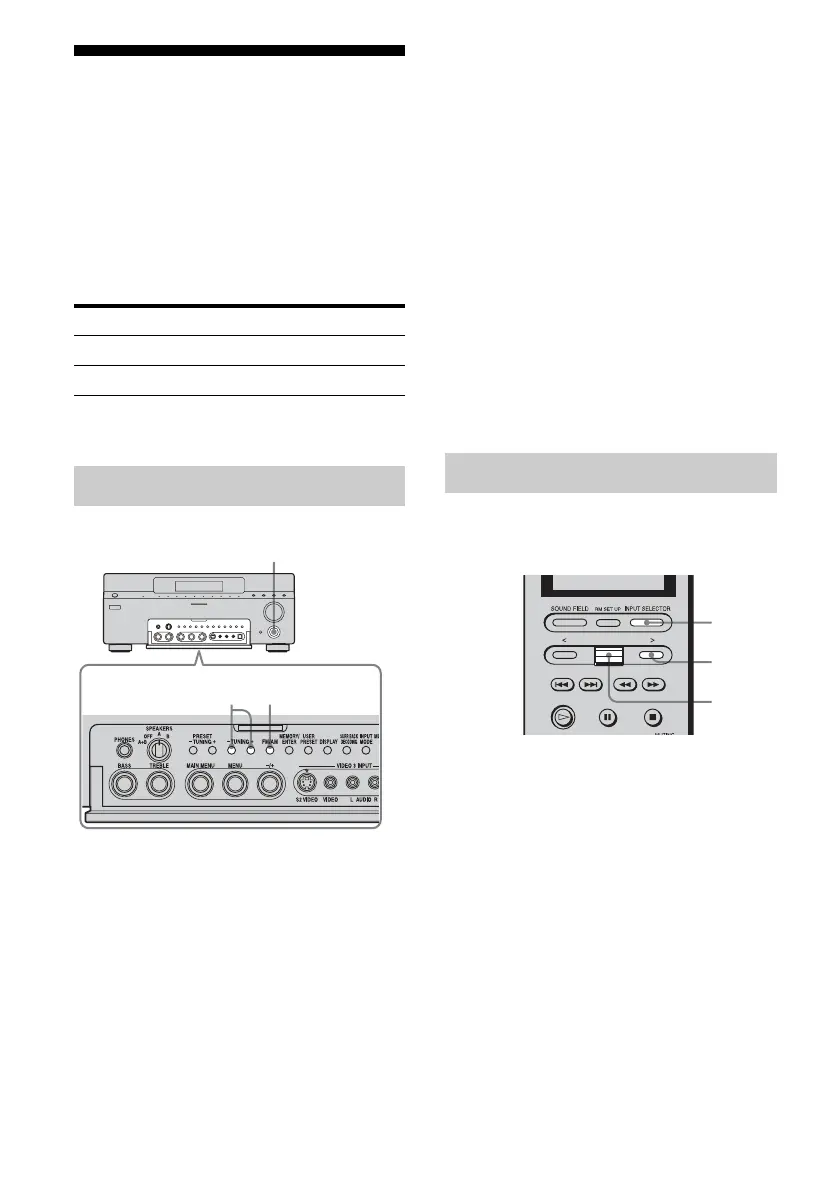
1 Turn INPUT SELECTOR to
select tuner.
2 Press FM/AM to select “FM” or
“AM.”
3 Press TUNING + or TUNING –.
Press TUNING + to scan from low to
high; press TUNING – to scan from high
to low.
The receiver stops scanning whenever a
station is received.
In case of poor FM stereo
reception
If the FM stereo reception is poor and
“STEREO” flashes on the display, select
monaural audio so that the sound will be less
distorted.
1 Turn MAIN MENU to select “TUNER.”
2 Turn MENU to select “FM MODE.”
3 Turn +/– to select “MONO.”
The FM reception switches to monaural.
Enter the frequency of a station directly by
using the NUM menu.
1 Press INPUT SELECTOR, then
select “TUNER” from the input
list.
You can also use INPUT SELECTOR on
the receiver.
2 Press > repeatedly until the
SUB menu appears.
Area code FM AM
UC 100 kHz 10 kHz*
CEL, TW, KR, CN 50 kHz 9 kHz
Automatic tuning
23
1
Direct tuning
1
2,5
3,4














 To Next Page