15
STR-DB795
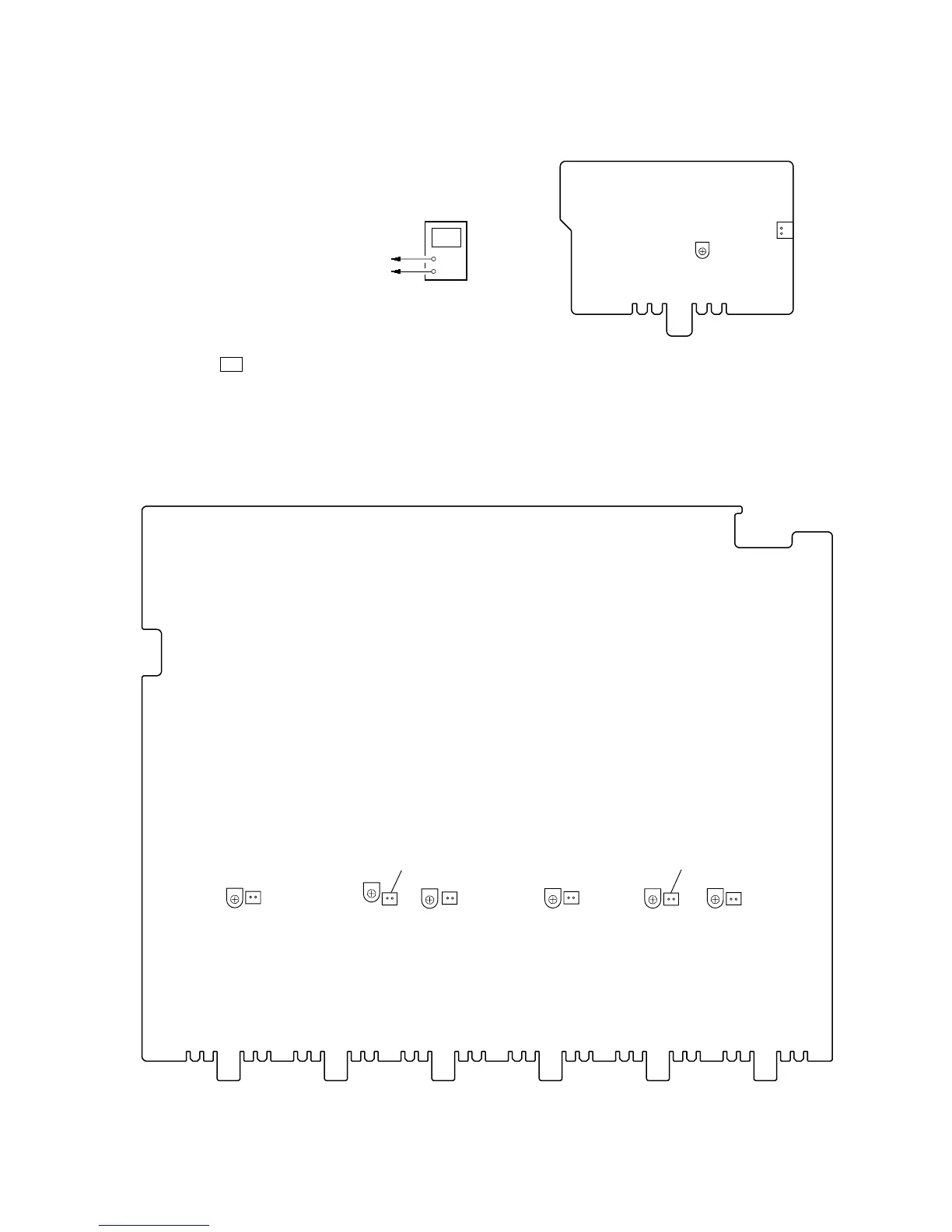
BIAS ADJUSTMENT
Condition:
input signal: no signal (no load)
volume: minimum
Connection
Procedure:
1. Connect a digital voltmeter to the CN432 (CN482, CN532,
CN582, CN632, CN682) on the MAIN board or CN732 on
the SBL board.
2. Press the I/1 button to turn on the main power.
3. Adjust the RV431 (RV481, RV531, RV581, RV631, RV681)
on the MAIN board or RV731 on the SBL board so that the
digital voltmeter reading is 15±2 mV.
Note: When the adjusting voltage is higher than 15±2 mV, adjust the
voltage to the minimum voltage.
Adjustment and Connection Loacation:
+
–
digital voltmeter
CN432 (CN482, 532, 582, 632, 682, 732) pin
1
CN432 (CN482, 532, 582, 632, 682, 732) pin
2
RV731
– SBL BOARD (Component Side) –
CN732
1
2
– MAIN BOARD (Component Side) –
RV431
CN432
2 1
RV481
RV631
RV681
RV531 RV581
CN482
CN632
CN682
CN532
CN582
2 1
2 1
2 1
2 1
2 1
SECTION 5
ELECTRICAL ADJUSTMENTS








 To Next Page