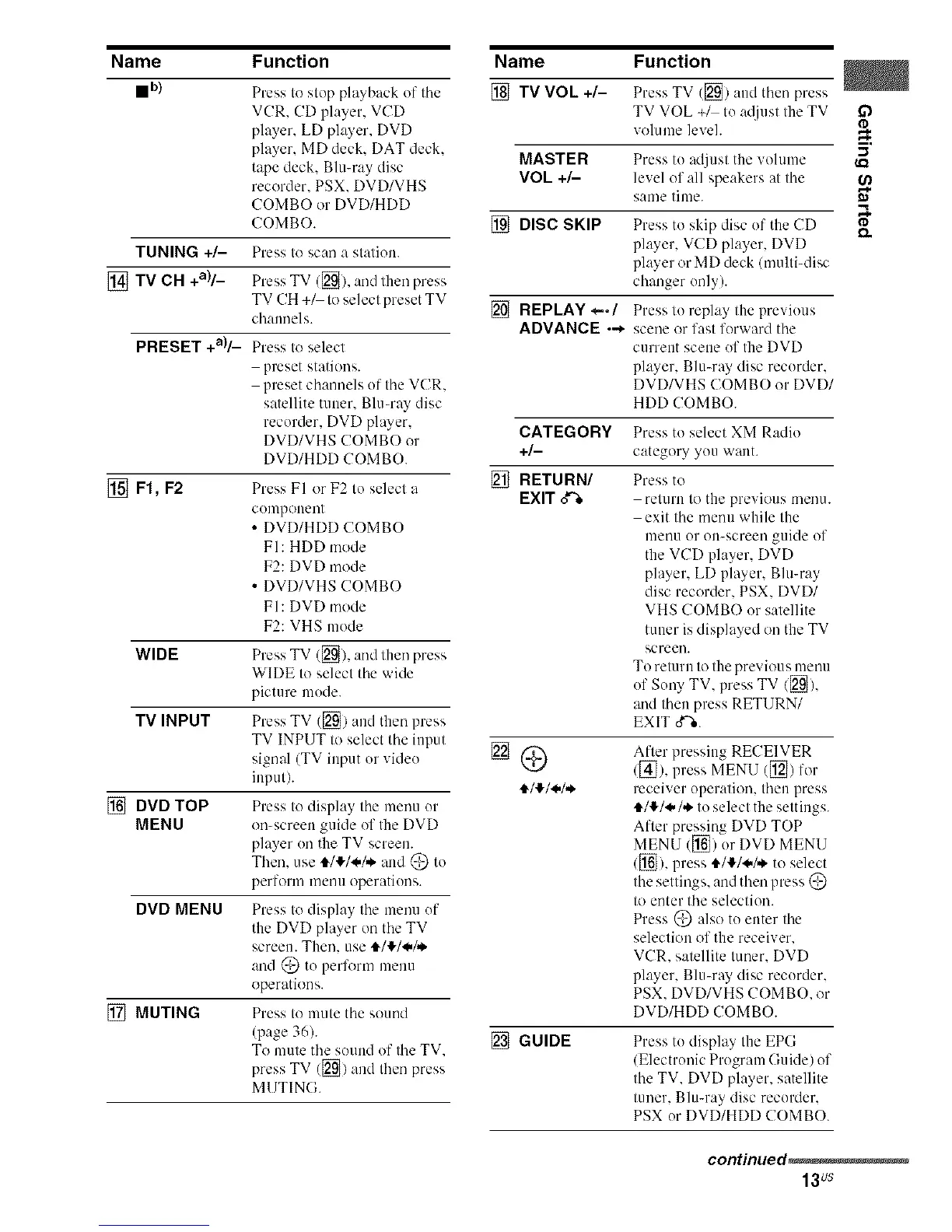
Name Function
mb)
TUNING +/-
[] TV CH +a)/_
PRESET +a)/_
[] F1, F2
WIDE
TV INPUT
[] DVD TOP
MENU
DVD MENU
[] MUTING
Press to stup playback of the
VCR. CD player, VCD
player, LD player. DVD
player. MD deck. DAT deck.
tape deck. Blumay disc
recorder. PSX. DVD/VHS
COMBO or DVD/HDD
COMBO.
Press to scan a station.
Press TV ([_). and lhen press
TV CH +_ to select preset TV
chalmels.
Press to select
preset stations.
preset channels of the VCR.
satellite tuner. Blu-my disc
recorder. DVD player,
DVD/VHS COMBO or
DVD/HDD COMBO.
Press FI or F2 to select a
cumpouent
• DVD/HDD COMBO
FI: HDD mode
F2: DVD mode
• DVD/VHS COMBO
FI: DVD mode
F2: VHS mode
Press TV ([_/, (-rodtiler( press
WIDE to select the wide
picture mode.
Press TV ([_) aud then press
TV INPUT to select the input
signal (TV input or vide()
input).
Press to display the menu ur
on-screen guide of the DVD
player on the TV screen.
Then. use i/!/._,/,_ and @ tu
perform meuu operations.
Press to display tile mmm uf
the DVD player on tile TV
screen. Then. use t_/!/_/,,_
and @ tu perform menu
operations.
Press to mute tile sound
(page 36).
To mute tile sound of tile TV.
press TV ([]) and tiler( press
MUTING.
Name Function
[] TV VOL +/- PressTV ([_) and then press
TV VOL +/ to a@(st the TV
volume level.
MASTER Press tu adjust the vohune
VOL +/- level of all speakers at the
same time.
[] DISC SKIP Press tu skip disc uf tile CD
player, VCD player. DVD
player or MD deck (multbdisc
changer only).
[] REPLAY *-./ Press lu replay tile previous
ADVANCE ._ scene or fast forward the
current scene uf the DVD
player, Blu-ray disc recurder.
DVD/VHS COMBO or DVD/
HDD COMBO.
CATEGORY Press to select XM Radio
+/- category yuu want.
[] RETURN/ Press to
EXIT _ return to the previous menu.
exit tile menu while the
umnu ur Ol>screen guide of
the VCD player. DVD
player, LD player, Blu-ray
disc recorder. PSX. DVD/
VHS COMBO or satellite
tuner is displayed on the TV
screen.
To return to the previous menu
of Suny TV, press TV/[_),
and then press RETURN/
EXIT o"%.
After pressing RECEIVER
/[_]). press MENU ([_) for
receiver operation, then press
,t/!/.*/.*. to select the settings.
After pressing DVD TOP
MENU ([]) ur DVD MENU
/[] ), press i/!/_,/,*, to select
tile settings, and then press @
to enter tile selection.
Press @ also tu enter Ihe
selection of the receiver.
VCR. satellite tuner. DVD
player, Blu-ray disc recurder.
PSX. DVD/VHS COMBO. or
DVD/HDD COMBO.
[] GUIDE Press tu display the EPG
/Electrouic Prugram Guide) of
the TV. DVD player, satellite
tuner. Blu-ray disc recorder.
PSX or DVD/HDD COMBO.
I'D
5'
I.Q
I'D
continued_
13Us



 To Next Page