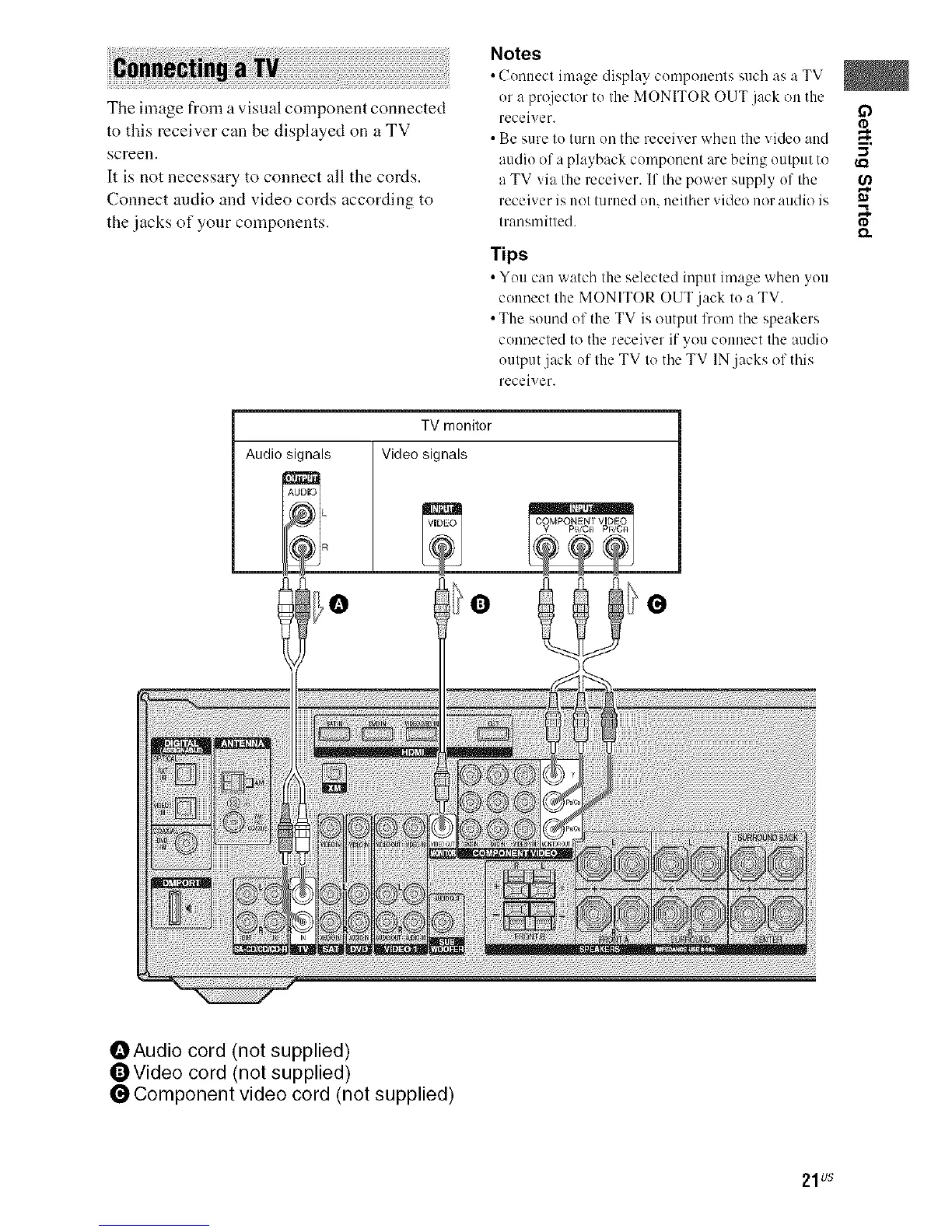
The image from a visual component connected
to this receiver can be displayed on a TV
screen.
It is not necessary to connect all the cords.
Connect audio and video cords according to
the .jacks of your components.
Notes
c(
nuecl ima_.e display cumponenls as a
such TV
i
or a projeclor to Ihe MONITOR OUT jack on the
receiver.
• Be sure I11turn on the receiver when the video and
m,
-,,I
audiu of a playback component are being uulput to
a TV via tile receiver. If the power supply 171'the O_
receiver is not turned on, neither video i1/)1"audio is m
Irausmitled. I'D
Tips
• You c:m watch the selected input image when you
connect the MONITOR OUT jack to a TV.
• The sound uf the TV is output from the speakers
connected to the receiver if you connect the audio
output jack of the TV to the TV IN.jacks of this
receiver.
TV monitor
Audio signals Video signals
_Audio cord (not supplied)
OVideo cord (not supplied)
Component video cord (not supplied)
21us



 To Next Page