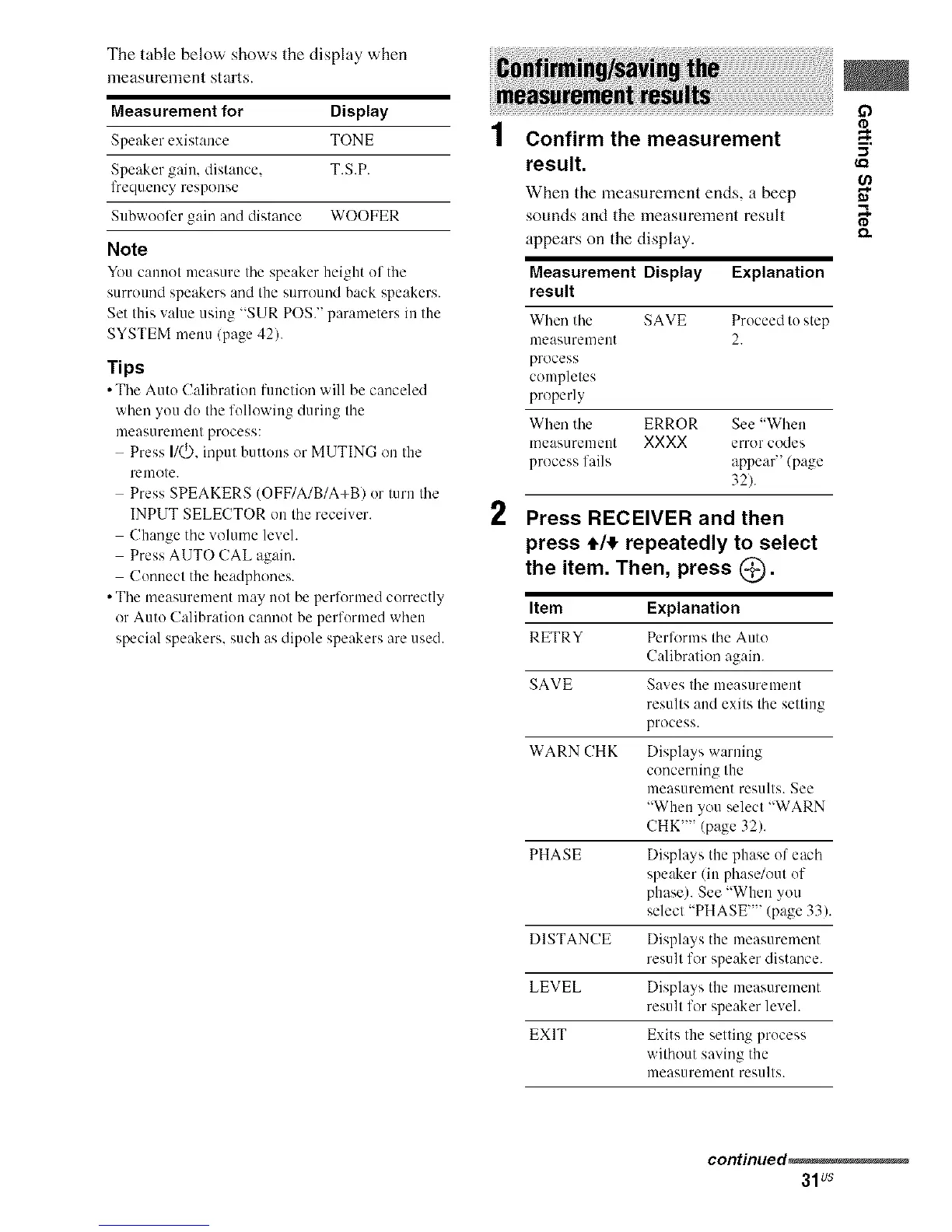
The table below shows tile display when
nleasurelnent starts.
Measurement for Display
Speaker existance TONE
Speaker gain, distance, T.S.P.
lbequency response
Subwoofcr gain and distance WOOFER
Note
You c:muot me:inure tile speaker height of tile
surround speakers and the surround back speakers.
Set this value using "SUR POSY parameters in the
SYSTEM menu (page 42).
Tips
• The Auto Calibration function will be canceled
when you do the following during the
measurement process:
Press I1(_, inpul buttens or MUTING on tile
remote.
Press SPEAKERS (OFF/A/B/A+BI or turn the
INPUT SELECTOR on the receiver.
Change the volume level.
Press AUTO CAL again.
Conuect the headphones.
• The measurement may not be perlk_rmed correctly
or Auto Calibration cannot be performed when
special speakers, such as dipole speakers are used.
2
Confirm the measurement
result.
When tile measurement ends, a beep
sounds and tile measurement result
appears on the display.
Measurement Display Explanation
result
When the SAVE Proceed to step
measurement 2.
process
completes
properly
When the ERROR See "When
measurement XXXX error codes
process fails appeal' (page
32).
Press RECEIVER and then
press 4,/_,repeatedly to select
the item. Then, press @_).
Item Explanation
RETRY Perlk)rms the Auto
Calibration again.
SAVE Saves the measurement
results and exits the setting
process.
WARN CHK Displays warning
concerning the
measurement results. See
"When you select "WARN
CHK'"' (page 32).
PHASE Displays the phase of each
speaker/iu phase/out of
phase). See "When you
select "PHASE'"' (page 33).
DISTANCE Displays the measurement
result for speaker distance.
LEVEL Displays the measurement
result for speaker level.
EXIT Exits the setting process
without saving the
measurement results.
5'
continued_
31us



 To Next Page