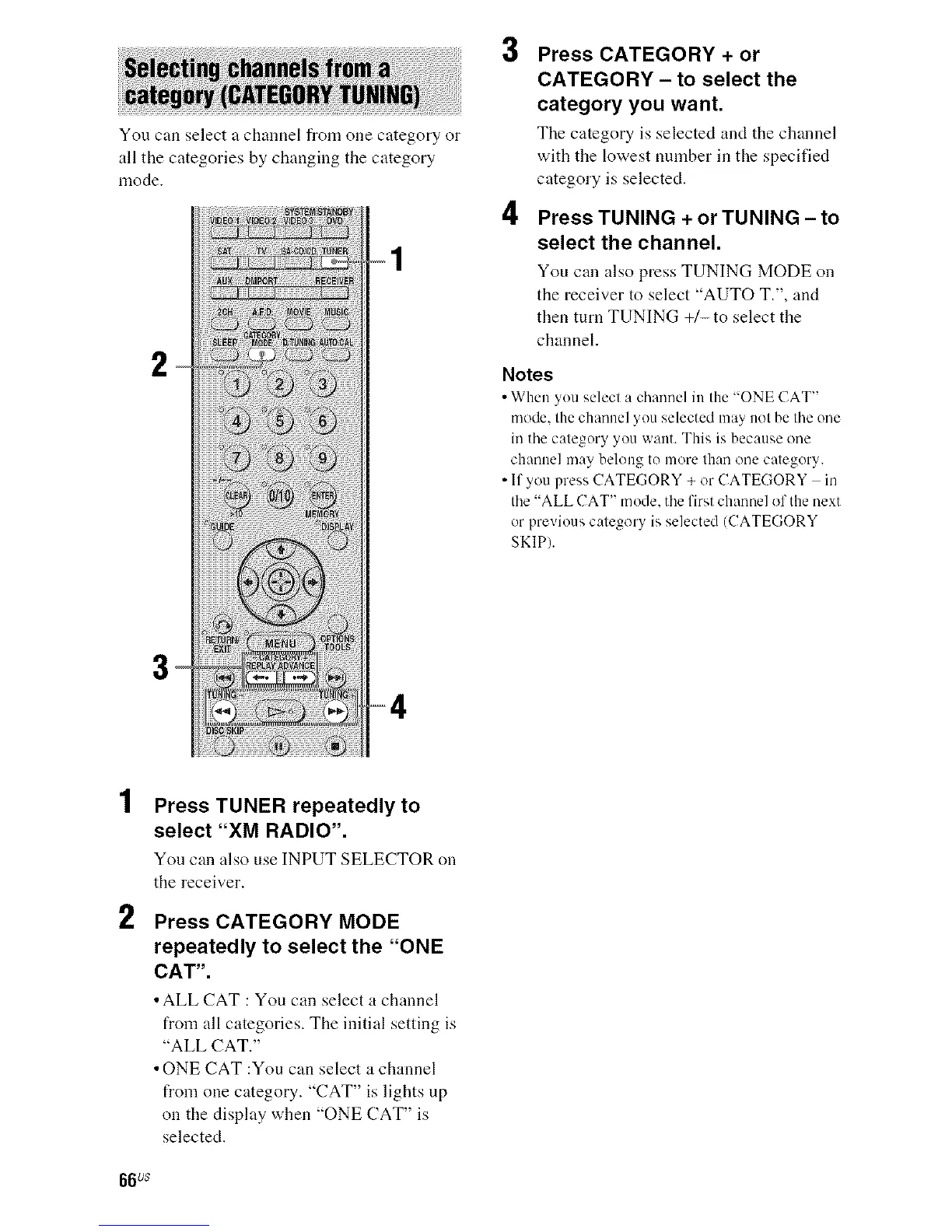
You can select a channel from one category or
all the categories by changing the category
mode.
2
3
4
Press CATEGORY + or
CATEGORY - to select the
category you want.
The category is selected and the channel
with the lowest number in the specified
category is selected.
Press TUNING + or TUNING - to
select the channel.
You can also press TUNING MODE on
the receiver to select "AUTO T.", and
then turn TUNING +/-to select the
channel.
Notes
• When you select a channel in the "ONE (-'AT"
mode, the channel you selected may not be the one
in the category you want. This is because one
channel may belong to more than one category.
• If you press CATEGORY + or CATEGORY in
the "ALL CAT" mode, the first channel of the next
or previous category is selected (CATEGORY
SKIP).
2
Press TUNER repeatedly to
select "XM RADIO".
You can also use INPUT SELECTOR on
the receiver.
Press CATEGORY MODE
repeatedly to select the "ONE
CAT".
• ALL CAT : You can select a channel
from all categories. The initial setting is
"ALL CAT."
• ONE CAT :You can select a channel
from one category. "CAT" is lights up
on the display when "ONE CAT" is
selected.
66us



 To Next Page