23
US
C:\Documents and
Settings\pc13\Desktop\JC060000_2667347112DG900_US\2667347112\US03CON_STR-DG900-
U.fm
masterpage: Right
STR-DG900
2-667-347-11 (2)
Getting Started
Notes
• Connect image display components such as a TV
monitor or a projector to the MONITOR OUT jack
on the receiver.
• Turn on the receiver when the video and audio of a
playback component are being output to a TV
through the receiver. If the power supply of the
receiver is not on, neither video nor audio is
transmitted.
• An on screen display is not output from HDMI
MONITOR OUT jack of this receiver.
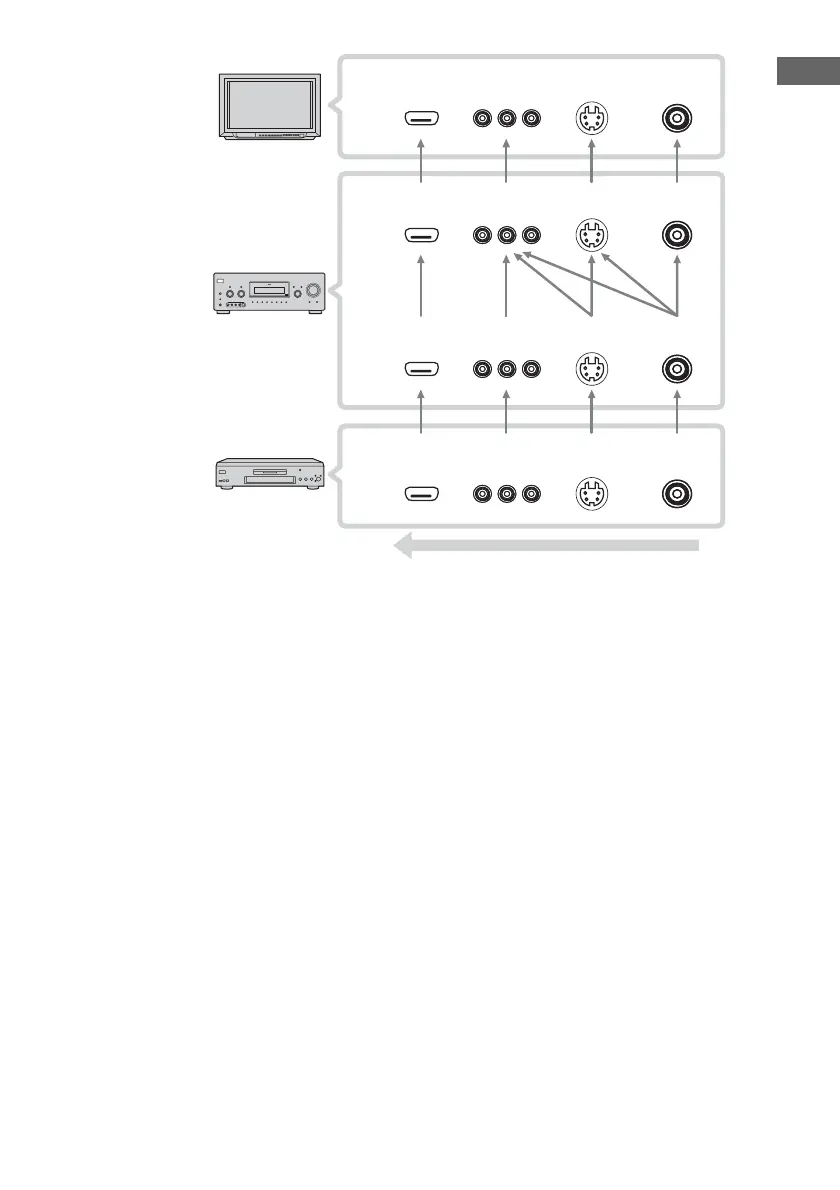
Converting video signals
This receiver is equipped with a function for
converting video signals. You can output the
video signal after connecting this receiver via
the MONITOR OUT jack as shown in the
illustration.
Video signals can be output as component
video or S-video signals, S-video signals can
be output as component video signals and this
upconverted video signals can only be output
from the MONITOR OUT jack.
Note on converting video signals
When video signals from a VCR, etc., are
converted on this receiver and then output to
your TV, depending on the status of the video
signal output, the image on the TV screen may
appear distorted horizontally or no image may
be output.
Reassigning video input signals
to another input
Component video input signals and HDMI
input can be reassigned to another input (page
79, 80).
?/1
High quality image
TV monitor etc., INPUT jack
Receiver MONITOR OUT jack
Receiver INPUT jack
Video component OUTPUT jack
Signal
processing
HDMI
COMPONENT
VIDEO
S-VIDEO VIDEO
HDMI
COMPONENT
VIDEO
S-VIDEO VIDEO
HDMI
COMPONENT
VIDEO
S-VIDEO VIDEO
HDMI
COMPONENT
VIDEO
S-VIDEO VIDEO
US01COV_STR-DG900-U.book Page 23 Wednesday, April 26, 2006 12:15 PM












 To Next Page