5
US
C:\Documents and
Settings\pc13\Desktop\JC060000_2667347112DG900_US\2667347112\US03CON_STR-DG900-
U.fm
masterpage: Right
STR-DG900
2-667-347-11 (2)
Getting Started
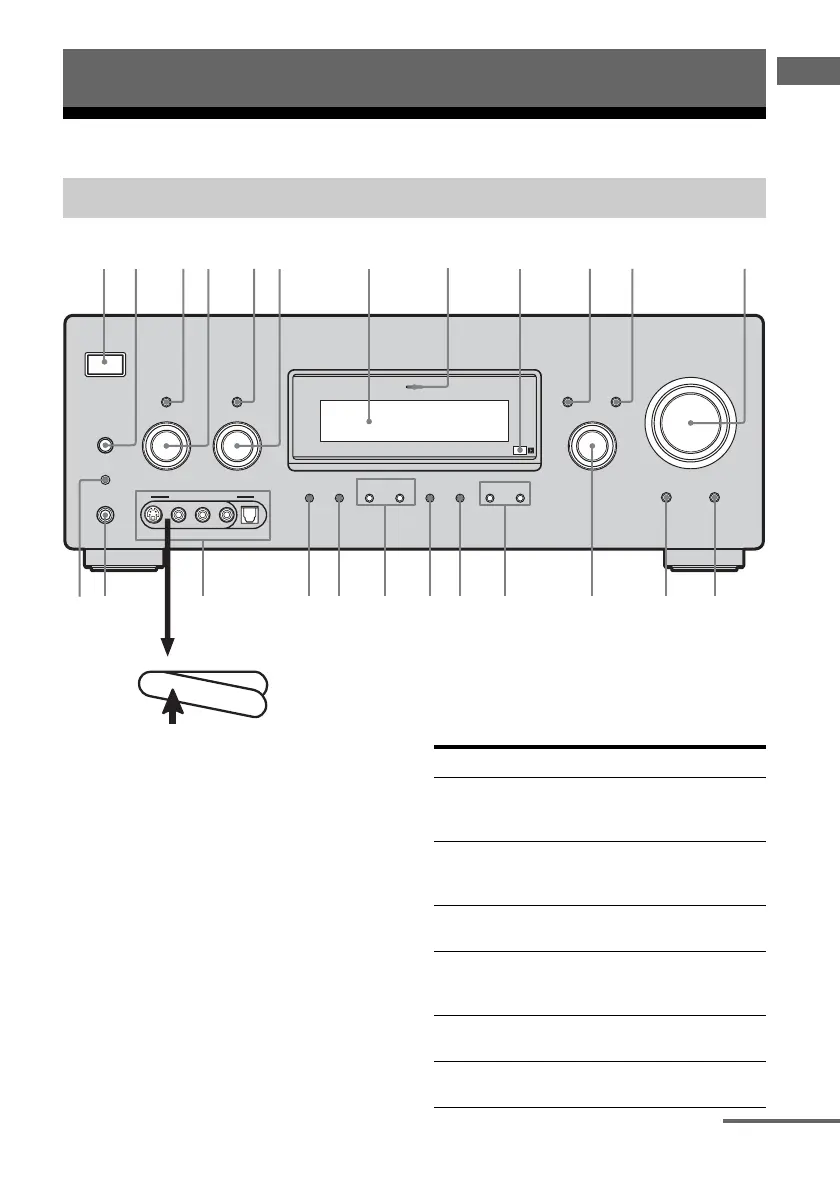
Description and location of parts
To remove the cover
Press PUSH.
When you remove the cover, keep it out of
reach from children.
Getting Started
Front panel
?/1
AUTO CAL MIC
SPEAKERS
(OFF/A/B/A+B)
PHONES
MEMORY/
ENTER
CATEGORY
MODE
–
CATEGORY +
2CH A.F.D. MOVIE
MUSIC
MULTI CHANNEL DECODING
TUNING MODE
DISPLAY INPUT MODE
TUNING INPUT SELECTOR
–+
TONE MODE
TONE
–+
MULTI CH IN/
DIRECT
HDMI
MASTER VOLUME
P
U
S
H
1 7 qa9
qd
qfwf qgqhqlwswd qjwa w; qk
2
4 6qs
VIDEO 3 IN/PORTABLE AV IN
VIDEOS-VIDEO L AUDIO R
DIGITAL(OPT)
53q;
Name Function
A ?/1 Press to turn the receiver
on or off (page 32, 41, 42,
66, 101).
B SPEAKERS
(OFF/A/B/A+B)
Press to select OFF, A, B,
A+B of the front speakers
(page 34).
C TONE MODE Press to select Equalizer
mode (page 46).
D TONE +/– Turn to adjust the
EQUALIZER menu
parameters (page 46, 51).
E TUNING MODE Press to select the tuning
mode (page 70, 101).
F TUNING +/– Turn to scan a station
(page 67, 69).
continued
US01COV_STR-DG900-U.book Page 5 Wednesday, April 26, 2006 12:15 PM












 To Next Page