25
US
C:\Documents and
Settings\pc13\Desktop\JC060000_2667347112DG900_US\2667347112\US03CON_STR-DG900-
U.fm
masterpage: Right
STR-DG900
2-667-347-11 (2)
Getting Started
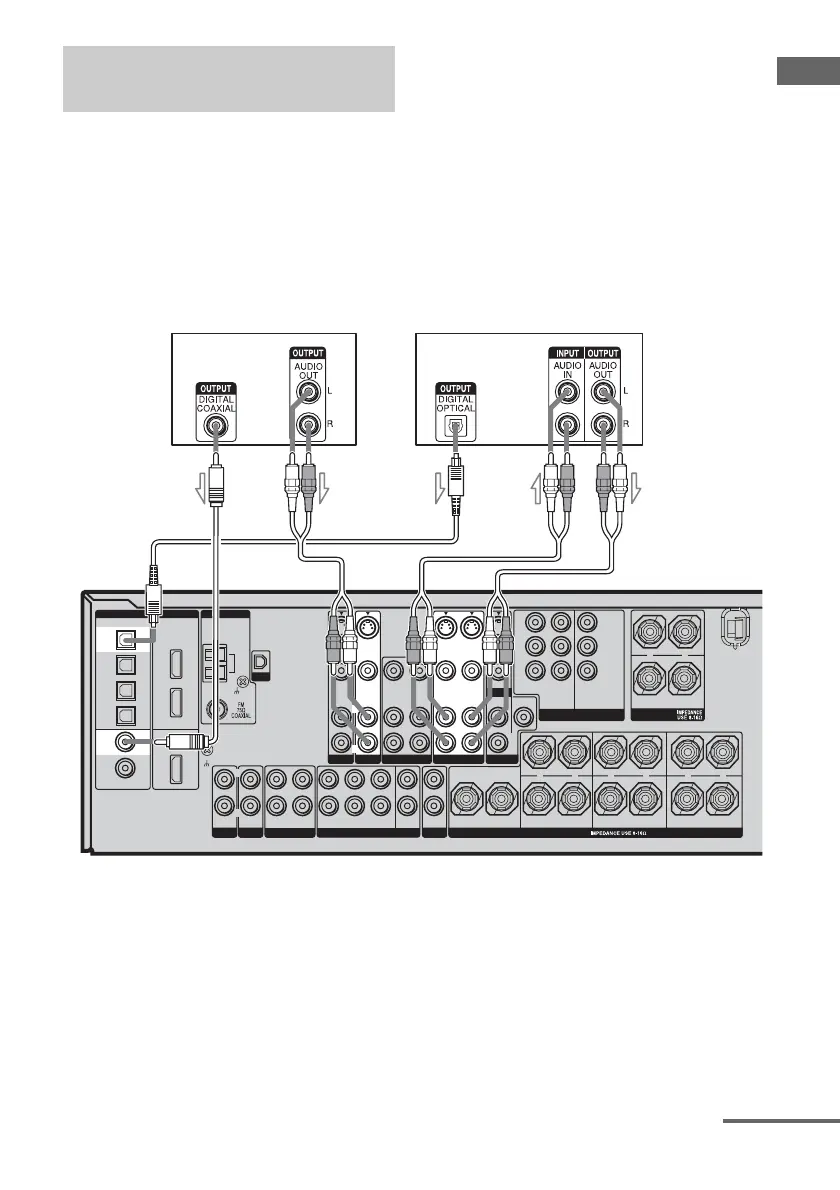
The following illustration shows how to
connect a DVD player/DVD recorder.
It is not necessary to connect all the cables.
Connect audio and video cords according to
the jacks of your components.
1 Connecting audio
Notes
• To input multi channel digital audio from the DVD
player, set the digital audio output setting on the
DVD player. Refer to the operating instructions
supplied with the DVD player.
• When connecting optical digital cords, insert the
plugs straight in until they click into place.
• Do not bend or tie optical digital cords.
Tip
All the digital audio jacks are compatible with
32 kHz, 44.1 kHz, 48 kHz, and 96 kHz sampling
frequencies.
Hooking up a DVD player/DVD
recorder
ASSIGNABLE
(INPUT ONLY)
DVD
IN
COAXIAL
SA-CD/
CD
IN
OPTICAL
VIDEO 1
IN
TV/SAT
IN
MD/
TAPE
IN
MD/
TAPE
OUT
ASSIGNABLE
IN 1
IN 2
MONITOR
OUT
SIGNAL GND
DIGITAL HDMI
XM
ANTENNA
AM
TV/SAT
S-VIDEO
IN
DVD
AUDIO IN
VIDEO IN
S-VIDEO
IN
R
L
AUDIO OUT
VIDEO OUT
L
R
VIDEO 2 VIDEO 1
VIDEO OUT
S-VIDEO
OUT
AUDIO IN
VIDEO IN
S-VIDEO
IN
L
R
PRE OUT
S-VIDEO
OUT
SUR
L
R
P
B
/C
B
/B-Y
P
R
/C
R
/R-Y
Y
ASSIGNABLE
TV/SAT
IN
DVD
IN
MONITOR
OUT
COMPONENT VIDEO
FRONT B
L
R
+
–
SPEAKERS
FRONT A
L
R
+
–
SURROUND
L
R
+
–
SURROUND BACK
(ZONE 2)
L
R
+
–
CENTER
+
–
SPEAKERS
SUB
WOOFER
PHONO
IN
SA-CD/CD
L
R
L
R
MULTI CH IN
L
R
ZONE 2
OUT IN
L
R
FRONT SURROUND
L
R
SUR
BACK
SUB
WOOFER
OUT
IN
MD/TAPE
CENTER
VIDEO IN
AUDIO IN
VIDEO IN
AUDIO IN
VIDEO OUT
AUDIO OUT
MONITOR
DVD player
A
B
A Coaxial digital cord (not supplied)
B Audio cord (not supplied)
C Optical digital cord (not supplied)
DVD recorder
C
B
continued
US01COV_STR-DG900-U.book Page 25 Wednesday, April 26, 2006 12:15 PM












 To Next Page