Connecting speakers other than front speakers
Monaural audio cable (not supplied)
Speaker cable (not supplied)
After you have made the bi-amplifier connection, set [Speaker Setting] - [Surround Back
Speakers Assign] to [Bi-Amplifier Speakers] from the home menu.
Hint
You can also set the assignment for the surround back speaker terminals on the display panel. Set
[SB ASSIGN] to [BI-AMP] in the [<SPEAKER>] menu.
You can only set [SB ASSIGN] if the speaker pattern is set to a setting that does not have surround
back and front high speakers.
[19] Preparation 2. Connecting speakers
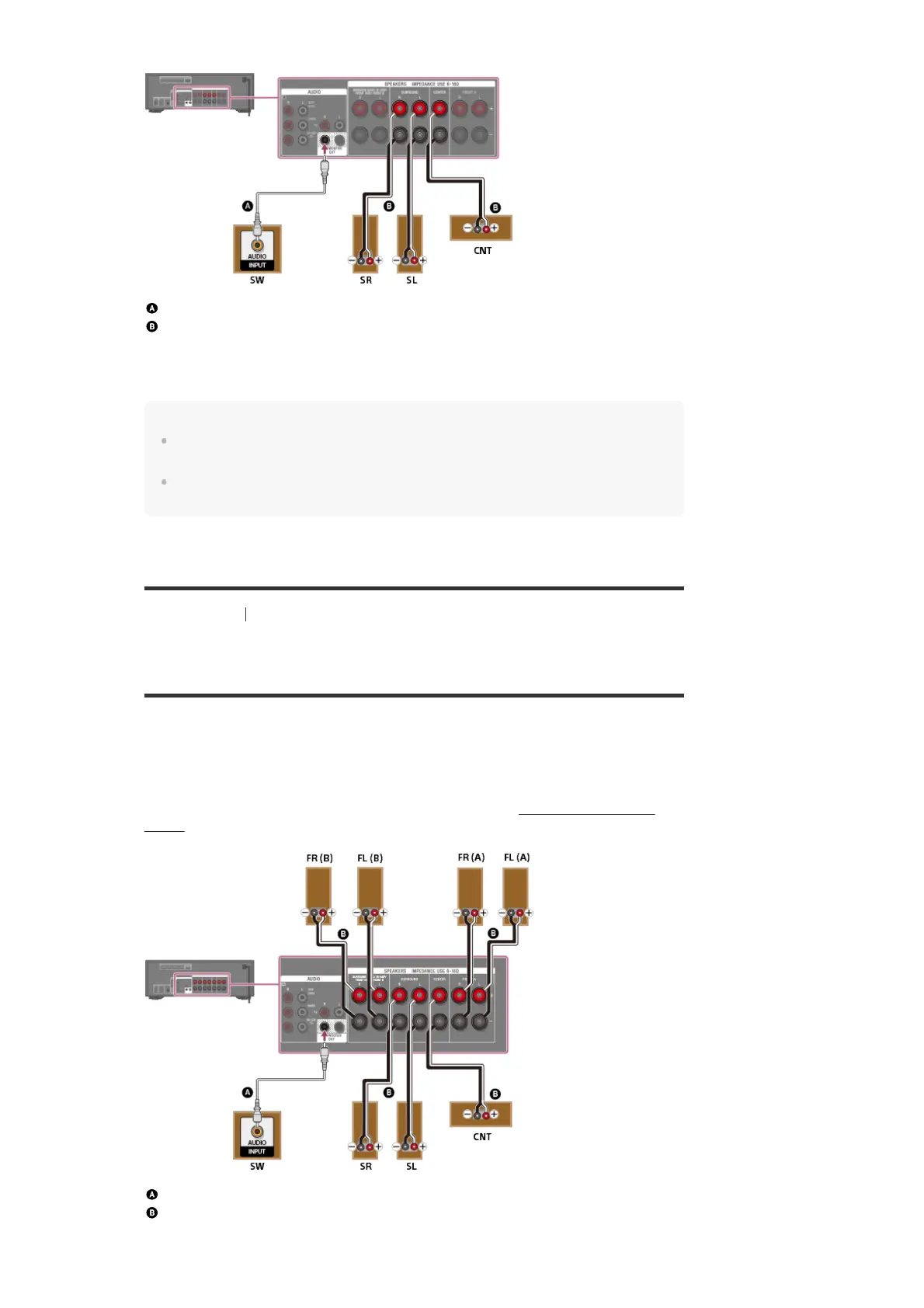
Connecting 5.1-channel speaker system with front B
speaker connection
If you are not using surround back speakers or front high speakers, you can connect additional
front B speakers to the SPEAKERS SURROUND BACK/BI-AMP/FRONT HIGH/FRONT B
terminals.
Connect each speaker as illustrated below.
Before connecting cables, be sure to disconnect the AC power cord (mains lead).
For details on how to connect speaker cables to the receiver, see “How to connect speaker
cables.”
Monaural audio cable (not supplied)
Speaker cable (not supplied)
After you have made the front B speaker connection, set [Speaker Setting] - [Surround Back



 To Next Page