If [2. xxxx (input name)] or [3. xxxx (input name)] disappears in step 3, press ZONE
SELECT again.
To exit zone operation
Press ZONE SELECT on the receiver repeatedly to select the zone you want to exit, then
press ZONE POWER.
Available input for zone operations
See “Available inputs for each zone (for STR-DN1060 only).”
Hint
A dedicated App for this model “SongPal” enables easier zone operation such as
changing the settings or switching the zone inputs from your smartphone or tablet.
[109] Using the Multi-Zone Features (for STR-DN1060 only)
Enjoying sound from
speakers located in other rooms using another amplifier (for STR-DN1060 only)
1. Connecting another amplifier in Zone 2 (for STR-
DN1060 only)
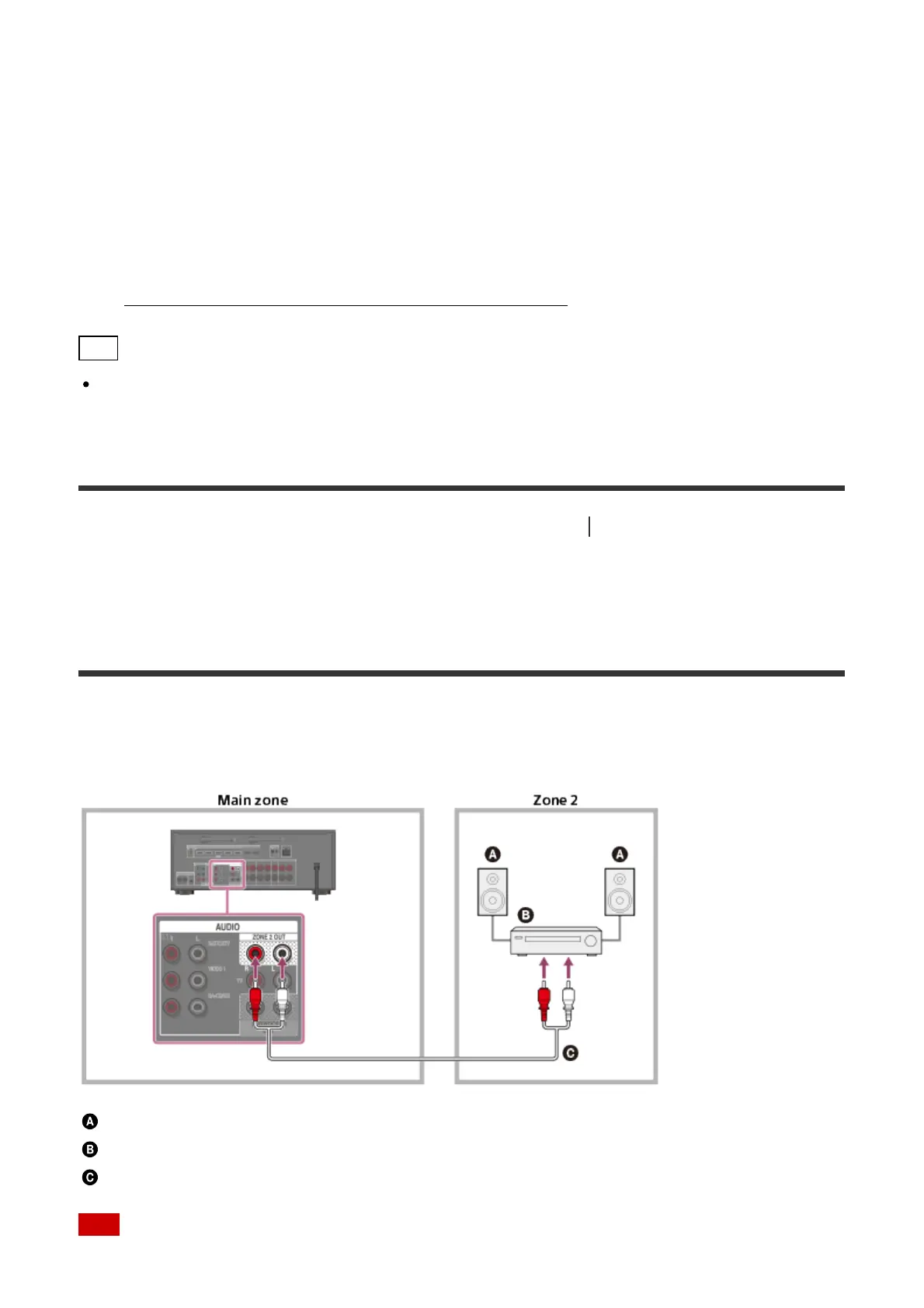
You can enjoy sound from a device connected to the receiver in a zone other than the main
zone. For example, you can watch a DVD in the main zone and listen to a CD in Zone 2.
Speakers
Amplifier/receiver
Audio cable (not supplied)
Note



 To Next Page