EasyManua.ls Logo

Sony Trinitron KV-13VM20 - Page 41

Sony Trinitron KV-13VM20
97 pages
Print Icon
To Next Page IconTo Next Page
To Previous Page IconTo Previous Page
Loading...
Checking
the
Timer
Settings
|
Note
|
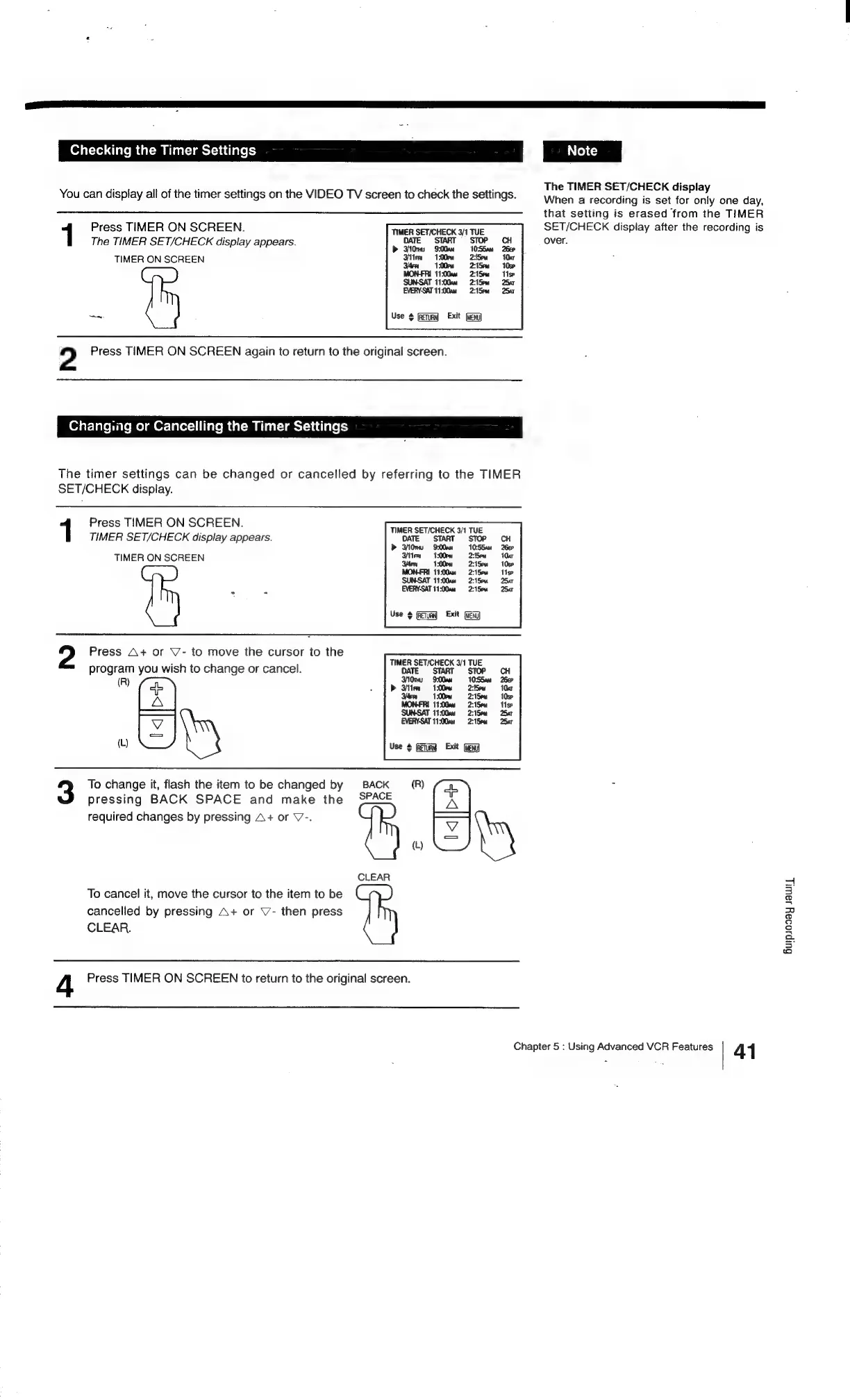
You
can
display
all
of
the
timer
settings
on
the
VIDEO
TV
screen
to
check
the
settings.
1
Press
TIMER
ON
SCREEN.
TIMER
SET/CHECK
3/1
TUE
The
TIMER
SET/CHECK
display
appears.
DATE
START
STO!
TIMER
ON
SCREEN
EVERY-SAT
11:00am
Use
fRetunn)
Exit
2
Press
TIMER
ON
SCREEN
again
to
return
to
the
original
screen.
Changing
or
Cancelling
the
Timer
Settings
The
timer
settings
can
be
changed
or
cancelled
by
referring
to
the
TIMER
SET/CHECK
display.
Press
TIMER
ON
SCREEN.
TIMER
SET/CHECK
display
appears.
TMOATE.
“START
Stop
x
10:55am
7
2:!5em
TIMER
ON
SCREEN
Dice
2:15°m
2:15
EVERY-SAT
11:00am
2:15pm
Use
>
(etm)
Exit
(ae)
Press
A+
or
Y7-
to
move
the
cursor
to
the
program
you
wish
to
change
or
cancel.
(R)
ofl
reas)
To
change
it,
flash
the
item
to
be
changed
by
BACK
(R)
A
pressing
BACK
SPACE
and
make
the
SPACE
required
changes
by
pressing
A+
or
V-.
-——
WS
CLEAR
To
cancel
it,
move
the
cursor
to
the
item
to
be
cancelled
by
pressing
A+
or
V-
then
press
CLEAR.
4
Press
TIMER
ON
SCREEN
to
return
to
the
original
screen.
The
TIMER
SET/CHECK
display
When
a
recording
is
set
for
only
one
day,
that
setting
is
erased
from
the
TIMER
SET/CHECK
display
after
the
recording
is
over.
Chapter
5
:
Using
Advanced
VCR
Features
41
Gurpoday
sawp

Related product manuals