7
9
Additional TV Features
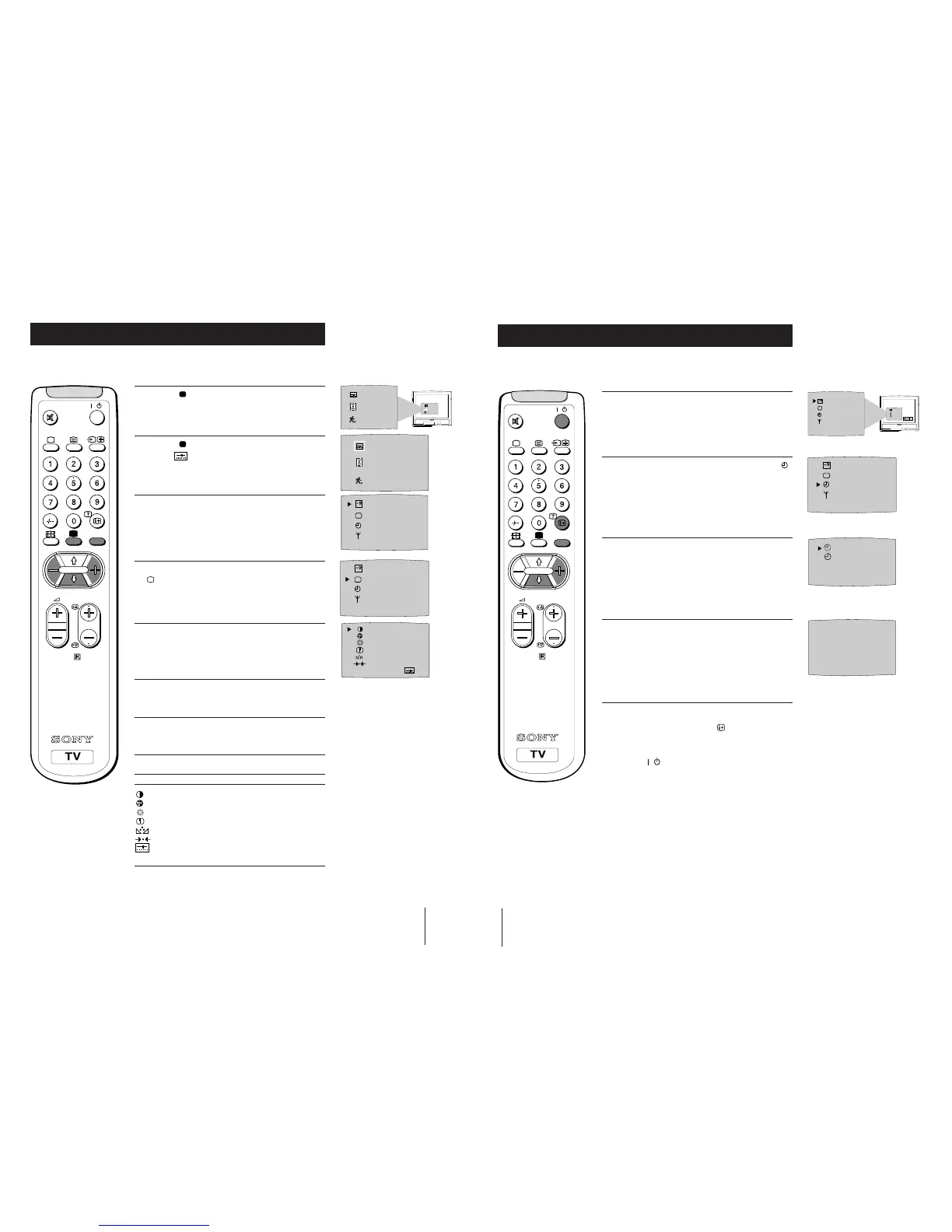
Adjusting the Picture
Although the picture is adjusted at the factory, you can modify it to suit your own
requirement.
1 Press the button on the remote control to
display the three different modes on the TV
screen.
2 Press the button to highlight the personal mode
symbol
as shown.
3 Press the MENU button to display the menu on
the TV screen.
4 Press the blue button on the control to select the
symbol on the TV screen then press the yellow
button.
5 Press the blue button to select the item you wish
to change (see below).
6 Press the red or yellow button to alter the selected
item.
7 Press the MENU
button to remove the menu
display from the TV screen.
Symbol Item
• Contrast
• Colour
• Brightness
• Sharpness
• Hue control (only for NTSC video signals)
• Reset - resets to factory preset picture level
• Represents the mode selected in the “Using
Select Mode” section.
SELEC
T
RM-883
PROGR
MENU
/
SELEC
T
IIIIIIIIIIIIIII- - - - - -
IIIIIIIIIIIIIII- - - - - -
IIIIIIIIIIIIIII- - - - - -
IIIIIIIIIIIIIII- - - - - -
IIIIIIIIIIIIIII- - - - - -
10
Additional TV Features
Using the Sleep Timer
The TV may be set to switch automatically to the standby mode after a length of time
chosen by you. You may set the time in 15 minute steps up to 4 hours.
RM-883
PROGR
MENU
/
1 Press the MENU button on the remote control to
display the menu on the TV screen.
2 Press the blue button on the control to select the
symbol on the TV screen, then press the yellow
button.
3 Press the yellow button repeatedly until the
required amount of time delay appears on the
screen.
4 Once the time delay has been selected, press the
MENU button to remove the on-screen display.
One minute before standby, the display shown
appears on the screen.
Notes:
• When watching TV, press the
button to display
time remaining.
• To return to normal operation from standby mode,
press the



 To Next Page