21
KV-25M2/25T2
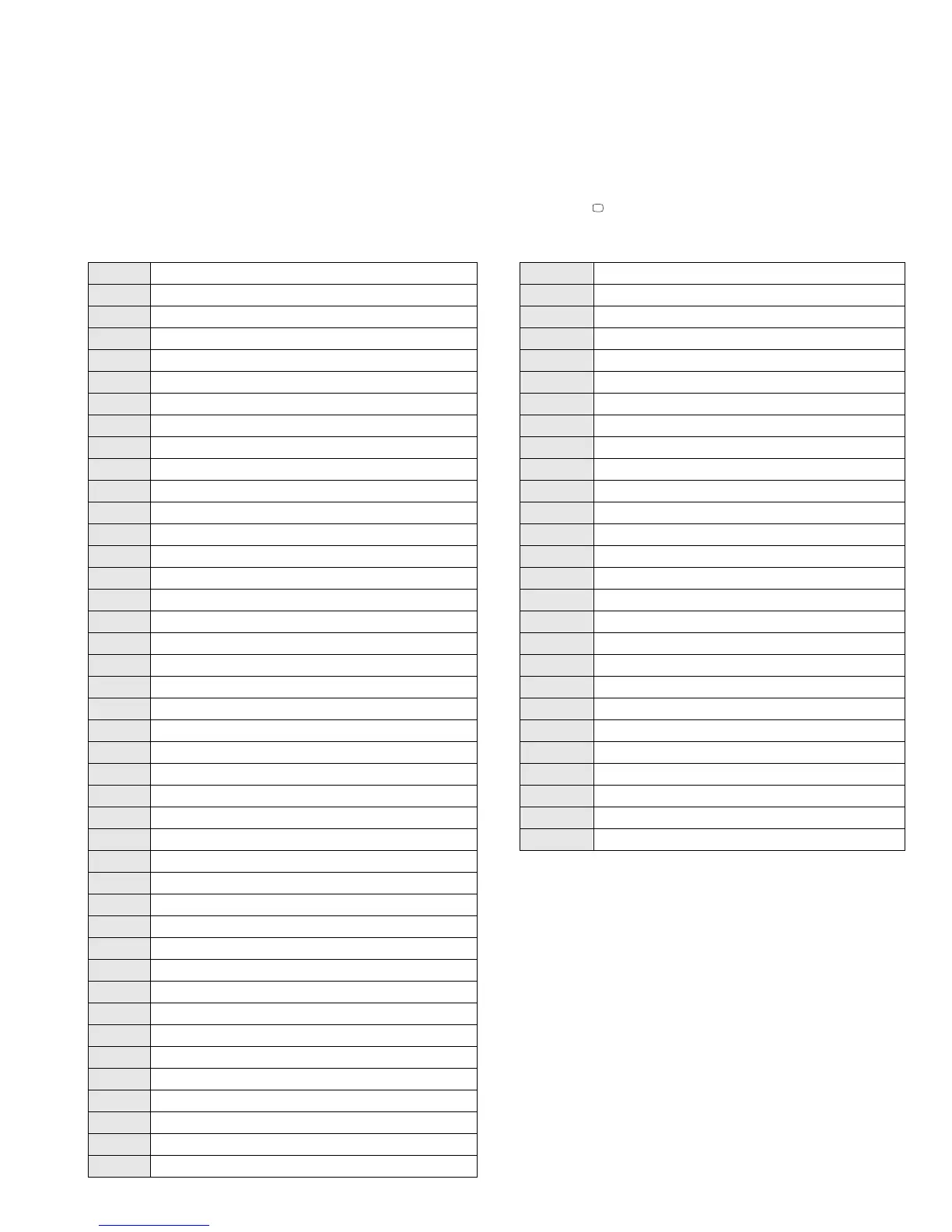
4-2. TEST MODE 2:
00 Cancel Test mode
01 Picture maximum
02 Picture minimum
03 Volume 35%
04 Volume 50%
05 Volume 65%
06 Volume 80%
07 Ageing mode On/Off
08 Set shipping conditions
09 Display TV Status
10 No function
11 Sub Picture Adjustment
12 Sub Colour Adjustment
13 Sub Brightness Adjustment
14 Text H position Adjustment
15 Rotation test
16 Picture level 50%
17 Audio mute ON
18 Disable Blanking
19 No function
20 No function
21 Destination A
22 Destination L
23 Destination E
24 Destination U
25 Destination D
26 Destination B
27 Destination K
28 Destination R
29 No function
30 No function
31 Audio shutoff Disable/Enable
32 RGB priority Disable/Enable
33 Rotation On/OFF
34 Text language East/West
35 Wide CRT/4:3 CRT
36 VM ON/OFF test
37 No function
38 No function
39 No function
40 No function
41 Re-initialize the NVM [Only when Prog=59]
42 Re-initialise geometry settings [Only when Prog=59]
43 No function
44 No function
45 No function
46 No function
47 No function
48 Set NVM as NON Virgin [Only when Prog=59]
49 Set NVM as Virgin [Only when Prog=59]
50 No function
51 No function
52 No function
53 No function
54 No function
55 No function
56 No function
57 No function
58 No function
59 No function
60 No function
61 Auto AGC Adjust
62 Alternative Dest B Autotuning
63 Enable/Disable Y/C input
64 Signal Quality Check for Auto Tune
65 Signal Quality NOT Checked for Auto Tune
66 No function
67 Manual AGC Adjust
68 -100 No function
Is available by pressing ‘TEST’ button twice, OSD ‘TT’ appears. The functions described below are available by pressing the two numbers. To
release the Test mode 2, press 0 twice, or switch the TV into stand-by mode, or press the TV button on the remote commander.




 To Next Page