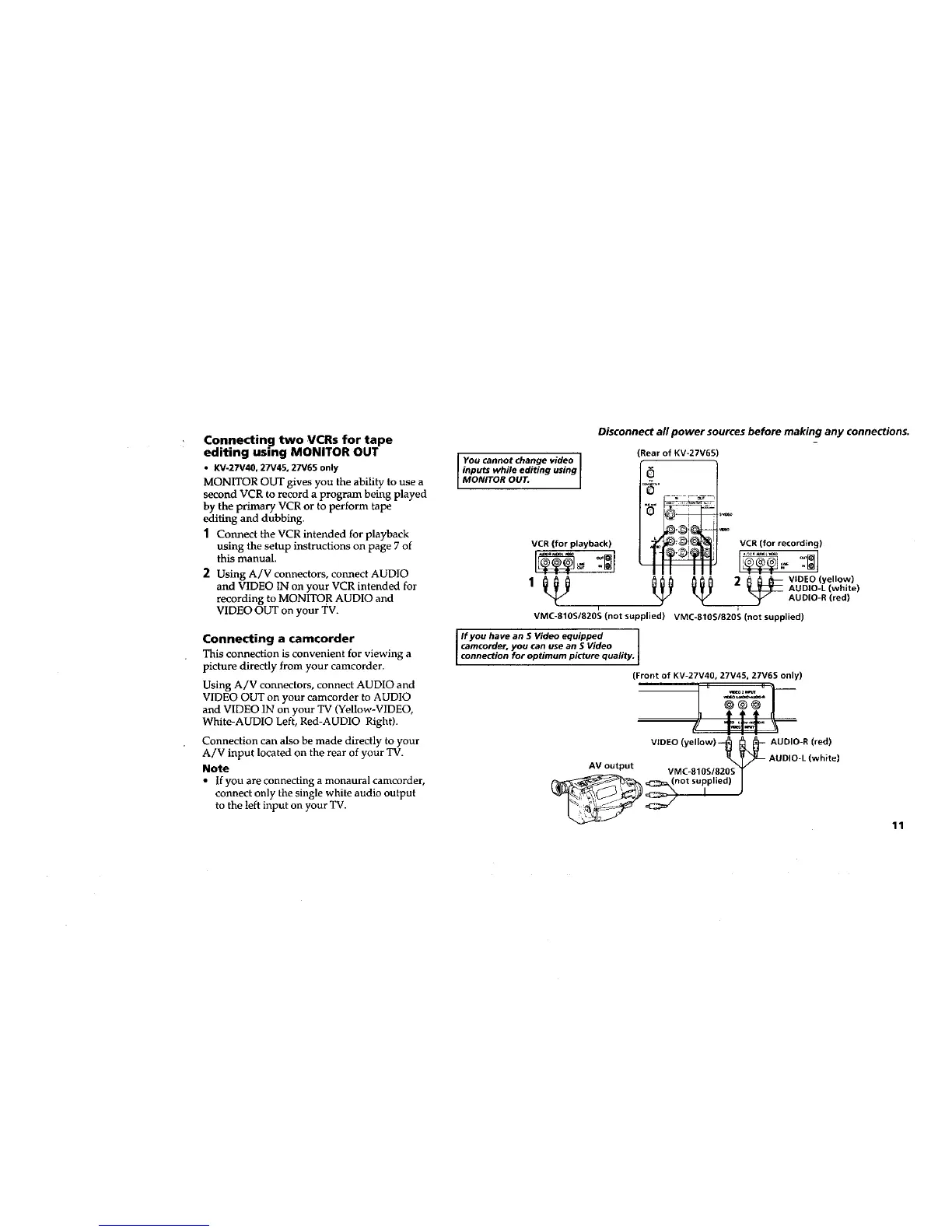
Connecting two VCRs for tape
editing using MONITOR OUT
• KV-27V40, 27V45, 27V65 only
MONITOR OUT gives you the ability to use a
second VCR to record a program being played
by the primary VCR or to perform tape
editing and dubbing.
1 Connect the VCR intended for playback
using the setup instructions on page 7 of
this manual.
2 Using A/V connectors, connect AUDIO
and VIDEO IN on your VCR intended for
recording to MONITO R AUDIO and
VIDEO OUT on your TV.
Connecting a camcorder
This connection is convenient for viewing a
picture directly from your camcorder.
Using A/V connectors, connect AUDIO and
VIDEO OUT on your camcorder to AUDIO
and VIDEO IN on your TV (Yellow-VIDEO,
White-AUDIO Left, Red-AUDIO Right).
Connection can also be made directly to your
A/V input located on the rear of your TV.
Note
• If you are connecting a monaural camcorder,
connect only the single white audio output
to the left input on your TV.
Disconnect all power sources before making any connections.
I You cannotchange video I
inputs while editing using
[ MONITOR OUT. [
(Rear of KV*27V65
VCR (for playback) VCR (for recording)
• . . _ " II III . . . _
1_ _ _ 2_ VIDEO lyell°w)
AUDIO-L (white)
AUDIO-R Ired)
i
VMC-810S/820S (not supplied) VMC-810S/820S (not supplied)
If you have an S Wdeo equipped
camcorder, you can use an 5 Video
connection for optimum picture quality.
(Front of KV-27V40, 27V45, 27V65 only)
VIDEO (yellow)--_ _L_- AUDIO-R (red)
VMC-810S/820 v_S _ _ AUDIO-L (white)
AV output _C_=_ (n°t suppli_O)S _
11








 To Next Page