Using your Menus
Learning menu selection
Use the MENU button to access a menu and
use the select buttons (4. or €) to alter settings.
Use the following example, in which we
activate the CABLE, to learn how to modify
settings.
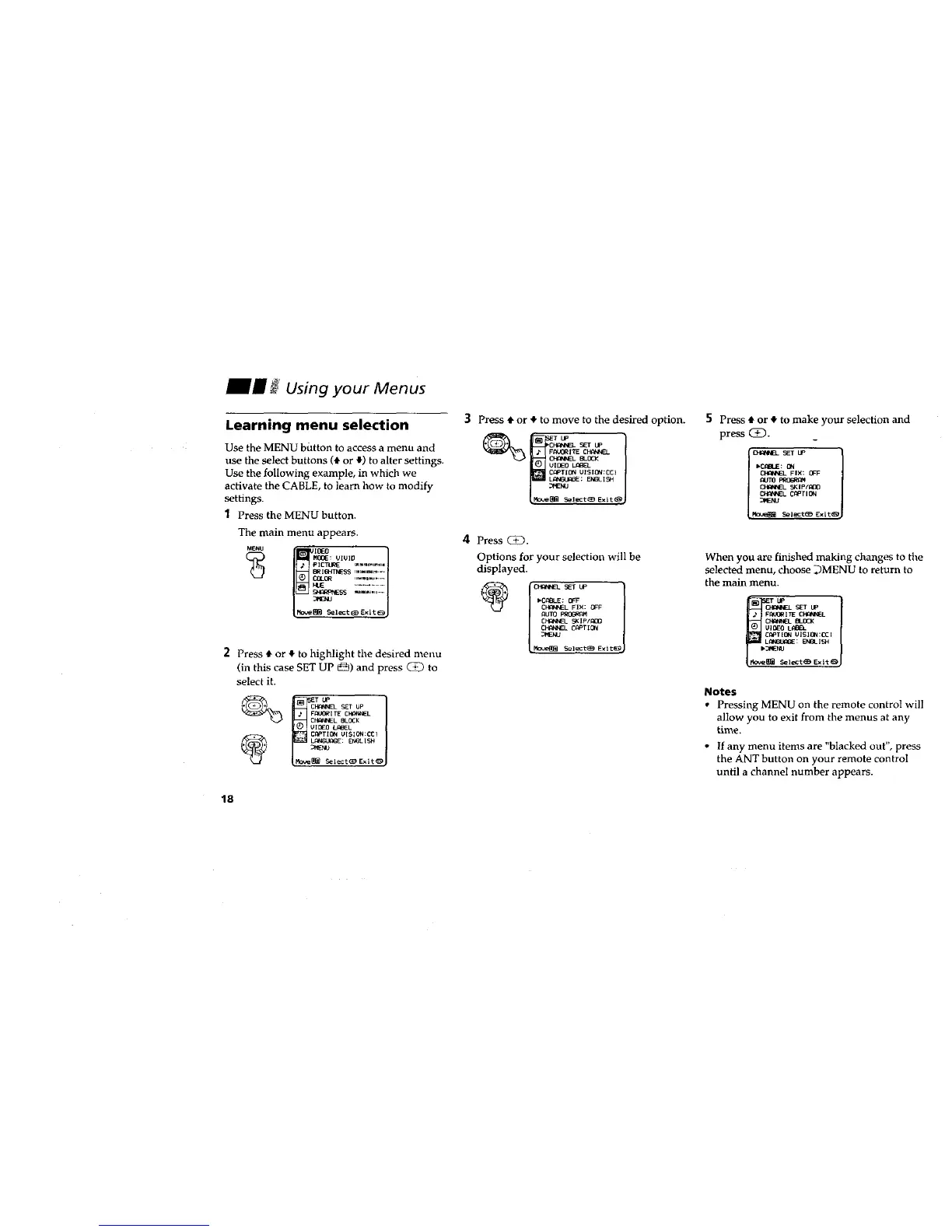
1 Press the MENU button.
The main menu appears.
(_ M_: VIUIO
SS m,m_,l,., .....
/t40v,_ m S_l_:tt_ Exit _J
2 Press _,or € to highlight the desired menu
(in this case SET UP _) and press _ to
select it.
CF_ SET UP
FPkJORITE CHflNNEL
CFW4NNI:LBLOCK
VIDFO LP_L
C_€_TI_ UISION:CCI
Select(_ Exit_
18
3 Press $ or € to move to the desired option.
VIDEO BLL_I3EI._
_elect (_9Exit (B)
4 Press C_).
Options for your selection will be
displayed.
_C_BLE: O_F
CFIqNNEL FIX: OFF
(%UTO PRI](J_
CHI_i_qE]L5KIp/l_O
_L CPPT IO_l
Select_ Exit_
5 Press # or € to make your selection and
press (i).
l O_IN__ SET LP l
I'C_IBLE: ON
CFKaWNEL 5K Ip_DO
When you are finished making changes to the
selected menu, choose _MENU to return to
the main menu.
FA4_ORITE CHANNEL
CF_QNNEL BLOCK
O_TION UISION:CCI
_l_t_ Exit_
Notes
• Pressing MENU on the remote control will
allow you to exit from the menus at any
time.
• If any menu items are "blacked out", press
the ANT button on your remote control
until a channel number appears.








 To Next Page