Using your New TV
Setting up the "IV automatically
The Easy Setup Guide allows you to set the
on-screen language and set all receivable
channels. The Easy Setup Guide screen
appears every time you lama on the TV until
you perform AUTO PROGRAM.
The Easy Setup Guide feature does not apply for
installations that use a cable boxfor all channel
selection.
To set up the TV manually, refer to "Using the
SET UP menu" on page 23.
Tips "_"
• performthisfunctionduringtheday, withtheantenna
and_ cableproperly cannected, to ensunethat all available
channels will bebroadcasting and receivablc.
• AfleruaingtheEasySetupGuideyouunllstillhavethe
option of adjusting atry ofthe system settings,likeskipping
channels, through the SET UP menu (page 24).
• TheTVmustbesettotheTVinputtoexecuteAIdTO
pROGRAM. Puss ANT until a channelnumberappears.
• lfyourcableorantennaisconnectetltaAUX, then
press ANT until AUX appa_ next to the channel
number. (KV-27S65, 27V65 only)
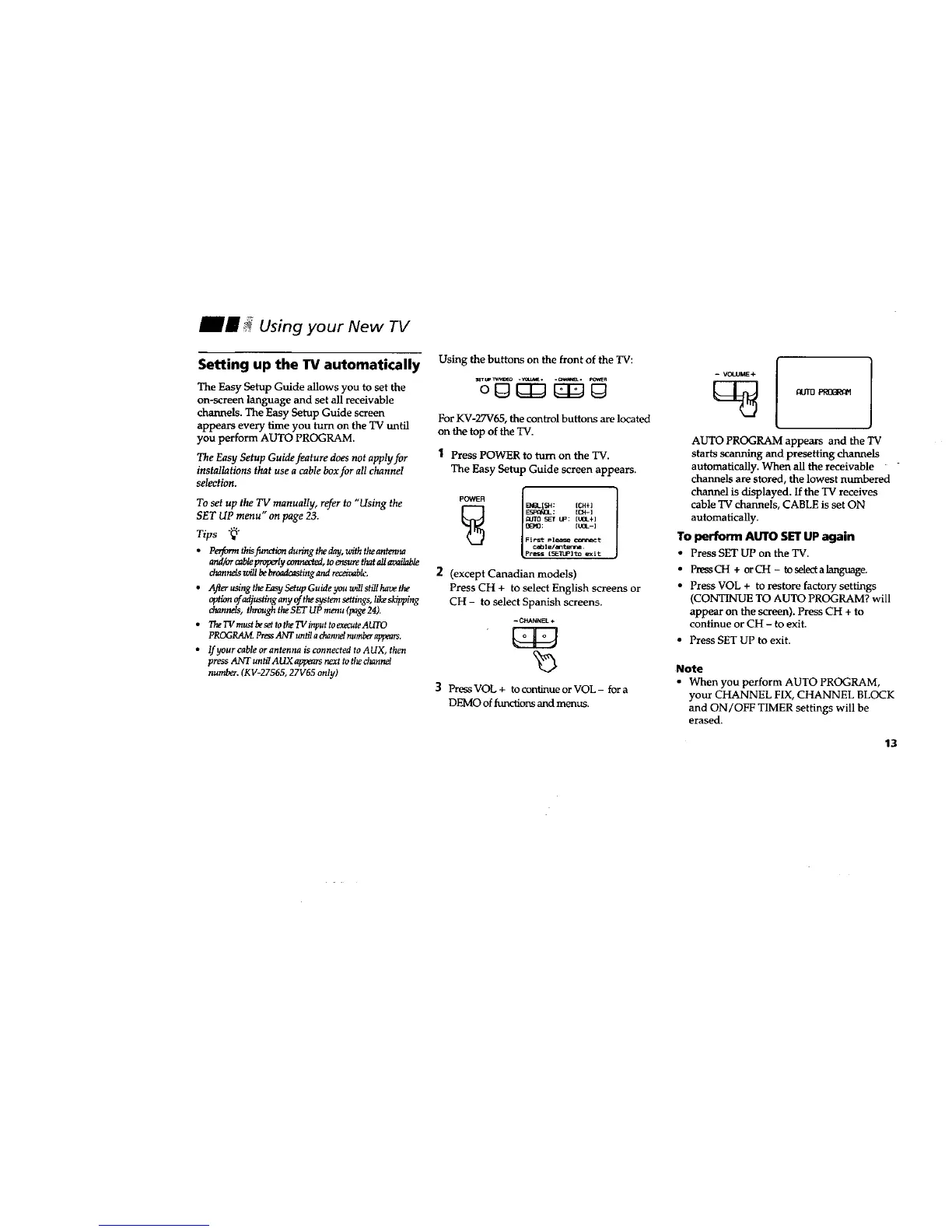
Using the buttons on the front of the TV:
oO {ZIJO
For KV-27V65, the control buttons are located
on the top of the TV.
1 Press POWER to turn on the TV.
The Easy Setup Guide screen appears.
POWER I B'__I_: ICH÷]
_ EN_I_I{I_: [CN-]
_lk_[I _" tiP: [tO_+]
_1'11 : [tO_-]
First Pl_ c_nn_t
e_ble/_tm.
Pttss ISI_llPI'_ _it:
2 (except Canadian models)
Press CH + to select English screens or
CH - to select Spanish screens.
- CHANNEL +
] Press VOL + to continue or VOL- for a
DEMO of functions and menus.
-- VOLUME+
[_ fl_JT[2 PROfiRgP1
AUTO PROGRAM appears and the TV
starts scanning and presetting chartnels
automatically. When all the receivable -
channels are stored, the lowest numbered
channel is displayed. If the TV receives
cable TV channels, CABLE is s_ ON
automatically.
To perform AUTO SET UPagain
• Press SET UP on the TV.
• PressCH + orCH - to select a language.
• Press VOL + to restore factory settings
(CONTINUE TO AUTO PROGRAM? will
appear on the screen). Press CH + to
continue or CH - to exit.
• Press SET UP to exit.
Note
• When you perform AUTO PROGRAM,
your CHANNEL FIX, CHANNEL BLOCK
and ON/OFF TIMER settings will be
erased.
13




 To Next Page