JrRemote Control
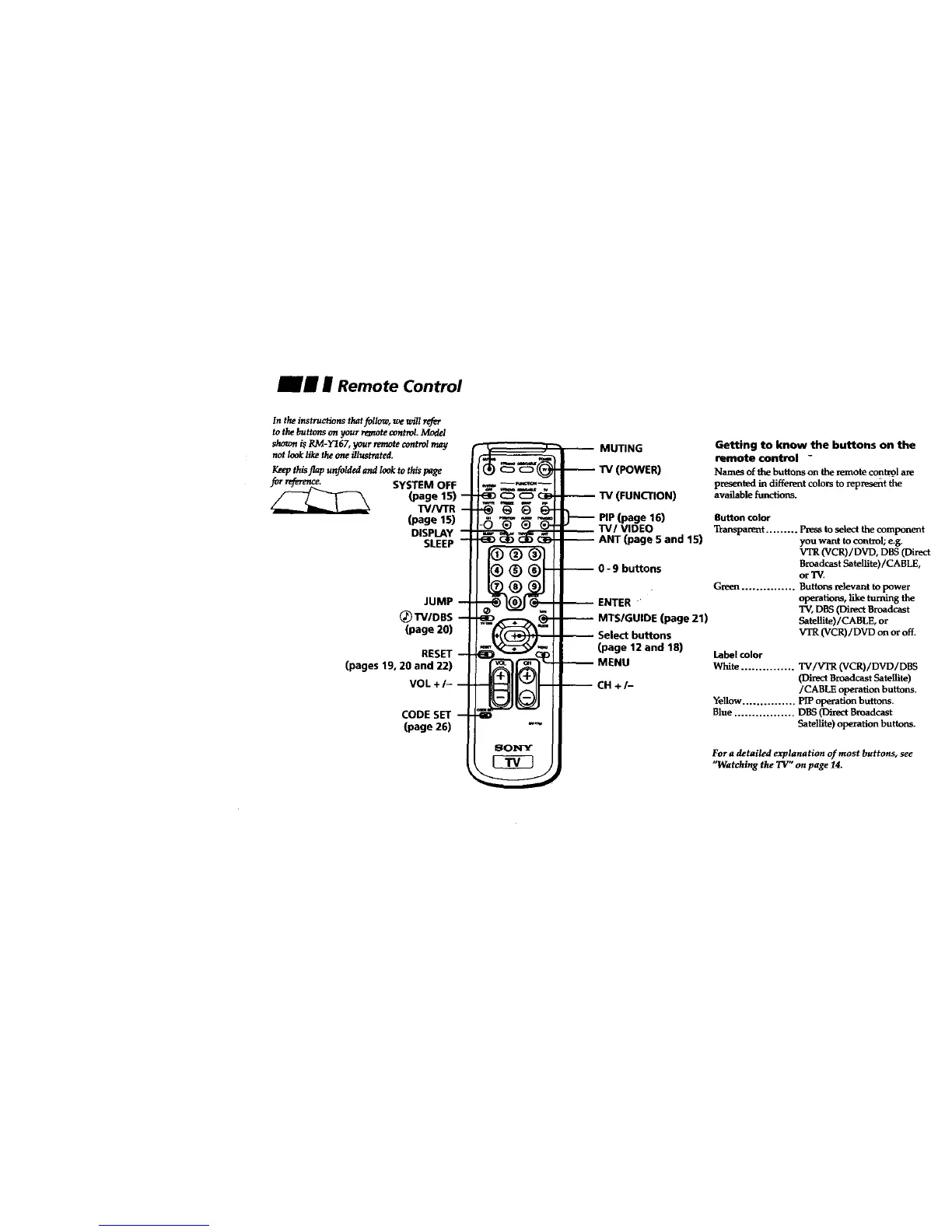
In the instructions that follow, we will refer
te the buttons on your remote controI. Model
shown i_ RM-Y167, your remote control may
not look like the one illustrated.
Keepthis flap unfolded and lookto this page
SYSTEM OFF
(page 15)
TWVTR
(page 15)
DISPLAY
SLEEP
JUMP
_TV/DBS
(page 20)
RESET
(pages19,20 and 22)
VOL+/-
CODE SET
(page 26)
_
-:®;
MUTING
TV(POWER)
TV (FUNCTION)
PIP(page 16)
"IV/VIDEO
ANT (page 5 and 15)
-- MTS/GUIDE (page 21)
Select buttons
(page 12 and 18)
MENU
-- CH +/-
Getting to know the buttons on the
remote control -
Names of the buttons on the remote contrgl are
presented in different colors to _prese_t the
available functions.
Button color
Transparent ......... Press to select the component
you want to control; e.g.
VTR (VCR)/DVD, D_S (Direct
Broadcast Satellite)/CABLE,
or 'IV.
Green ............... Buttons relevant to power
operations, like turning the
TV, DBS (Direct Broadcast
Satelllte)/CABLE, or
VTR (VCR)/DVD on or off.
Label color
White ............... TV/VTR (VCR)/DVD/DBS
(Direct Broadcast Satellite)
/CABIE operation buttons.
Yellow ............... PIP operation buttons.
Blue ................. DBS (Direct Broadcast
Satellite) operation buttons.
For a detailed explanation of most buttons, see
"Watching the TV" on page 14.








 To Next Page