__ II Connecting and Installing the TV
Connector Types
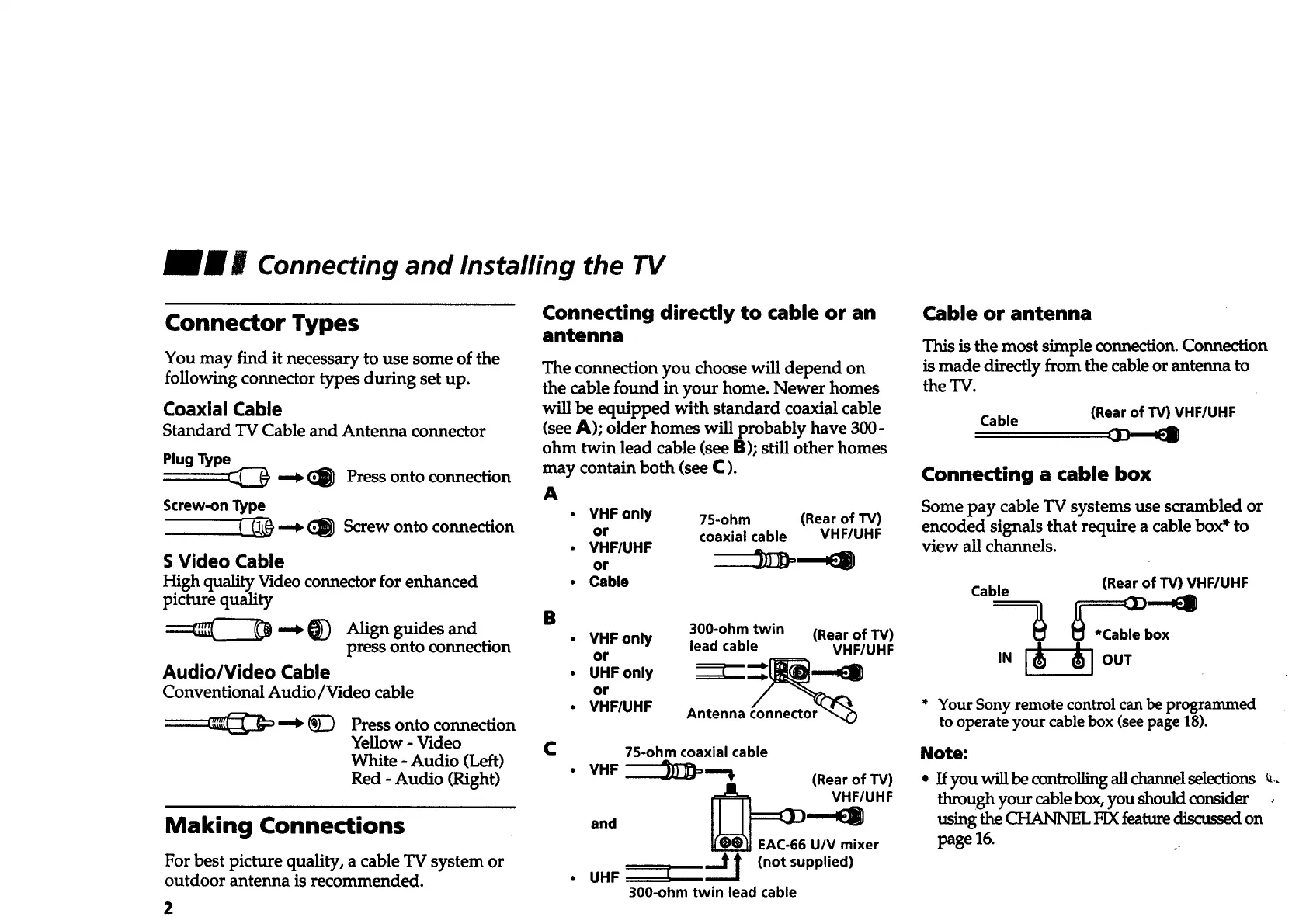
You may find it necessary to use some of the
following connector types during set up.
Coaxial Cable
Standard TV Cable and Antenna connector
Plug Type
_ (_ Press onto connection
Screw-onType
-'_ CI_ Screwontoconnection
S Video Cable
High quality Video connector for enhanced
picture quality
-.__) Alignguidesand
pressontoconnection
Audio/Video Cable
Conventional Audio/Video cable
_ _ Press onto connection
Yellow - Video
White - Audio (Left)
Red - Audio (Right)
Making Connections
For best picture quality, a cable TV system or
outdoor antenna is recommended.
Connecting directly to cable or an
antenna
The connection you choose will depend on
the cable found in your home. Newer homes
will be equipped with standard coaxial cable
(see A); older homes will probably have 300-
ohm twin lead cable (see B); still other homes
may contain both (see C).
A
• VHF only 75-ohm (Rear of TV)
or coaxial cable VHF/UHF
• VHF/UHF
or
Cable or antenna
This is the most simple connection. Connection
is made directly from the cable or antenna to
the TV.
Cable
(Rear of TV) VHF/UHF
Connecting a cable box
Some pay cable TV systems use scrambled or
encoded signals that require a cable box* to
view all channels.
i Cable Cable _ (Rear of TV) VHF/UHF
B 300-ohm twin (Rear of TV) ox
VHF only lead cable VHF/UHF _ '
or ,N OUT
• UHF only
or
• VHF/UHF Antenna connector _ * Your Sony remote control can be programmed
to operate your cable box (see page 18).
C 7S-ohm coaxial cable Note:
VHF
-'---'JJ)-)_= "% (Rear of TV)
_ EAC-66 U/V mixer
(not
supplied)
• UHF I
300-ohm twin lead cable
• If you will be controlling all channel selections _,.
through your cable box, you should consider ,
usingthe CHANNEL FIX featurediscussed on
page 16.








 To Next Page