Adjusting your SET UP (menus) (continued)
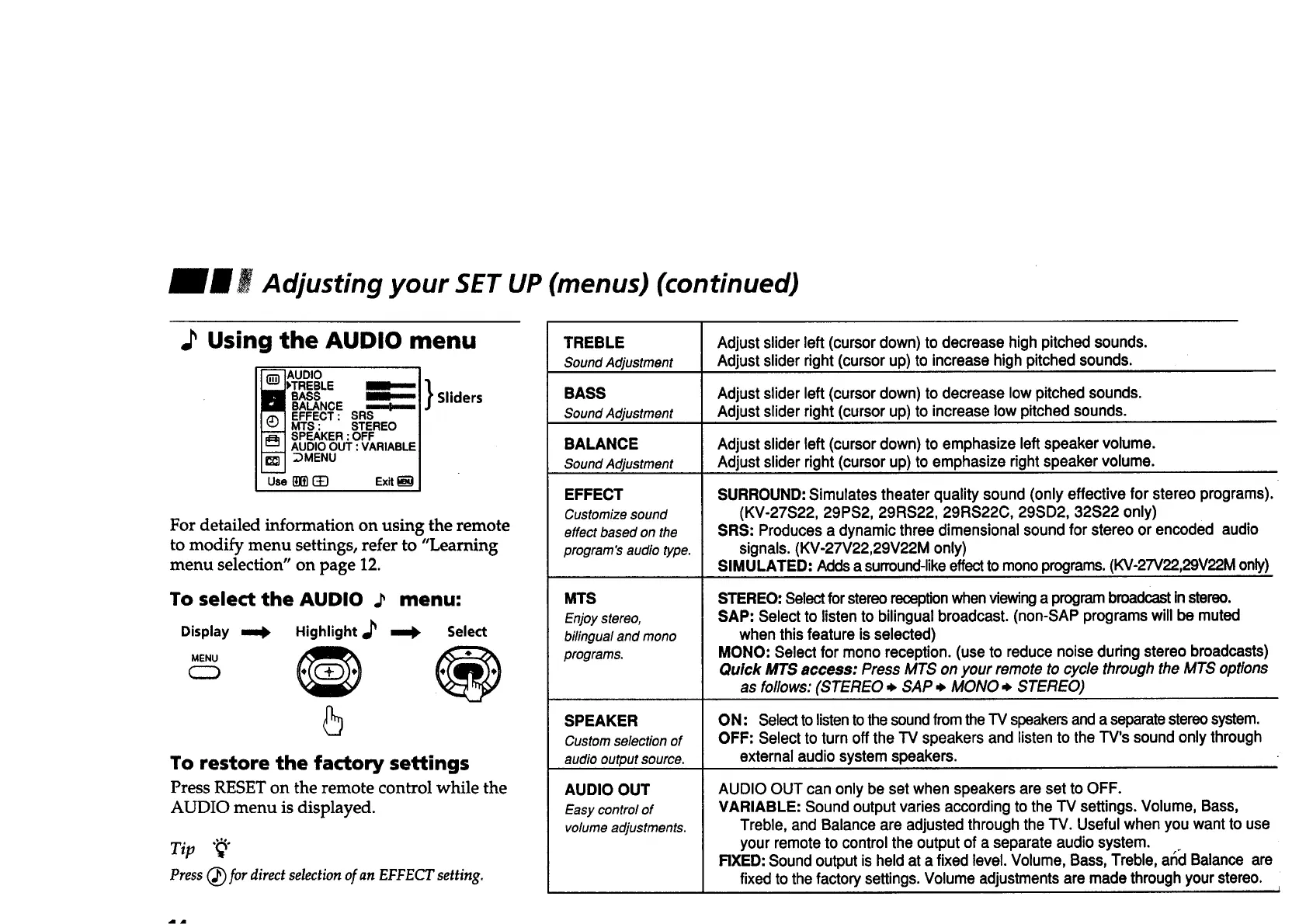
.P Using the AUDIO menu
BASS
BALANCE ,,m...b..,.,=
EFFECT : SRS
MTS : STEREO
SPEAKER :OFF
AUDIO OUT :VARIABLE
DMENU
Use []]_] _ Exit
Sliders
For detailed information on using the remote
to modify menu settings, refer to "Learning
menu selection" on page 12.
To select the AUDIO .P
=rob Highlight ir _
Display
MENU
menu:
arab Select
5
To restore the factory settings
Press RESET on the remote control while the
AUDIO menu is displayed.
Tip "_"
Press (_ for direct selection of an EFPECT setting.
TREBLE
Sound Adjustment
BASS
Sound Adjustment
BALANCE
Sound Adjustment
EFFECT
Customize sound
effect based on the
program's audio type.
MTS
Enjoy stereo,
bilingualand mono
programs.
SPEAKER
Custom selection of
audio outputsource.
AUDIO OUT
Easy control of
volume adjustments.
Adjust sliderleft (cursor down) to decrease high pitched sounds.
Adjust slider right (cursorup) to increase high pitched sounds.
Adjust slider left (cursordown) to decrease low pitched sounds.
Adjust slider right (cursor up) to increase low pitched sounds.
Adjust slider left (cursordown) to emphasize leftspeaker volume.
Adjust slider right (cursor up) to emphasize right speaker volume.
SURROUND: Simulates theater quality sound (only effective for stereo programs).
(KV-27S22, 29PS2, 29RS22, 29RS22C, 29SD2, 32S22 only)
SRS: Produces a dynamic three dimensional sound for stereo or encoded audio
signals. (KV-27V22,29V22M only)
SIMULATED: Addsa surround-likeeffectto mono programs.(KV-27V22,29V22M only)
STEREO: Select forstereoreception when viewinga program broadcastinstereo.
SAP: Select to listen to bilingual broadcast. (non-SAP programs will be muted
when this feature is selected)
MONO: Select for mono reception. (use to reduce noise during stereo broadcasts)
Quick MTS access: Press MTS onyour remote to cycle through the MTS options
as follows:(STEREO ,_ SAP ,_ MONO ,_ STEREO)
ON: Select tolistento the sound fromthe TV speakersand a separatestereosystem.
OFF: Select to turn off the TV speakers and listento the TV's sound only through
external audio system speakers.
AUDIO OUT can only be set when speakers are set to OFF.
VARIABLE: Sound output varies according to the TV settings. Volume, Bass,
Treble, and Balance are adjusted through the TV. Usefulwhen you want to use
your remote to control the output of a separate audio system.
RXED: Sound output is held at a fixed level. Volume, Bass, Treble, arid Balance are
fixed to thefactory settings.Volume adjustments are made throughyour stereo.








 To Next Page