Connecting a DBS (Direct Broadcast
Satellite) receiver
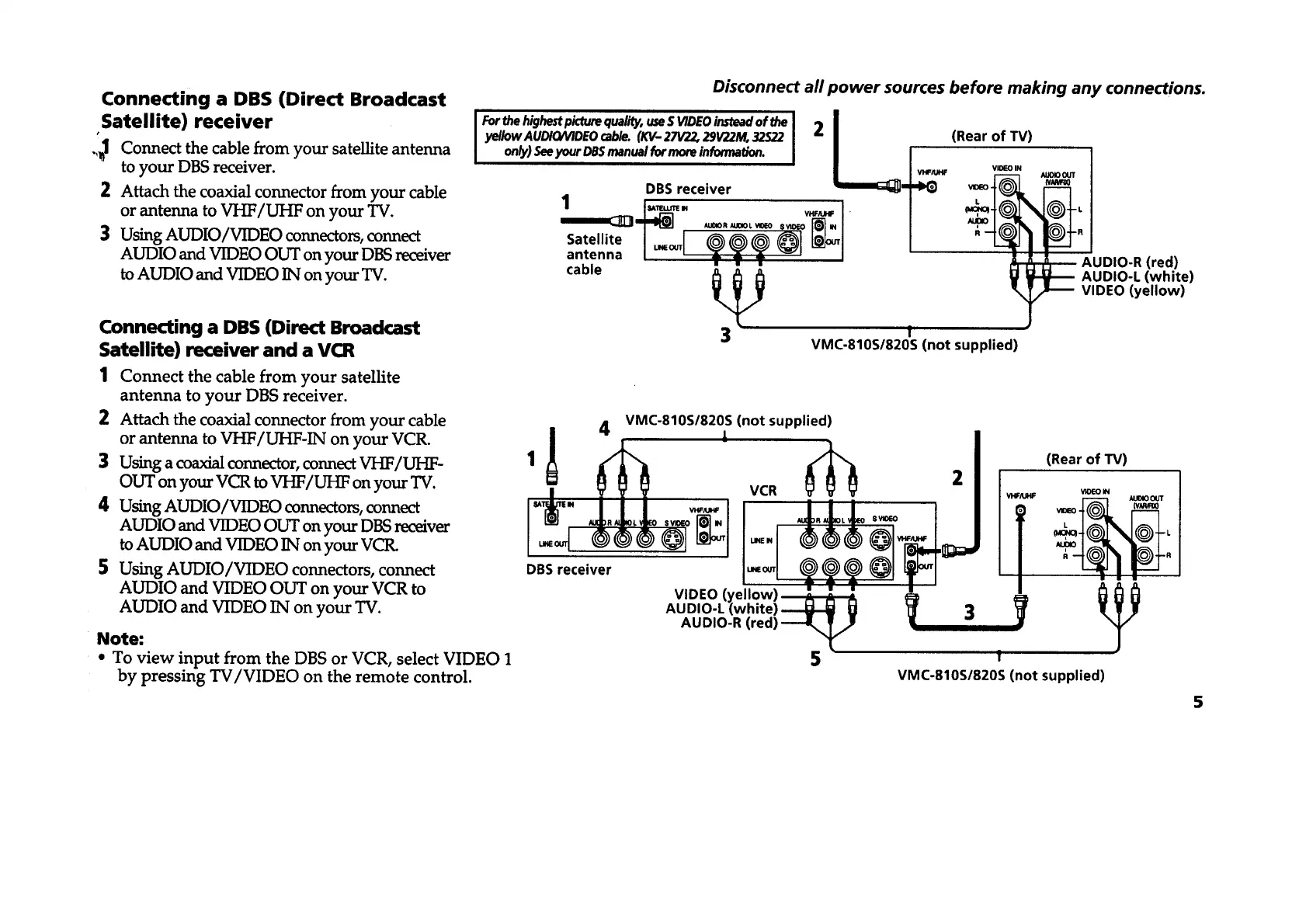
.,_1 Connect the cable from your satellite antenna
to your DBS receiver.
2 Attach the coaxial connector from your cable
or antenna to VHF/UHF on your TV.
3 Using AUDIO/VIDEO connectors, connect
AUDIO and VIDEO OUT on your DBS receiver
to AUDIO and VIDEO IN on your TV.
Connecting a DBS (Direct Broadcast
Satellite) receiver and a VCR
1 Connect the cable from your satellite
antenna to your DBS receiver.
2 Attach the coaxial connector from your cable
or antenna to VHF/UHF-IN on your VCR.
3 Using a coaxial connector, connect VHF/UHF-
OUT on your VCR to VHF/UHF on your TV.
4 Using AUDIO/VIDEO connectors, connect
AUDIO and VIDEO OUT on your DBS receiver
to AUDIO and VIDEO IN on your VCR.
5 Using AUDIO/VIDEO connectors, connect
AUDIO and VIDEO OUT on your VCR to
AUDIO and VIDEO IN on your TV.
Note:
• To view input from the DBS or VCR, select VIDEO 1
by pressing TV/VIDEO on the remote control.
Disconnect all power sources before making any connections.
Forthehighestpicturequality,useS VIDEOinsteadof the I 2 I
yeIIow AUDtO/VIDEO cable. (KV- 27V22, 29V22M, 32S22 I |
on_) See your DBSmanual for more informatlon. I I Iv,.,.
Satellite I _ L_I /
antenna [u__ ] /
cable
(Rear of TV)
VIDEO IN
R
_ AUDIO-R (red)
3_ AUDIO-L (white)
VIDEO (yellow)
f
VMC-810S/820S (not supplied)
(not supplied)
oBsr-- I !
VIDEO (yellow)
AUDIO-L (white) _ 3
AUDIO-R (red)
5 1
(Rear of TV)
LV_O I _1 (V.,U',,'_OI.
N_r°
VMC-810S/820S (not supplied)
5








 To Next Page